
Cosy vs TinyFast
Side-by-side comparison to help you choose the right AI tool.

Streamline your Slack community with automated onboarding and member introductions, saving you hours each week.
Last updated: February 28, 2026

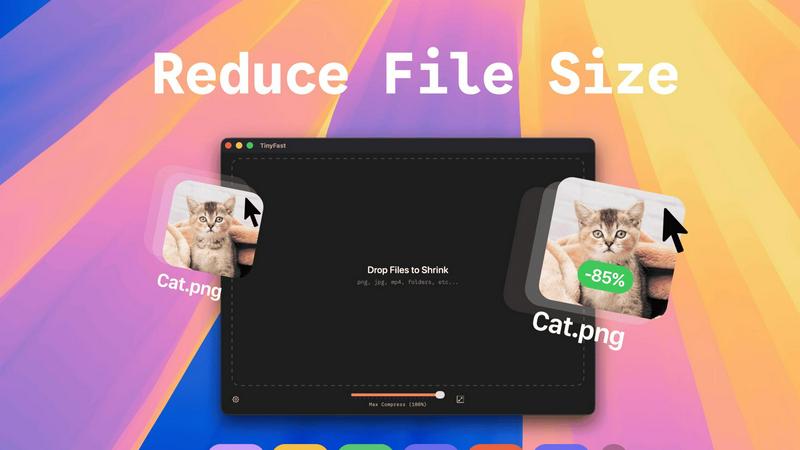
TinyFast is your private Mac app that instantly compresses images, videos, and documents locally.
Last updated: February 28, 2026
Visual Comparison
Cosy

TinyFast
Feature Comparison
Cosy
Automate Onboarding
Cosy allows you to create and automate up to 10 distinct onboarding welcome DM sequences. When new members join your Slack workspace, they receive automated DMs tailored to welcome them, either immediately or based on a delay of your choosing. This feature ensures that no one is left unacknowledged, even if they join at odd hours, significantly reducing the manual effort involved in onboarding.
Connect Your Members
Enhance community engagement by automatically introducing members to each other through personalized DMs. Once opted-in, members are introduced to each other at customizable intervals, fostering relationships and increasing community interaction. This thoughtful automation not only saves time but also helps maintain a vibrant and interconnected community.
Member Directory
Cosy provides a simple, searchable member directory integrated within Slack, allowing community members to find and connect with each other effortlessly. You can customize the fields in the directory, prompting members to fill out their profiles. This feature enhances member interaction and helps build a well-informed community without anyone having to leave the Slack environment.
Content Highlights
With Cosy's content highlighting feature, you can quickly surface the top 10 most engaging posts or identify unreplied messages across channels using simple slash commands. This allows community managers to keep content fresh and relevant, driving engagement and encouraging members to participate in discussions rather than letting valuable content fade away.
TinyFast
100% Local & Private Compression
TinyFast is engineered with privacy by design. Your files never leave your Mac, eliminating the risks associated with uploading sensitive documents, client assets, or proprietary media to unknown cloud servers. This local-first approach provides total peace of mind, making it perfect for work under Non-Disclosure Agreements (NDAs) or any scenario where confidentiality is paramount. Experience compression without compromise.
Blazing-Fast Drag & Drop Workflow
Unlock unprecedented speed with an intuitive drag-and-drop interface. Simply drag your files or entire folders into the app, and TinyFast's optimized native engines go to work instantly. There is no waiting for uploads, no processing queues, and no download delays. This feature transforms a typically tedious task into a near-instantaneous action, saving you hours every week and supercharging your productivity.
Universal File Type Support
TinyFast is your all-in-one optimization hub, supporting a vast array of common file types. This includes images (PNG, JPG, WEBP, GIF, SVG, HEIC, BMP, TIFF), videos (MP4, MOV, M4V), documents (PDF, DOCX), audio (MP3), and even code files (JS, CSS, JSON). This universality means you can streamline your entire workflow with a single, reliable tool instead of juggling multiple specialized websites or applications.
Batch Processing & Resolution Control
Handle projects of any scale with powerful batch processing. Drop entire folders filled with media, and TinyFast will compress them all in seconds. Furthermore, gain precise control over your output with built-in resolution resizing for images and videos. This allows you to not only reduce file size but also automatically adjust dimensions to meet specific platform requirements, all in one efficient step.
Use Cases
Cosy
Streamlined Onboarding for New Members
When new members join your Slack community, Cosy automates the welcome process with tailored DMs. This ensures that each new member feels appreciated and integrated without requiring manual follow-ups from community managers, enhancing their onboarding experience.
Facilitated Member Interactions
Cosy automates introductions between members, increasing engagement and connection. Regular, randomized introductions help foster relationships, making it easier for members to network and collaborate, ultimately enriching the community experience.
Enhanced Member Discoverability
The member directory allows users to search for specific skills, interests, or backgrounds among fellow members. This feature helps individuals find and connect with others who share similar goals or expertise, creating a more cohesive and supportive community environment.
Increased Content Engagement
By highlighting the most engaging posts and identifying messages that have gone unanswered, Cosy ensures that community discussions remain lively and relevant. This feature empowers community managers to promote interaction and keep important conversations at the forefront, driving sustained engagement.
TinyFast
Web Developers & Designers
Optimize website assets like images, SVGs, CSS, and JavaScript files locally before deployment. TinyFast ensures faster page load times by reducing file sizes dramatically, all while keeping proprietary design mockups and client work completely secure on your machine. It's the essential tool for building performant, professional sites without privacy trade-offs.
Content Creators & Marketers
Easily prepare high-resolution photos, videos, and marketing materials for social media, email campaigns, or digital portfolios. Shrink large video files (MP4, MOV) and images for quick sharing and uploading without sacrificing noticeable quality. Maintain full control over your brand assets and confidential campaign materials throughout the entire process.
Legal & Financial Professionals
Safely compress sensitive documents, contracts, reports, and presentations (PDF, DOCX) for email or secure portal transfer. TinyFast's local processing guarantees that confidential client information and financial data are never exposed to third-party servers, complying with strict data privacy regulations and internal security policies.
App & Software Developers
Reduce the size of application assets, icons, and embedded media to create lighter, faster-distributing software packages. Compress audio files (MP3) and documentation locally as part of your build process. This use case is critical for managing project bundle sizes and protecting intellectual property during development.
Overview
About Cosy
Cosy is a revolutionary tool that transforms community engagement within Slack, enabling community managers to create a dynamic and interactive environment. Designed specifically for community leaders, Cosy streamlines onboarding, facilitates member connections, and moderates content effortlessly. By automating essential interactions, Cosy not only saves valuable time but also cultivates a vibrant community atmosphere where collaboration thrives. Features such as automated onboarding sequences, a searchable member directory, and content highlighting empower users to foster a welcoming environment that encourages connections among community members. With its seamless Slack integration, Cosy enables easy access to the tools needed to keep your community engaged and informed. Whether you are leading a small team or managing a large community, Cosy is your essential partner in transforming Slack into a thriving hub of interaction and support, ensuring that every member feels valued and connected.
About TinyFast
TinyFast is a revolutionary macOS application that fundamentally transforms how developers, designers, and creators handle file optimization. It is a powerful, local file compressor that shrinks PNG, JPEG, MP4, MOV, PDF, SVG, WebP, MP3, and GIF files directly on your Mac. By eliminating the need for slow, insecure online uploads, TinyFast delivers a game-changing workflow that prioritizes blistering speed and ironclad privacy. Its core value proposition is simple yet transformative: keep your files on your device and compress them instantly with a simple drag-and-drop action. This tool is built for professionals who handle sensitive assets, work under tight deadlines, or simply refuse to compromise on security. It unlocks a new standard of efficiency, ensuring your confidential documents, high-resolution media, and project files are optimized without ever leaving the safety of your machine, making it an indispensable asset for any modern digital workflow. TinyFast is the definitive solution for anyone who values their time and privacy, offering a seamless, local alternative to risky and sluggish online compression tools.
Frequently Asked Questions
Cosy FAQ
What is Cosy and how does it work?
Cosy is a tool designed to enhance community engagement within Slack by automating onboarding, member introductions, and content moderation. It integrates seamlessly with Slack, making it easy for community managers to facilitate connection and collaboration.
How can I automate onboarding with Cosy?
You can create up to 10 automated onboarding welcome DM sequences that are triggered when new members join your Slack workspace. You have the flexibility to customize messages and set timing for when they are sent, ensuring no new member feels overlooked.
Is there a way for members to connect with each other easily?
Yes, Cosy automates member introductions through DMs, allowing opted-in members to be introduced regularly. This feature not only saves time for community managers but also fosters a more interconnected community atmosphere.
Can I customize the member directory?
Absolutely. Cosy allows you to create a searchable member directory with customizable fields, enabling members to fill out their profiles. This helps enhance discoverability and interaction among community members without leaving Slack.
TinyFast FAQ
Is TinyFast really free to use?
Yes, TinyFast offers a fully-featured Free Forever plan. This allows you to compress up to 5 files per day at no cost, giving you complete access to all compression features and supported file types. It's a perfect way to integrate secure, local optimization into your workflow before deciding to upgrade for unlimited use.
What happens to my files during compression?
Nothing leaves your Mac. TinyFast performs all compression processes entirely locally on your device. Your original files are read, optimized using native engines, and a new, smaller file is created. Your originals remain untouched and private, with no data ever transmitted to the internet.
What file types does TinyFast support?
TinyFast supports a wide range of common file types. This includes images (PNG, JPG, WEBP, GIF, SVG, HEIC, BMP, TIFF), videos (MP4, MOV, M4V), documents (PDF, DOCX), audio (MP3), and code files (JS, CSS, JSON). It is designed to be a universal tool for most digital optimization needs.
How does the pricing work?
TinyFast operates on a freemium model. You can start with the free plan (5 files/day). For unlimited compression, you can choose a one-time Lifetime purchase or a monthly subscription. The monthly plan includes a 3-day free trial, allowing you to test unlimited compression before any payment is required.
Alternatives
Cosy Alternatives
Cosy is an innovative tool designed to elevate community engagement within Slack, specifically tailored for community managers and leaders. It automates onboarding, facilitates member introductions, and moderates content, creating a seamless experience that saves users precious time while enhancing community interaction. Users often seek alternatives to Cosy for various reasons, including pricing considerations, specific feature requirements, or compatibility with different platforms. When searching for a suitable alternative, it's essential to evaluate the core functionalities that align with your community's needs, such as automation capabilities, user experience, and integration possibilities. A well-chosen alternative can unlock the potential for deeper connections and more efficient community management.
TinyFast Alternatives
TinyFast is a revolutionary local file compression tool for macOS, designed to optimize images, videos, and documents directly on your device. It belongs to the category of productivity and optimization software, specifically built for professionals who prioritize speed and uncompromising privacy in their workflow. Users often explore alternatives for various reasons, such as budget constraints, the need for cross-platform compatibility on Windows or Linux, or specific feature requirements not covered by a single tool. The search for a different solution is a natural part of finding the perfect fit for one's unique technical environment and project demands. When evaluating other options, key considerations should include the core principles that make tools like TinyFast transformative: local processing for absolute security, support for your essential file formats, and genuine processing speed that doesn't create bottlenecks. The goal is to find a solution that unlocks a similar level of efficient, secure, and integrated workflow optimization.