

TinyFast
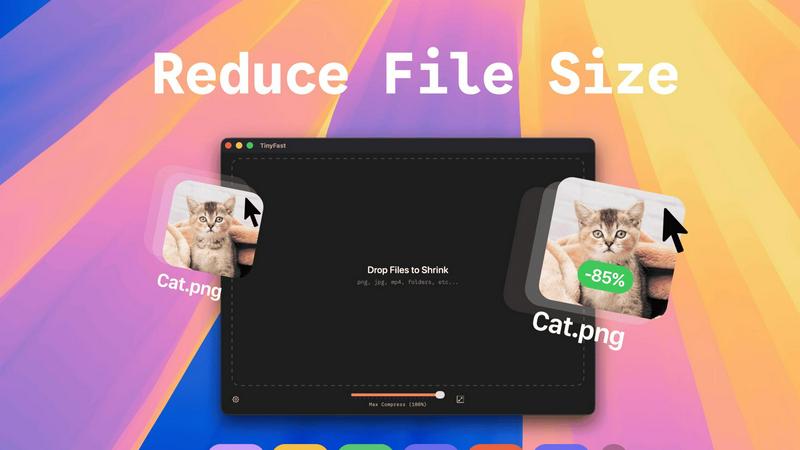
TinyFast is your private Mac app that instantly compresses images, videos, and documents locally.
About TinyFast
TinyFast is a revolutionary macOS application that fundamentally transforms how developers, designers, and creators handle file optimization. It is a powerful, local file compressor that shrinks PNG, JPEG, MP4, MOV, PDF, SVG, WebP, MP3, and GIF files directly on your Mac. By eliminating the need for slow, insecure online uploads, TinyFast delivers a game-changing workflow that prioritizes blistering speed and ironclad privacy. Its core value proposition is simple yet transformative: keep your files on your device and compress them instantly with a simple drag-and-drop action. This tool is built for professionals who handle sensitive assets, work under tight deadlines, or simply refuse to compromise on security. It unlocks a new standard of efficiency, ensuring your confidential documents, high-resolution media, and project files are optimized without ever leaving the safety of your machine, making it an indispensable asset for any modern digital workflow. TinyFast is the definitive solution for anyone who values their time and privacy, offering a seamless, local alternative to risky and sluggish online compression tools.
Features
100% Local & Private Compression
TinyFast is engineered with privacy by design. Your files never leave your Mac, eliminating the risks associated with uploading sensitive documents, client assets, or proprietary media to unknown cloud servers. This local-first approach provides total peace of mind, making it perfect for work under Non-Disclosure Agreements (NDAs) or any scenario where confidentiality is paramount. Experience compression without compromise.
Blazing-Fast Drag & Drop Workflow
Unlock unprecedented speed with an intuitive drag-and-drop interface. Simply drag your files or entire folders into the app, and TinyFast's optimized native engines go to work instantly. There is no waiting for uploads, no processing queues, and no download delays. This feature transforms a typically tedious task into a near-instantaneous action, saving you hours every week and supercharging your productivity.
Universal File Type Support
TinyFast is your all-in-one optimization hub, supporting a vast array of common file types. This includes images (PNG, JPG, WEBP, GIF, SVG, HEIC, BMP, TIFF), videos (MP4, MOV, M4V), documents (PDF, DOCX), audio (MP3), and even code files (JS, CSS, JSON). This universality means you can streamline your entire workflow with a single, reliable tool instead of juggling multiple specialized websites or applications.
Batch Processing & Resolution Control
Handle projects of any scale with powerful batch processing. Drop entire folders filled with media, and TinyFast will compress them all in seconds. Furthermore, gain precise control over your output with built-in resolution resizing for images and videos. This allows you to not only reduce file size but also automatically adjust dimensions to meet specific platform requirements, all in one efficient step.
Use Cases
Web Developers & Designers
Optimize website assets like images, SVGs, CSS, and JavaScript files locally before deployment. TinyFast ensures faster page load times by reducing file sizes dramatically, all while keeping proprietary design mockups and client work completely secure on your machine. It's the essential tool for building performant, professional sites without privacy trade-offs.
Content Creators & Marketers
Easily prepare high-resolution photos, videos, and marketing materials for social media, email campaigns, or digital portfolios. Shrink large video files (MP4, MOV) and images for quick sharing and uploading without sacrificing noticeable quality. Maintain full control over your brand assets and confidential campaign materials throughout the entire process.
Legal & Financial Professionals
Safely compress sensitive documents, contracts, reports, and presentations (PDF, DOCX) for email or secure portal transfer. TinyFast's local processing guarantees that confidential client information and financial data are never exposed to third-party servers, complying with strict data privacy regulations and internal security policies.
App & Software Developers
Reduce the size of application assets, icons, and embedded media to create lighter, faster-distributing software packages. Compress audio files (MP3) and documentation locally as part of your build process. This use case is critical for managing project bundle sizes and protecting intellectual property during development.
Pricing
TinyFast offers straightforward pricing to unlock its full potential. The Free Forever plan allows compression of up to 5 files per day with access to all features. For unlimited use, choose between a Lifetime Plan for a single payment of €17.99, which includes lifetime updates, or a Monthly Subscription at €2.99/month after a 3-day free trial. Both paid plans provide unlimited local compressions, full feature access, and support future development.
Frequently Asked Questions
Is TinyFast really free to use?
Yes, TinyFast offers a fully-featured Free Forever plan. This allows you to compress up to 5 files per day at no cost, giving you complete access to all compression features and supported file types. It's a perfect way to integrate secure, local optimization into your workflow before deciding to upgrade for unlimited use.
What happens to my files during compression?
Nothing leaves your Mac. TinyFast performs all compression processes entirely locally on your device. Your original files are read, optimized using native engines, and a new, smaller file is created. Your originals remain untouched and private, with no data ever transmitted to the internet.
What file types does TinyFast support?
TinyFast supports a wide range of common file types. This includes images (PNG, JPG, WEBP, GIF, SVG, HEIC, BMP, TIFF), videos (MP4, MOV, M4V), documents (PDF, DOCX), audio (MP3), and code files (JS, CSS, JSON). It is designed to be a universal tool for most digital optimization needs.
How does the pricing work?
TinyFast operates on a freemium model. You can start with the free plan (5 files/day). For unlimited compression, you can choose a one-time Lifetime purchase or a monthly subscription. The monthly plan includes a 3-day free trial, allowing you to test unlimited compression before any payment is required.
Similar to TinyFast

Kody Tools
Free collection of online developer utilities, code formatters, and digital converters designed to streamline your daily workflow.

Sprite Sheet Maker
A free browser-based toolkit for creating, cutting, converting, and previewing sprite sheet animations.
Forms Plugin
The #1 Native Form Builder Plugin for Framer - No Code, No Embeds, No External Platforms.




PerPageFax
PerPageFax lets you send a fax online from any browser for a flat $0.50 per page — no account, no subscription, no fax machine.
