

Cosy
Streamline your Slack community with automated onboarding and member introductions, saving you hours each week.
AI tool Details
Explore More
Alternatives
About Cosy
Cosy is a revolutionary tool that transforms community engagement within Slack, enabling community managers to create a dynamic and interactive environment. Designed specifically for community leaders, Cosy streamlines onboarding, facilitates member connections, and moderates content effortlessly. By automating essential interactions, Cosy not only saves valuable time but also cultivates a vibrant community atmosphere where collaboration thrives. Features such as automated onboarding sequences, a searchable member directory, and content highlighting empower users to foster a welcoming environment that encourages connections among community members. With its seamless Slack integration, Cosy enables easy access to the tools needed to keep your community engaged and informed. Whether you are leading a small team or managing a large community, Cosy is your essential partner in transforming Slack into a thriving hub of interaction and support, ensuring that every member feels valued and connected.
Features
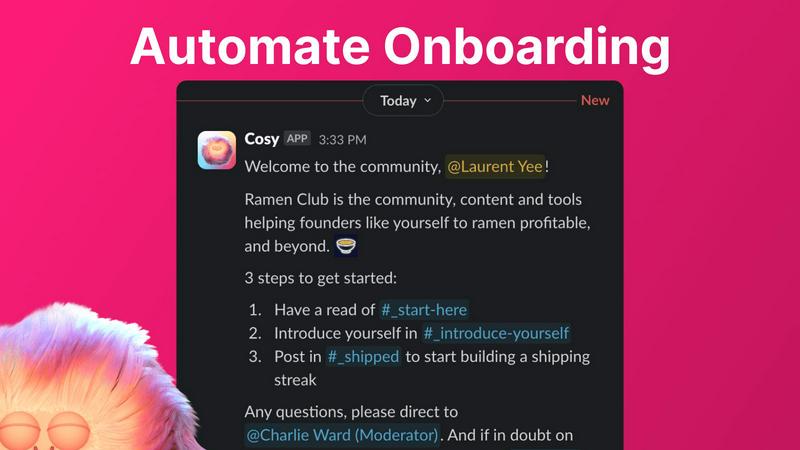
Automate Onboarding
Cosy allows you to create and automate up to 10 distinct onboarding welcome DM sequences. When new members join your Slack workspace, they receive automated DMs tailored to welcome them, either immediately or based on a delay of your choosing. This feature ensures that no one is left unacknowledged, even if they join at odd hours, significantly reducing the manual effort involved in onboarding.
Connect Your Members
Enhance community engagement by automatically introducing members to each other through personalized DMs. Once opted-in, members are introduced to each other at customizable intervals, fostering relationships and increasing community interaction. This thoughtful automation not only saves time but also helps maintain a vibrant and interconnected community.
Member Directory
Cosy provides a simple, searchable member directory integrated within Slack, allowing community members to find and connect with each other effortlessly. You can customize the fields in the directory, prompting members to fill out their profiles. This feature enhances member interaction and helps build a well-informed community without anyone having to leave the Slack environment.
Content Highlights
With Cosy's content highlighting feature, you can quickly surface the top 10 most engaging posts or identify unreplied messages across channels using simple slash commands. This allows community managers to keep content fresh and relevant, driving engagement and encouraging members to participate in discussions rather than letting valuable content fade away.
Use Cases
Streamlined Onboarding for New Members
When new members join your Slack community, Cosy automates the welcome process with tailored DMs. This ensures that each new member feels appreciated and integrated without requiring manual follow-ups from community managers, enhancing their onboarding experience.
Facilitated Member Interactions
Cosy automates introductions between members, increasing engagement and connection. Regular, randomized introductions help foster relationships, making it easier for members to network and collaborate, ultimately enriching the community experience.
Enhanced Member Discoverability
The member directory allows users to search for specific skills, interests, or backgrounds among fellow members. This feature helps individuals find and connect with others who share similar goals or expertise, creating a more cohesive and supportive community environment.
Increased Content Engagement
By highlighting the most engaging posts and identifying messages that have gone unanswered, Cosy ensures that community discussions remain lively and relevant. This feature empowers community managers to promote interaction and keep important conversations at the forefront, driving sustained engagement.
Frequently Asked Questions
What is Cosy and how does it work?
Cosy is a tool designed to enhance community engagement within Slack by automating onboarding, member introductions, and content moderation. It integrates seamlessly with Slack, making it easy for community managers to facilitate connection and collaboration.
How can I automate onboarding with Cosy?
You can create up to 10 automated onboarding welcome DM sequences that are triggered when new members join your Slack workspace. You have the flexibility to customize messages and set timing for when they are sent, ensuring no new member feels overlooked.
Is there a way for members to connect with each other easily?
Yes, Cosy automates member introductions through DMs, allowing opted-in members to be introduced regularly. This feature not only saves time for community managers but also fosters a more interconnected community atmosphere.
Can I customize the member directory?
Absolutely. Cosy allows you to create a searchable member directory with customizable fields, enabling members to fill out their profiles. This helps enhance discoverability and interaction among community members without leaving Slack.
Similar to Cosy
Kody Tools
Free collection of online developer utilities, code formatters, and digital converters designed to streamline your daily workflow.
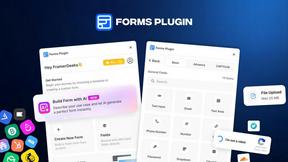
Forms Plugin
The #1 Native Form Builder Plugin for Framer - No Code, No Embeds, No External Platforms.


amaze.directory
Hand-checked AI tools with real pricing on the card and no paid ranks.

benchmark.directory
Independent AI tool listings: the cheapest usable plan, the real free-tier limit, tested integrations, and who trains on your work.


Tools Network
Tools Network is a curated directory that brings the internet's best AI tools together in one organized, easy-to-navigate place.