
Hush Touch | Voice-to-Text for MacOS vs URL to Any
Side-by-side comparison to help you choose the right AI tool.

Hush Touch | Voice-to-Text for MacOS
Experience smarter on-device dictation for Mac, transforming speech into text with unmatched accuracy and privacy.
Last updated: February 28, 2026

URL to Any
URL to Any instantly transforms web content into your desired format, making conversions effortless and efficient.
Last updated: February 28, 2026
Visual Comparison
Hush Touch | Voice-to-Text for MacOS

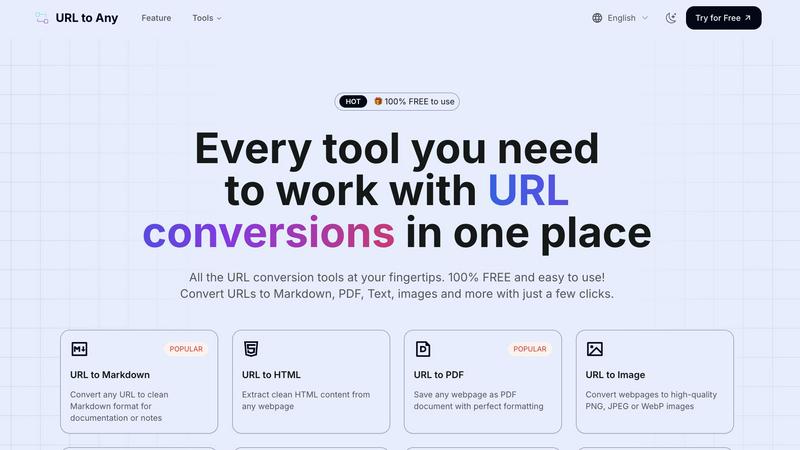
URL to Any
Feature Comparison
Hush Touch | Voice-to-Text for MacOS
Dual-Engine Recognition
Hush Touch employs a unique dual-engine recognition system that combines DictationTranscriber and SFSpeechRecognizer. This allows for natural flow and accurate punctuation while also understanding and incorporating your custom vocabulary. By blending these two powerful Apple engines, the app delivers unparalleled accuracy and responsiveness in real-time dictation.
Custom Vocabulary
Hush Touch supports a custom vocabulary feature that allows users to add up to 500 terms. This is especially beneficial for professionals in specialized fields such as medicine or technology, where specific jargon is common. The app learns from corrections you make during dictation, adapting to your unique language preferences over time.
Smart Text Processing
The app's smart text processing capabilities enhance the dictation experience by removing filler words, auto-correcting common mistakes, and formatting text as you dictate. Voice snippets for repeated phrases and numbered list formatting are processed locally and in real-time, ensuring a smooth and efficient writing experience without interruptions.
100% On-Device Privacy
With Hush Touch, your privacy is paramount. The app processes all voice data locally on your Mac, eliminating any reliance on cloud services. This means zero data collection and complete control over your information, providing peace of mind while dictating sensitive content.
URL to Any
URL to Markdown
Transform any webpage into clean Markdown format effortlessly. This feature is perfect for documentation, notes, or any situation where you need a simple text format that keeps your content organized and easy to edit.
URL to PDF
Convert any webpage into a beautifully formatted PDF document with just a click. This feature ensures that you can save important web content for offline access, sharing, or archiving without losing the original layout and structure.
URL to Image
Instantly convert webpages into high-quality PNG, JPEG, or WebP images. This feature is ideal for creating visual content, capturing website snapshots, or enhancing presentations with relevant imagery without needing additional software.
AI Summarizer
Leverage advanced AI technology to summarize any webpage in seconds. This feature is a game-changer for researchers and students, allowing them to quickly distill essential information from lengthy articles or reports, saving time and enhancing comprehension.
Use Cases
Hush Touch | Voice-to-Text for MacOS
Drafting Emails
Hush Touch is an excellent tool for busy professionals looking to draft emails quickly and efficiently. With hands-free dictation and customizable command phrases, users can send messages seamlessly without the need to type, allowing for more focus on the content of the email.
Taking Notes
Students and professionals alike can benefit from Hush Touch when taking notes during lectures or meetings. The ability to dictate notes in real-time allows for a more natural flow of information and ensures that important details are captured effortlessly, enhancing productivity.
Writing Documents
Whether it's a report, article, or creative writing piece, Hush Touch transforms the writing process. Users can dictate entire documents without the constraints of traditional typing, fostering creativity and allowing thoughts to flow freely.
Coding and Technical Writing
For software developers and technical writers, Hush Touch’s dual-engine recognition is invaluable. The app can accurately transcribe complex terminology and code commands, making it easier to document processes or communicate technical concepts without the hassle of typing.
URL to Any
Research and Documentation
Researchers can use URL to Any to convert academic articles, studies, and sources into Markdown or PDF formats for easy reference and citation in their work. This simplifies the process of compiling research materials.
Content Creation
Content creators can quickly save online articles or inspiration in various formats, such as images or text, streamlining their workflow. This allows for efficient content curation and idea generation without the hassle of manual formatting.
Educational Purposes
Students can convert lecture notes, educational websites, or online resources into accessible formats that suit their study needs. Whether it is turning a webpage into a PDF for ease of access or extracting text for quick revisions, URL to Any enhances learning.
Social Media Sharing
Marketers and social media managers can generate QR codes from URLs for quick sharing of promotional content or articles. This feature facilitates easy distribution of links and enhances engagement with audiences across platforms.
Overview
About Hush Touch | Voice-to-Text for MacOS
Hush Touch is a revolutionary voice-to-text application designed specifically for macOS, prioritizing natural dictation, speed, and privacy. Ideal for professionals, writers, and anyone who values efficient communication, Hush Touch operates entirely on-device, ensuring that your voice data remains secure and private. With a lightweight installation of just 5.5 MB, it launches quickly and integrates seamlessly into your daily writing processes. The app utilizes two advanced Apple transcription engines combined with an Apple Intelligence final pass, resulting in remarkably accurate and clean text output. Users can easily dictate emails, notes, and documents hands-free, thanks to customizable command phrases and smart auto-insertion features. Hush Touch is perfect for those seeking a dependable dictation solution without reliance on cloud services, making it an essential tool for anyone who values both privacy and efficiency in their workflow.
About URL to Any
In an era inundated with information, URL to Any emerges as a revolutionary web content conversion tool that empowers users to capture and repurpose online content effortlessly. Designed for a diverse audience that includes content creators, researchers, developers, and students, this all-in-one solution streamlines the process of transforming any webpage into the desired digital format. With URL to Any, users can bypass the cumbersome tasks of manual copying, complex software setups, and subscription fees. The tool offers unparalleled versatility, enabling instant conversions into formats like Markdown, PDF, images, and text, all at no cost. Its mission is simple: to make web content accessible, portable, and useful, transforming the way you interact with online information. By merely providing a URL, users unlock a command center for content conversion, redefining how they save and utilize web resources. URL to Any is not just a tool; it is a catalyst for enhanced productivity and creativity in the digital landscape.
Frequently Asked Questions
Hush Touch | Voice-to-Text for MacOS FAQ
How does Hush Touch ensure privacy?
Hush Touch guarantees privacy by processing all voice data entirely on your Mac. There is no reliance on cloud services or external servers, ensuring your information remains confidential and secure.
Can I customize the vocabulary?
Yes, Hush Touch allows users to add up to 500 custom terms to its vocabulary. It learns from your corrections, adapting to your specific language needs and improving accuracy over time.
Is there a trial available for Hush Touch?
Absolutely! Hush Touch offers a 7-day free trial with no credit card required. You can experience the app's functionality and performance firsthand before making a purchase.
What is the cost of Hush Touch?
Hush Touch is available for a one-time payment of $20, providing users with a lifetime license. This eliminates the need for monthly subscriptions, making it a cost-effective solution for voice-to-text dictation.
URL to Any FAQ
How does URL to Any work?
URL to Any operates by allowing users to input a webpage URL and select the desired output format. The tool processes the request and delivers the content in the chosen format instantly, ensuring a seamless conversion experience.
Is URL to Any really free?
Yes, URL to Any is completely free to use. There are no hidden fees or subscription costs, making it accessible for anyone looking to convert web content without financial barriers.
What formats can I convert URLs into?
You can convert URLs into various formats including Markdown, PDF, text, images, JSON, XML, and more. This extensive range of options caters to diverse needs and preferences, making it a versatile tool for all users.
Is my data safe when using URL to Any?
Absolutely. URL to Any processes your data securely and does not store any information on its servers. Your privacy and data security are top priorities, allowing you to convert URLs with confidence.
Alternatives
Hush Touch | Voice-to-Text for MacOS Alternatives
Hush Touch | Voice-to-Text for MacOS is an innovative voice-to-text application designed specifically for macOS users. It leverages advanced on-device processing, utilizing two Apple transcription engines followed by an Apple Intelligence final pass, ensuring faster and more accurate text conversion without the need for internet connectivity. As part of the AI Assistants category, it caters to individuals seeking seamless dictation experiences. Users often seek alternatives to Hush Touch due to various reasons, including pricing, feature sets, compatibility with different platforms, and specific user requirements. When selecting an alternative, it's essential to consider factors such as ease of use, the ability to work offline, transcription accuracy, and how well the software integrates into existing workflows. Additionally, assessing privacy measures and overall cost-effectiveness can significantly influence the decision-making process.
URL to Any Alternatives
In today's fast-paced digital environment, URL to Any stands out as a powerful tool within the content conversion category, designed to transform web content into various formats with remarkable ease. Users often seek alternatives to such tools for a variety of reasons, including pricing considerations, the breadth of features, and compatibility with specific platforms or workflows. As individuals and organizations strive to streamline their processes, they may look for solutions that not only offer versatility but also align with their unique needs and preferences. When searching for an alternative to URL to Any, it is crucial to consider several factors. Look for tools that provide a wide range of format conversions to ensure you can meet diverse project requirements. Additionally, focus on user experience; options that offer fast, intuitive access without unnecessary barriers can significantly enhance productivity. Lastly, evaluating the cost structure is essential, as finding a solution that is both effective and budget-friendly can make all the difference in your content management strategy.