
Changeflow vs TinyFast
Side-by-side comparison to help you choose the right AI tool.

Changeflow
Changeflow uses AI to track and summarize only the critical website changes that matter to your business.
Last updated: March 4, 2026

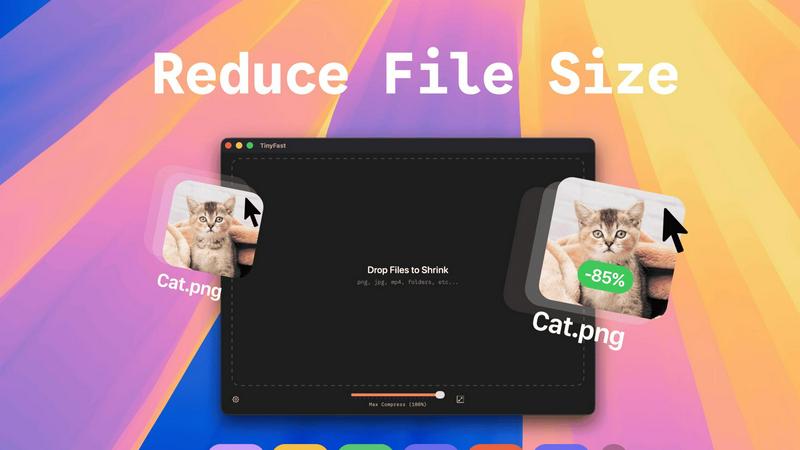
TinyFast is your private Mac app that instantly compresses images, videos, and documents locally.
Last updated: February 28, 2026
Visual Comparison
Changeflow

TinyFast
Feature Comparison
Changeflow
AI-Powered Contextual Intelligence
Changeflow's core engine uses sophisticated AI to do more than just spot differences. It reads the content, understands the context of your specific monitoring goals, and filters out irrelevant noise. This means you receive clear, concise summaries of only the meaningful changes, explaining not just what changed but why it matters to your business, dramatically reducing false positives and saving valuable time.
Natural Language & Smart Link Following
Setup requires zero technical expertise. Simply describe what you want to track in plain English. Furthermore, Changeflow's intelligence extends to turning any page with links into a dynamic feed. It automatically follows new links, reads the target pages, determines their relevance based on your criteria, and summarizes the important content, effectively creating an intelligent, self-updating information network from a single starting point.
Enterprise-Grade Reliability & Anti-Blocking
Built on over a decade of experience tracking billions of pages, Changeflow offers enterprise-level reliability. Its advanced anti-blocking technology ensures a 99.9% success rate on challenging sites that commonly thwart other monitors, including those with complex JavaScript, login requirements, or aggressive bot detection. This guarantees consistent, uninterrupted monitoring for mission-critical intelligence.
Interactive Change Viewer & Team Collaboration
Go beyond summaries with the interactive Site Version Control feature. This allows for forensic analysis by providing timestamped archives of every page version. You can navigate through time and see changes highlighted directly on the page. Combined with shared workspaces, centralized user admin, and flexible notifications, it keeps entire teams perfectly synchronized on the latest intelligence.
TinyFast
100% Local & Private Compression
TinyFast is engineered with privacy by design. Your files never leave your Mac, eliminating the risks associated with uploading sensitive documents, client assets, or proprietary media to unknown cloud servers. This local-first approach provides total peace of mind, making it perfect for work under Non-Disclosure Agreements (NDAs) or any scenario where confidentiality is paramount. Experience compression without compromise.
Blazing-Fast Drag & Drop Workflow
Unlock unprecedented speed with an intuitive drag-and-drop interface. Simply drag your files or entire folders into the app, and TinyFast's optimized native engines go to work instantly. There is no waiting for uploads, no processing queues, and no download delays. This feature transforms a typically tedious task into a near-instantaneous action, saving you hours every week and supercharging your productivity.
Universal File Type Support
TinyFast is your all-in-one optimization hub, supporting a vast array of common file types. This includes images (PNG, JPG, WEBP, GIF, SVG, HEIC, BMP, TIFF), videos (MP4, MOV, M4V), documents (PDF, DOCX), audio (MP3), and even code files (JS, CSS, JSON). This universality means you can streamline your entire workflow with a single, reliable tool instead of juggling multiple specialized websites or applications.
Batch Processing & Resolution Control
Handle projects of any scale with powerful batch processing. Drop entire folders filled with media, and TinyFast will compress them all in seconds. Furthermore, gain precise control over your output with built-in resolution resizing for images and videos. This allows you to not only reduce file size but also automatically adjust dimensions to meet specific platform requirements, all in one efficient step.
Use Cases
Changeflow
Competitive & Pricing Intelligence
Business and pricing teams use Changeflow to gain a decisive edge by automatically tracking competitor websites, product catalogs, and pricing pages. The AI filters out minor blog updates or promotional banners, alerting you only to critical changes in price, product features, terms of service, or strategic announcements, enabling rapid and informed competitive responses.
Legal & Regulatory Compliance Monitoring
Legal librarians at top law firms and compliance officers at Fortune 500 companies rely on Changeflow to monitor crucial sources like court dockets, SEC filings, FDA guidance documents, and regulatory body websites. It ensures they never miss a filing deadline or regulatory update by providing AI-summarized alerts on the exact legal citations or procedural changes that matter.
Market & News Surveillance
Marketing, PR, and executive teams stay ahead of market movements and brand mentions by using Changeflow to track industry news, analyst reports, and media outlets. The platform transforms these sources into a noise-free feed of relevant updates, summarizing key developments, emerging trends, or significant news mentions without requiring manual daily review of dozens of sites.
Supply Chain & Vendor Monitoring
Procurement and operations teams leverage Changeflow to monitor key vendor websites for changes to lead times, material specifications, service terms, or outage notices. By tracking these digital footprints, companies can proactively manage supply chain risks, anticipate disruptions, and maintain operational continuity based on real-time updates from partner sites.
TinyFast
Web Developers & Designers
Optimize website assets like images, SVGs, CSS, and JavaScript files locally before deployment. TinyFast ensures faster page load times by reducing file sizes dramatically, all while keeping proprietary design mockups and client work completely secure on your machine. It's the essential tool for building performant, professional sites without privacy trade-offs.
Content Creators & Marketers
Easily prepare high-resolution photos, videos, and marketing materials for social media, email campaigns, or digital portfolios. Shrink large video files (MP4, MOV) and images for quick sharing and uploading without sacrificing noticeable quality. Maintain full control over your brand assets and confidential campaign materials throughout the entire process.
Legal & Financial Professionals
Safely compress sensitive documents, contracts, reports, and presentations (PDF, DOCX) for email or secure portal transfer. TinyFast's local processing guarantees that confidential client information and financial data are never exposed to third-party servers, complying with strict data privacy regulations and internal security policies.
App & Software Developers
Reduce the size of application assets, icons, and embedded media to create lighter, faster-distributing software packages. Compress audio files (MP3) and documentation locally as part of your build process. This use case is critical for managing project bundle sizes and protecting intellectual property during development.
Pricing Comparison
Changeflow
Changeflow offers straightforward, business-focused pricing plans. The Plus plan is ideal for getting started at $19 per month, allowing you to track 20 pages with core features like email support, hourly/daily/weekly checks, and 2 notification addresses. For teams needing greater scale, the Business plan at $149 per month supports monitoring of 500 pages and includes enhanced capabilities such as expert support, 20 saved page versions, 5 notification addresses, bulk import tools, and access to the premium page unblocker for maximum reliability. All plans include a comprehensive 30-day free trial.
TinyFast
TinyFast offers straightforward pricing to unlock its full potential. The Free Forever plan allows compression of up to 5 files per day with access to all features. For unlimited use, choose between a Lifetime Plan for a single payment of €17.99, which includes lifetime updates, or a Monthly Subscription at €2.99/month after a 3-day free trial. Both paid plans provide unlimited local compressions, full feature access, and support future development.
Overview
About Changeflow
Changeflow is a transformative AI-powered web monitoring platform that redefines how businesses track online information. It moves far beyond basic change detection, eliminating the noise of "something changed" alerts to deliver precise, contextual intelligence on what actually matters. By leveraging advanced AI that reads and understands page context, Changeflow summarizes critical updates, saving professionals from the tedious and error-prone task of manual checking. Its game-changing simplicity allows users to set up monitors in plain English—just describe what you care about and point it at a page. The platform expertly handles complex technical barriers like login walls and JavaScript-heavy sites with a 99.9% success rate, reaching pages other tools cannot. Designed for serious business applications, it is trusted by Fortune 500 compliance teams, Am Law 200 legal librarians, and business strategists to track competitor pricing, regulatory shifts, news mentions, and market movements. With features like shared workspaces, a robust API, and Site Version Control for timestamped archives, Changeflow unlocks potential by turning the chaotic web into a structured, actionable feed of strategic intelligence.
About TinyFast
TinyFast is a revolutionary macOS application that fundamentally transforms how developers, designers, and creators handle file optimization. It is a powerful, local file compressor that shrinks PNG, JPEG, MP4, MOV, PDF, SVG, WebP, MP3, and GIF files directly on your Mac. By eliminating the need for slow, insecure online uploads, TinyFast delivers a game-changing workflow that prioritizes blistering speed and ironclad privacy. Its core value proposition is simple yet transformative: keep your files on your device and compress them instantly with a simple drag-and-drop action. This tool is built for professionals who handle sensitive assets, work under tight deadlines, or simply refuse to compromise on security. It unlocks a new standard of efficiency, ensuring your confidential documents, high-resolution media, and project files are optimized without ever leaving the safety of your machine, making it an indispensable asset for any modern digital workflow. TinyFast is the definitive solution for anyone who values their time and privacy, offering a seamless, local alternative to risky and sluggish online compression tools.
Frequently Asked Questions
Changeflow FAQ
How does Changeflow differ from traditional website change detectors?
Traditional tools often simply take screenshots or detect HTML differences, flooding you with alerts for every minor change like a shifted image or updated timestamp. Changeflow is transformative because it employs AI to read and comprehend the page's content like a human would. It understands context, filters out irrelevant noise, and delivers a plain-English summary of only the substantive changes that align with your monitoring goals, saving you hours of manual verification.
Can Changeflow monitor websites that require a login or have complex JavaScript?
Yes, this is one of Changeflow's key advantages. The platform is built with sophisticated anti-blocking technology that allows it to successfully navigate and monitor pages behind login walls, those with complex JavaScript rendering, and other challenging structures that typically block simpler bots. It boasts a 99.9% success rate, making it reliable for the most critical business sources that other tools cannot reach.
What kind of notifications will I receive?
You receive concise, AI-generated notifications that clearly describe the update and its significance. These alerts can be delivered to your Changeflow dashboard, to specified email addresses, or to hundreds of other apps like Slack or Microsoft Teams via Zapier integration. You have full control over the frequency, ensuring you stay informed without being overwhelmed by noise.
How do I get started with monitoring a large list of URLs?
Getting started is simple even with a large volume of sources. You can use the built-in AI chatbot to quickly add pages one by one. For bulk operations, Changeflow offers import capabilities from CSV or Excel files. For extensive website monitoring, the platform can even perform a site crawl based on a root URL to discover and add relevant pages automatically, streamlining the initial setup process.
TinyFast FAQ
Is TinyFast really free to use?
Yes, TinyFast offers a fully-featured Free Forever plan. This allows you to compress up to 5 files per day at no cost, giving you complete access to all compression features and supported file types. It's a perfect way to integrate secure, local optimization into your workflow before deciding to upgrade for unlimited use.
What happens to my files during compression?
Nothing leaves your Mac. TinyFast performs all compression processes entirely locally on your device. Your original files are read, optimized using native engines, and a new, smaller file is created. Your originals remain untouched and private, with no data ever transmitted to the internet.
What file types does TinyFast support?
TinyFast supports a wide range of common file types. This includes images (PNG, JPG, WEBP, GIF, SVG, HEIC, BMP, TIFF), videos (MP4, MOV, M4V), documents (PDF, DOCX), audio (MP3), and code files (JS, CSS, JSON). It is designed to be a universal tool for most digital optimization needs.
How does the pricing work?
TinyFast operates on a freemium model. You can start with the free plan (5 files/day). For unlimited compression, you can choose a one-time Lifetime purchase or a monthly subscription. The monthly plan includes a 3-day free trial, allowing you to test unlimited compression before any payment is required.
Alternatives
Changeflow Alternatives
Changeflow is an AI-driven market and competitor insights platform, a transformative tool in the competitive intelligence and web monitoring category. It goes beyond simple change detection to understand context and deliver summaries of what truly matters, unlocking a new level of market awareness. Users often explore alternatives for various reasons, such as budget constraints, specific feature requirements, or the need for a different platform integration. The quest for the right tool is about finding the perfect fit for your team's unique workflow and strategic goals. When evaluating options, prioritize solutions that offer not just alerts but intelligent analysis, robust handling of complex web pages, and collaborative features. Look for a tool that acts as a true partner in your workflow, seamlessly turning vast data into actionable insights.
TinyFast Alternatives
TinyFast is a revolutionary local file compression tool for macOS, designed to optimize images, videos, and documents directly on your device. It belongs to the category of productivity and optimization software, specifically built for professionals who prioritize speed and uncompromising privacy in their workflow. Users often explore alternatives for various reasons, such as budget constraints, the need for cross-platform compatibility on Windows or Linux, or specific feature requirements not covered by a single tool. The search for a different solution is a natural part of finding the perfect fit for one's unique technical environment and project demands. When evaluating other options, key considerations should include the core principles that make tools like TinyFast transformative: local processing for absolute security, support for your essential file formats, and genuine processing speed that doesn't create bottlenecks. The goal is to find a solution that unlocks a similar level of efficient, secure, and integrated workflow optimization.