
Nano AI vs Sketch To
Side-by-side comparison to help you choose the right AI tool.

Nano AI
Nano AI is your all-in-one creative platform for ultra-fast AI image generation and transformative editing.
Last updated: February 28, 2026
Sketch To
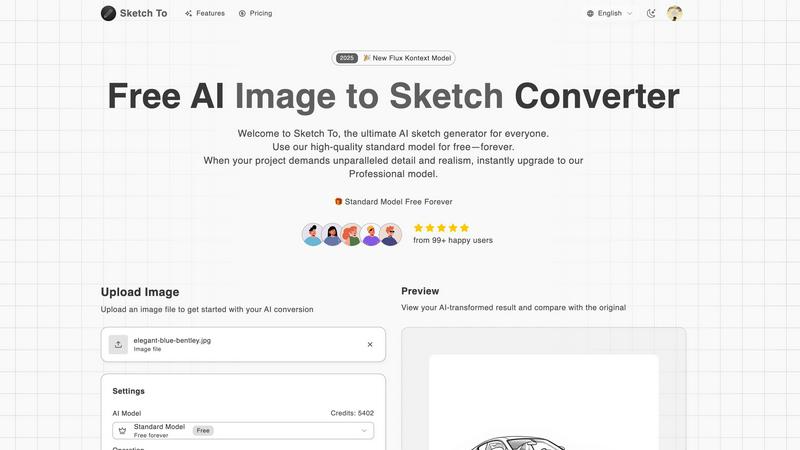
Effortlessly transform your images into stunning sketches with Sketch To’s advanced AI converter for every creative.
Last updated: February 28, 2026
Visual Comparison
Nano AI

Sketch To
Feature Comparison
Nano AI
Flash-Speed AI Generation
Experience the transformative power of sub-10-second image generation. Nano AI's advanced orchestration pipeline, powered by the Nano Banana model, delivers both text-to-image and image-to-image results almost instantly. This eliminates agonizing render waits, keeping you firmly in the creative moment and allowing you to explore ideas and iterate on concepts at the speed of thought, ultimately shipping visuals before a meeting even ends.
Deep Style Tuning & The Nano Banana Model
Move beyond generic presets and achieve granular creative control. The proprietary Nano Banana AI model honors layered, complex instructions and stylistic cues without requiring tedious prompt engineering. Simply describe the desired vibe—like "Renaissance lighting on cyberpunk geometry"—and the model faithfully follows, enabling sophisticated style generation and transfer for truly unique and tailored visual outcomes.
All-in-One Creative Workspace
Shatter the cycle of app-switching with a unified platform that brings every essential tool into one flow. From initiating ideas with AI image generation to refining them with advanced editors, resizing, converting formats, and sharing via team galleries, Nano AI consolidates the entire creative process. This seamless integration ensures you never lose momentum, making exploration, iteration, and export effortlessly efficient.
Magic Edit & Advanced Tools
Fix it in post, without the post-production hassle. The Magic Edit feature allows for powerful, natural language-based editing like inpainting and outpainting. Simply highlight an area and type what you want—change a shirt color, add an object, or expand a background. Combined with other utility tools like background removal and a suite of artistic effects, Nano AI provides a comprehensive toolkit for perfecting any asset.
Sketch To
AI Image to Sketch Conversion
Transform your photos into beautiful pencil sketches using advanced AI technology. This feature is ideal for artists and designers who want to create stunning visual presentations or social media content effortlessly.
Sketch to Image AI
With the ability to convert sketches into realistic images, this feature provides incredible detail and accuracy. Perfect for professional projects, it allows artists to showcase their sketches as high-quality visuals, enhancing their portfolios.
Free Trial Credits
New users can take advantage of trial credits with the standard model. This feature allows hobbyists and casual users to explore the platform's capabilities without any initial investment, making it easier to get started.
Instant Processing
Experience the power of rapid image conversion with Sketch To's cloud-based AI processing infrastructure. Users can generate high-quality results in seconds, streamlining the creative process and enabling quick iterations.
Use Cases
Nano AI
Rapid Marketing Asset Creation
Marketing teams can instantly generate and iterate on high-quality visuals for campaigns, social media, ads, and blog posts. The flash-speed generation and style control allow for rapid A/B testing of concepts and maintaining consistent brand aesthetics across all assets, dramatically accelerating time-to-market for any campaign without compromising on production quality or creative vision.
Streamlined Design & Concepting
Designers and agencies can use Nano AI as a powerful brainstorming and prototyping tool. Quickly visualize client concepts, build mockups, and explore stylistic directions in seconds. The all-in-one workspace enables seamless transition from initial AI-generated draft to refined, editable composition, polishing details and preparing final files for handoff without ever leaving the platform.
Content Creator Production Hub
Digital creators, influencers, and bloggers can produce a constant stream of unique, engaging visual content. Transform photos with artistic effects like watercolor or sketch, generate original artwork for thumbnails and posts, and use advanced editing to perfect images. Nano AI turns complex creative tasks into simple, fast operations, empowering creators to focus on their narrative and audience.
Team Collaboration & Project Management
Creative teams can leverage shared galleries and the upcoming Prompt Labs to keep every experiment, review, and export in one centralized place. This fosters better collaboration, streamlines feedback loops, and ensures version control. Teams can maintain creative momentum, align on visual direction, and ship cohesive projects faster by eliminating the chaos of scattered files and disjointed tools.
Sketch To
Social Media Content Creation
Artists and influencers can utilize Sketch To to produce engaging visuals for social media platforms. By transforming photos into striking sketches, users can create unique posts that capture attention and convey artistic flair.
Professional Portfolios
Designers can enhance their portfolios by converting their sketches into photorealistic images. This feature allows them to showcase their creative range and attract potential clients with high-quality visuals.
Educational Projects
Students and educators can use Sketch To for school projects that require artistic elements. Whether it's creating illustrations for reports or enhancing presentations, the tool simplifies the process of adding artistic value.
Gift Creation
Hobbyists can transform cherished photos into custom sketches as unique gifts for friends and family. This personal touch elevates any occasion, making memories last longer through beautiful artistic creations.
Overview
About Nano AI
Nano AI is a game-changing, all-in-one creative platform engineered to demolish the traditional barriers between creative vision and final execution. It transforms the fragmented, multi-app creative workflow into a single, streamlined workspace where modern creators, marketers, designers, and teams can draft, edit, and share stunning, production-ready visuals with unprecedented speed. At its revolutionary core is the powerful Nano Banana model, coupled with flash-speed orchestration that delivers sub-10-second results for both text-to-image and image-to-image generation. This platform is built for those who refuse to be slowed down by typical delays and app-switching headaches. It unlocks a new paradigm of creative potential by integrating granular style control, advanced editing tools like inpainting, shared galleries, and practical utilities into one intuitive flow. With Nano AI, you can iterate, refine, and ship high-quality assets faster than ever before, turning fleeting inspiration into shippable visuals in moments.
About Sketch To
Sketch To is a revolutionary AI-powered tool designed to transform the way we create and visualize art. Perfectly suited for artists, designers, and hobbyists alike, this innovative platform allows users to effortlessly convert images into captivating sketches and vice versa. Whether you're looking to enhance your artistic portfolio, brainstorm unique design concepts, or simply indulge in a creative hobby, Sketch To provides an intuitive and user-friendly interface to meet your needs. The platform features a dual functionality: you can either turn any photograph into a detailed sketch or breathe life into your sketches by converting them into photorealistic images. With a focus on accessibility, Sketch To offers a free standard model for casual users and a professional model for those seeking unparalleled detail and realism. Its instant processing capabilities ensure that your creative journey is swift and seamless, allowing you to produce high-quality artwork without the burden of subscription fees. Unleash your creativity with Sketch To and discover the limitless possibilities of artistic expression.
Frequently Asked Questions
Nano AI FAQ
What makes Nano AI different from other AI image generators?
Nano AI is not just a generator; it's a transformative, all-in-one creative platform. While its core Nano Banana model delivers exceptionally fast and style-aware generation, the true game-changer is the integrated workspace. It combines generation, advanced editing tools (like Magic Edit), utility apps (like BG removal), and team collaboration features into a single, streamlined flow, eliminating the need to juggle multiple disparate applications.
What is the "Nano Banana" model?
Nano Banana is the proprietary, powerful AI model at the heart of the Nano AI platform. It is specifically engineered for flash-speed inference and deep style understanding. Unlike generic models, it excels at interpreting layered, casual language prompts and faithfully executing complex stylistic directions, providing creators with granular control over the look and feel of their generated visuals without technical prompt engineering.
What kind of editing capabilities does Nano AI offer?
Nano AI offers a suite of advanced, AI-powered editing tools. The flagship "Magic Edit" feature allows for inpainting and outpainting using natural language commands. Beyond that, the platform includes practical tools for tasks like removing backgrounds, resizing images, converting formats, and applying neural filters to transform photos into paintings, sketches, manga, and other artistic styles.
Is Nano AI suitable for professional and commercial use?
Absolutely. Nano AI is built for modern creators, marketers, and design teams who need production-ready assets. Features like deep style tuning for brand consistency, upcoming 4K neural upscaling for high-resolution output, and the ability to rapidly generate and refine high-quality visuals make it a powerful tool for professional workflows, advertising, and commercial projects.
Sketch To FAQ
What types of images can I upload to Sketch To?
Sketch To supports multiple image formats, allowing users to upload a variety of files for conversion. This flexibility enables you to work with the images that best suit your creative vision.
Can I use Sketch To for commercial purposes?
Yes, Sketch To offers a Professional Model designed specifically for commercial use. This model provides superior detail and realism, making it suitable for professional projects and business needs.
How do I access the free trial credits?
New users can simply sign up on the Sketch To platform to receive trial credits. This allows you to explore the standard model's features without any cost, making it easy to get started.
Is there a limit to the size of images I can upload?
Yes, the maximum file size for uploads is 5MB. This limit ensures optimal processing speed and efficiency while maintaining high-quality results in the conversions you create.
Alternatives
Nano AI Alternatives
Nano AI is a transformative, all-in-one creative platform in the AI image generation and editing category. It's engineered to deliver ultra-fast, production-ready visuals by consolidating the entire creative workflow into a single, streamlined workspace, powered by its proprietary Nano Banana model. Users often explore alternatives for various reasons, such as budget constraints, specific feature requirements not covered by one platform, or the need for integration with different tools and ecosystems. The search for the right tool is a natural part of finding the perfect fit for one's unique creative process and team dynamics. When evaluating alternatives, key considerations include generation speed and output quality, the depth of editing and control features, and how well the platform integrates into your existing workflow. The goal is to find a solution that not only generates images but also enhances your overall creative velocity without compromising on your vision.
Sketch To Alternatives
Sketch To is a revolutionary AI-powered tool that specializes in transforming images into exquisite sketches and vice versa. This innovative platform falls under the category of image and photo editing, targeting artists, designers, and hobbyists alike who wish to elevate their visual creativity with ease and precision. Users often seek alternatives to Sketch To for various reasons, including pricing, specific feature sets, platform compatibility, and personal preferences for user experience. When choosing an alternative, it is essential to consider factors such as the quality of conversions, the availability of free trials or models, processing speed, and the level of detail offered in the output. Additionally, explore whether the alternative provides user-friendly interfaces and the necessary tools that cater to your unique creative needs, ensuring your artistic vision comes to life seamlessly.