
Img Editor vs Sketch To
Side-by-side comparison to help you choose the right AI tool.

Img Editor
Unlock your creative potential and transform ideas into stunning AI-generated images instantly.
Last updated: February 28, 2026
Sketch To
Effortlessly transform your images into stunning sketches with Sketch To’s advanced AI converter for every creative.
Last updated: February 28, 2026
Visual Comparison
Img Editor

Sketch To
Feature Comparison
Img Editor
Advanced Text-to-Image Generation
Harness the power of cutting-edge AI to transform your written ideas into vivid, high-quality visuals. Simply describe your vision in the prompt box, and Img Editor's sophisticated AI understanding will generate a unique image that matches your description, from photorealistic landscapes to abstract digital art. This feature is the core of the platform, designed to make visual creation as simple as typing a sentence.
Flexible Image Customization & Editing
Take full control over your creations with a suite of customization tools. Adjust the aspect ratio to fit any platform, choosing from square (1:1), widescreen (16:9), or portrait (9:16) formats. Select your desired image quality, from Standard 1K up to Ultra Quality 4K Nano Photo, ensuring your image is perfect for web use or high-resolution prints. The platform also includes image editing capabilities to refine your generated artwork.
Community-Powered Prompt Generator & Gallery
Overcome creative block and find inspiration through the vibrant community gallery. Browse popular prompts created by other users and click to instantly try them yourself. This shared library is a treasure trove of ideas and techniques. You can also submit your own best work to the gallery for review; once approved, you earn 10 extra free generations, fueling a cycle of creativity and collaboration.
Describe Your Image & Face Swap
Go beyond text-to-image with advanced AI functionalities. Use the "Describe Your Image" tool to let the AI analyze an image and create a detailed text description or prompt. Furthermore, leverage powerful face-swapping technology to place a subject from an uploaded photo into a completely new AI-generated scene, allowing for personalized and highly specific character creation within any imagined setting.
Sketch To
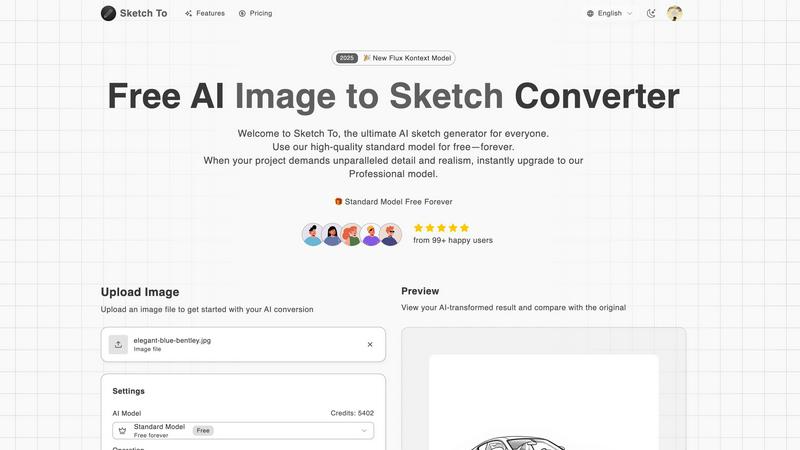
AI Image to Sketch Conversion
Transform your photos into beautiful pencil sketches using advanced AI technology. This feature is ideal for artists and designers who want to create stunning visual presentations or social media content effortlessly.
Sketch to Image AI
With the ability to convert sketches into realistic images, this feature provides incredible detail and accuracy. Perfect for professional projects, it allows artists to showcase their sketches as high-quality visuals, enhancing their portfolios.
Free Trial Credits
New users can take advantage of trial credits with the standard model. This feature allows hobbyists and casual users to explore the platform's capabilities without any initial investment, making it easier to get started.
Instant Processing
Experience the power of rapid image conversion with Sketch To's cloud-based AI processing infrastructure. Users can generate high-quality results in seconds, streamlining the creative process and enabling quick iterations.
Use Cases
Img Editor
Marketing & Social Media Content Creation
Revolutionize your digital marketing by generating eye-catching visuals for social media posts, blog articles, advertisements, and email campaigns in seconds. Create branded imagery that stands out, experiment with different concepts without a photoshoot, and maintain a consistent, professional visual presence across all channels without hiring a designer or purchasing stock photos.
Concept Art & Creative Brainstorming
Unlock new realms of creativity for artists, writers, and designers. Rapidly visualize characters, environments, product concepts, or story scenes during the brainstorming phase. This allows for quick iteration and exploration of ideas, turning abstract thoughts into tangible visual references that can guide larger projects, pitches, or personal artistic endeavors.
Educational & Presentation Material
Transform educational content and business presentations by creating custom illustrations, diagrams, and concept visuals. Teachers can generate images to explain complex topics, while professionals can craft unique graphics for slideshows and reports, making information more engaging, memorable, and accessible to any audience.
Personal Art Exploration & Hobby Projects
Empower anyone to explore their artistic side without needing technical drawing skills. Create custom artwork for personal projects, visualize ideas for home decor, design unique gifts like custom posters or phone wallpapers, or simply experiment with digital art as a relaxing and fulfilling hobby, all within a free and supportive platform.
Sketch To
Social Media Content Creation
Artists and influencers can utilize Sketch To to produce engaging visuals for social media platforms. By transforming photos into striking sketches, users can create unique posts that capture attention and convey artistic flair.
Professional Portfolios
Designers can enhance their portfolios by converting their sketches into photorealistic images. This feature allows them to showcase their creative range and attract potential clients with high-quality visuals.
Educational Projects
Students and educators can use Sketch To for school projects that require artistic elements. Whether it's creating illustrations for reports or enhancing presentations, the tool simplifies the process of adding artistic value.
Gift Creation
Hobbyists can transform cherished photos into custom sketches as unique gifts for friends and family. This personal touch elevates any occasion, making memories last longer through beautiful artistic creations.
Overview
About Img Editor
Img Editor is a revolutionary, free AI-powered platform that is fundamentally democratizing the world of digital art and visual creation. It is designed to unlock the creative potential within everyone, from professional artists and designers to marketers, content creators, and hobbyists. By leveraging cutting-edge artificial intelligence, Img Editor transforms simple text descriptions into stunning, professional-grade images in seconds, removing traditional barriers of cost, skill, and time. Its core value proposition is a powerful, accessible, and completely free-to-use model that grants users up to 10 high-quality image generations daily. Furthermore, it fosters a collaborative ecosystem where users can earn unlimited bonus generations by sharing their creations to the community gallery. This transformative approach makes professional visual asset creation available to all, empowering users to effortlessly bring their most imaginative concepts to life, illustrate ideas, and enhance any project without financial constraints.
About Sketch To
Sketch To is a revolutionary AI-powered tool designed to transform the way we create and visualize art. Perfectly suited for artists, designers, and hobbyists alike, this innovative platform allows users to effortlessly convert images into captivating sketches and vice versa. Whether you're looking to enhance your artistic portfolio, brainstorm unique design concepts, or simply indulge in a creative hobby, Sketch To provides an intuitive and user-friendly interface to meet your needs. The platform features a dual functionality: you can either turn any photograph into a detailed sketch or breathe life into your sketches by converting them into photorealistic images. With a focus on accessibility, Sketch To offers a free standard model for casual users and a professional model for those seeking unparalleled detail and realism. Its instant processing capabilities ensure that your creative journey is swift and seamless, allowing you to produce high-quality artwork without the burden of subscription fees. Unleash your creativity with Sketch To and discover the limitless possibilities of artistic expression.
Frequently Asked Questions
Img Editor FAQ
Is Img Editor really free to use?
Yes, Img Editor is fundamentally free. Every user receives a generous daily allowance of 10 high-quality image generations at no cost. There are no subscription fees or hidden charges for this core service. You can earn even more free generations by actively participating in the community, such as submitting your approved creations to the public gallery.
What is Nano Photo and how do I access 2K/4K quality?
Nano Photo is a sponsor or tier within Img Editor that provides access to higher-resolution outputs. While standard generation is available at 1K quality, the 2K (High Quality) and 4K (Ultra Quality) options are specifically available when you generate an image as a "Nano Photo." This may be part of a promotional offer or a specific generation mode within the platform.
How does the community gallery and bonus system work?
The community gallery is a shared space where users can publish their generated images. By submitting your creation for review and having it approved, you contribute to the inspiration pool for others. As a reward for enriching the community, you instantly earn 10 extra image generations on top of your daily free limit, enabling near-unlimited creativity.
Can I use the images I create for commercial purposes?
Based on the platform's focus on democratizing creativity for professionals and marketers, the images you generate are typically intended for your own use, which includes commercial projects like marketing and social media. However, it is always recommended to review the platform's specific Terms of Service for the latest and most detailed information on usage rights, licenses, and any applicable restrictions.
Sketch To FAQ
What types of images can I upload to Sketch To?
Sketch To supports multiple image formats, allowing users to upload a variety of files for conversion. This flexibility enables you to work with the images that best suit your creative vision.
Can I use Sketch To for commercial purposes?
Yes, Sketch To offers a Professional Model designed specifically for commercial use. This model provides superior detail and realism, making it suitable for professional projects and business needs.
How do I access the free trial credits?
New users can simply sign up on the Sketch To platform to receive trial credits. This allows you to explore the standard model's features without any cost, making it easy to get started.
Is there a limit to the size of images I can upload?
Yes, the maximum file size for uploads is 5MB. This limit ensures optimal processing speed and efficiency while maintaining high-quality results in the conversions you create.
Alternatives
Img Editor Alternatives
Img Editor is a transformative AI image generation platform in the digital art and photo editing category. It empowers users to create stunning visuals from text descriptions or edit existing images, all within a free, community-driven model. Users often explore alternatives for various reasons. Some may seek different pricing structures beyond free tiers, require specific advanced features for professional workflows, or need compatibility with other software platforms and ecosystems. The search for the right tool is deeply personal to one's creative process and project demands. When evaluating other platforms, consider core aspects like the quality and style of AI output, the flexibility of generation limits, the depth of editing tools available, and the overall user experience. The goal is to find a solution that seamlessly integrates with your vision and amplifies your creative potential without friction.
Sketch To Alternatives
Sketch To is a revolutionary AI-powered tool that specializes in transforming images into exquisite sketches and vice versa. This innovative platform falls under the category of image and photo editing, targeting artists, designers, and hobbyists alike who wish to elevate their visual creativity with ease and precision. Users often seek alternatives to Sketch To for various reasons, including pricing, specific feature sets, platform compatibility, and personal preferences for user experience. When choosing an alternative, it is essential to consider factors such as the quality of conversions, the availability of free trials or models, processing speed, and the level of detail offered in the output. Additionally, explore whether the alternative provides user-friendly interfaces and the necessary tools that cater to your unique creative needs, ensuring your artistic vision comes to life seamlessly.