
Nano AI vs Shrinkpad
Side-by-side comparison to help you choose the right AI tool.

Nano AI
Nano AI is your all-in-one creative platform for ultra-fast AI image generation and transformative editing.
Last updated: February 28, 2026

Shrinkpad
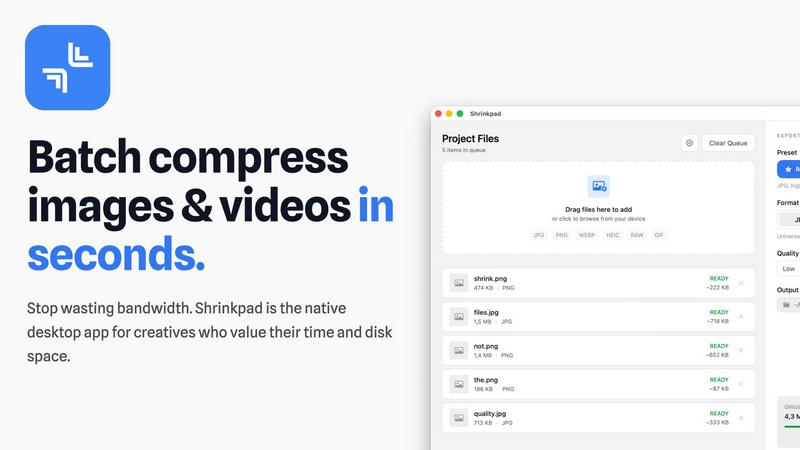
Shrinkpad effortlessly compresses images and videos in batches, optimizing your assets while saving time and space.
Last updated: February 28, 2026
Visual Comparison
Nano AI

Shrinkpad
Feature Comparison
Nano AI
Flash-Speed AI Generation
Experience the transformative power of sub-10-second image generation. Nano AI's advanced orchestration pipeline, powered by the Nano Banana model, delivers both text-to-image and image-to-image results almost instantly. This eliminates agonizing render waits, keeping you firmly in the creative moment and allowing you to explore ideas and iterate on concepts at the speed of thought, ultimately shipping visuals before a meeting even ends.
Deep Style Tuning & The Nano Banana Model
Move beyond generic presets and achieve granular creative control. The proprietary Nano Banana AI model honors layered, complex instructions and stylistic cues without requiring tedious prompt engineering. Simply describe the desired vibe—like "Renaissance lighting on cyberpunk geometry"—and the model faithfully follows, enabling sophisticated style generation and transfer for truly unique and tailored visual outcomes.
All-in-One Creative Workspace
Shatter the cycle of app-switching with a unified platform that brings every essential tool into one flow. From initiating ideas with AI image generation to refining them with advanced editors, resizing, converting formats, and sharing via team galleries, Nano AI consolidates the entire creative process. This seamless integration ensures you never lose momentum, making exploration, iteration, and export effortlessly efficient.
Magic Edit & Advanced Tools
Fix it in post, without the post-production hassle. The Magic Edit feature allows for powerful, natural language-based editing like inpainting and outpainting. Simply highlight an area and type what you want—change a shirt color, add an object, or expand a background. Combined with other utility tools like background removal and a suite of artistic effects, Nano AI provides a comprehensive toolkit for perfecting any asset.
Shrinkpad
Intelligent Compression
Shrinkpad automatically analyzes the visual complexity of your media to apply the perfect compression ratio, ensuring that your assets maintain their quality without artifacts, saving you time and effort in the process.
Batch Processing Capability
With Shrinkpad, you can batch process thousands of images and videos simultaneously, handling massive queues with ease. Unlike web-based tools, it is optimized for speed and reliability, allowing you to manage larger projects without crashing.
Folder Mode
Simply drag and drop an entire folder into Shrinkpad, and it will automatically detect and queue all supported media files for compression. This feature simplifies the process of managing multiple assets, allowing for seamless workflows.
Privacy-Focused Operation
All processing occurs locally on your device, ensuring that your sensitive media files never leave your machine. This privacy-first approach guarantees that your creative work remains secure and confidential while you optimize your assets.
Use Cases
Nano AI
Rapid Marketing Asset Creation
Marketing teams can instantly generate and iterate on high-quality visuals for campaigns, social media, ads, and blog posts. The flash-speed generation and style control allow for rapid A/B testing of concepts and maintaining consistent brand aesthetics across all assets, dramatically accelerating time-to-market for any campaign without compromising on production quality or creative vision.
Streamlined Design & Concepting
Designers and agencies can use Nano AI as a powerful brainstorming and prototyping tool. Quickly visualize client concepts, build mockups, and explore stylistic directions in seconds. The all-in-one workspace enables seamless transition from initial AI-generated draft to refined, editable composition, polishing details and preparing final files for handoff without ever leaving the platform.
Content Creator Production Hub
Digital creators, influencers, and bloggers can produce a constant stream of unique, engaging visual content. Transform photos with artistic effects like watercolor or sketch, generate original artwork for thumbnails and posts, and use advanced editing to perfect images. Nano AI turns complex creative tasks into simple, fast operations, empowering creators to focus on their narrative and audience.
Team Collaboration & Project Management
Creative teams can leverage shared galleries and the upcoming Prompt Labs to keep every experiment, review, and export in one centralized place. This fosters better collaboration, streamlines feedback loops, and ensures version control. Teams can maintain creative momentum, align on visual direction, and ship cohesive projects faster by eliminating the chaos of scattered files and disjointed tools.
Shrinkpad
Photographers
Photographers can use Shrinkpad to quickly compress large batches of images from shoots, significantly reducing file sizes while preserving high quality, making it easier to store and share their portfolios.
Designers
For designers, Shrinkpad streamlines the process of exporting assets from software like Figma or Photoshop, allowing them to export everything at once and have Shrinkpad handle the optimization and renaming in bulk.
Content Creators
Content creators can benefit from Shrinkpad’s ability to compress videos and images together in one batch, ensuring that their media files are optimized for faster load times on websites and social media platforms.
Developers
Developers can use Shrinkpad to reduce app bundle sizes and improve website performance by compressing various media assets, leading to faster load times and enhanced user experiences for their applications.
Overview
About Nano AI
Nano AI is a game-changing, all-in-one creative platform engineered to demolish the traditional barriers between creative vision and final execution. It transforms the fragmented, multi-app creative workflow into a single, streamlined workspace where modern creators, marketers, designers, and teams can draft, edit, and share stunning, production-ready visuals with unprecedented speed. At its revolutionary core is the powerful Nano Banana model, coupled with flash-speed orchestration that delivers sub-10-second results for both text-to-image and image-to-image generation. This platform is built for those who refuse to be slowed down by typical delays and app-switching headaches. It unlocks a new paradigm of creative potential by integrating granular style control, advanced editing tools like inpainting, shared galleries, and practical utilities into one intuitive flow. With Nano AI, you can iterate, refine, and ship high-quality assets faster than ever before, turning fleeting inspiration into shippable visuals in moments.
About Shrinkpad
Shrinkpad is a revolutionary desktop application designed exclusively for macOS, transforming the way creative professionals optimize their media assets. This powerful tool specializes in batch compression for images and videos, allowing photographers, designers, content creators, and developers to reclaim valuable storage space while enhancing their workflow efficiency. With Shrinkpad, users can compress hundreds or even thousands of files in seconds without compromising privacy or quality. It operates entirely on your device, eliminating the need for internet connectivity, cloud uploads, or server delays. Shrinkpad intelligently processes over 50 different file formats, including standard JPGs and PNGs, as well as professional RAW files and high-resolution 4K videos, achieving file size reductions of up to 90% while maintaining visual integrity. This is not just another compression tool; it is a comprehensive, privacy-first asset optimization engine designed to empower modern creatives.
Frequently Asked Questions
Nano AI FAQ
What makes Nano AI different from other AI image generators?
Nano AI is not just a generator; it's a transformative, all-in-one creative platform. While its core Nano Banana model delivers exceptionally fast and style-aware generation, the true game-changer is the integrated workspace. It combines generation, advanced editing tools (like Magic Edit), utility apps (like BG removal), and team collaboration features into a single, streamlined flow, eliminating the need to juggle multiple disparate applications.
What is the "Nano Banana" model?
Nano Banana is the proprietary, powerful AI model at the heart of the Nano AI platform. It is specifically engineered for flash-speed inference and deep style understanding. Unlike generic models, it excels at interpreting layered, casual language prompts and faithfully executing complex stylistic directions, providing creators with granular control over the look and feel of their generated visuals without technical prompt engineering.
What kind of editing capabilities does Nano AI offer?
Nano AI offers a suite of advanced, AI-powered editing tools. The flagship "Magic Edit" feature allows for inpainting and outpainting using natural language commands. Beyond that, the platform includes practical tools for tasks like removing backgrounds, resizing images, converting formats, and applying neural filters to transform photos into paintings, sketches, manga, and other artistic styles.
Is Nano AI suitable for professional and commercial use?
Absolutely. Nano AI is built for modern creators, marketers, and design teams who need production-ready assets. Features like deep style tuning for brand consistency, upcoming 4K neural upscaling for high-resolution output, and the ability to rapidly generate and refine high-quality visuals make it a powerful tool for professional workflows, advertising, and commercial projects.
Shrinkpad FAQ
Can I use Shrinkpad for free?
Yes, Shrinkpad offers a Free Starter plan that includes essential tools for casual use, allowing users to compress up to 10 files per batch in common formats like JPG and PNG.
What file formats does Shrinkpad support?
Shrinkpad supports over 50 file formats, including popular image formats like JPG, PNG, WEBP, and RAW, as well as video formats such as MP4 and MOV, making it versatile for various media types.
Does Shrinkpad support video compression?
Absolutely! Shrinkpad can compress both images and videos, allowing you to optimize all your media assets in one go, which is perfect for content creators working with mixed media.
How many files can I process at once?
With Shrinkpad, you can process thousands of assets in a single batch without crashing, making it ideal for users who need to handle large projects efficiently and effectively.
Alternatives
Nano AI Alternatives
Nano AI is a transformative, all-in-one creative platform in the AI image generation and editing category. It's engineered to deliver ultra-fast, production-ready visuals by consolidating the entire creative workflow into a single, streamlined workspace, powered by its proprietary Nano Banana model. Users often explore alternatives for various reasons, such as budget constraints, specific feature requirements not covered by one platform, or the need for integration with different tools and ecosystems. The search for the right tool is a natural part of finding the perfect fit for one's unique creative process and team dynamics. When evaluating alternatives, key considerations include generation speed and output quality, the depth of editing and control features, and how well the platform integrates into your existing workflow. The goal is to find a solution that not only generates images but also enhances your overall creative velocity without compromising on your vision.
Shrinkpad Alternatives
Shrinkpad is an innovative desktop application designed specifically for macOS that excels in batch compressing images and videos. It caters to a diverse range of users, including photographers, designers, content creators, and developers who seek to streamline their media management. Users often search for alternatives to Shrinkpad due to various reasons such as pricing concerns, feature limitations, or compatibility with different platforms. When assessing alternatives, it’s crucial to consider factors such as processing speed, file format support, privacy features, and user experience. Look for applications that maintain file quality while offering convenience and efficiency in managing your media files, ensuring they align with your specific workflow needs and preferences.