
RocketShare vs TinyFast
Side-by-side comparison to help you choose the right AI tool.

RocketShare
RocketShare transforms file sharing with private, zero-knowledge encryption that even we cannot access.
Last updated: March 4, 2026

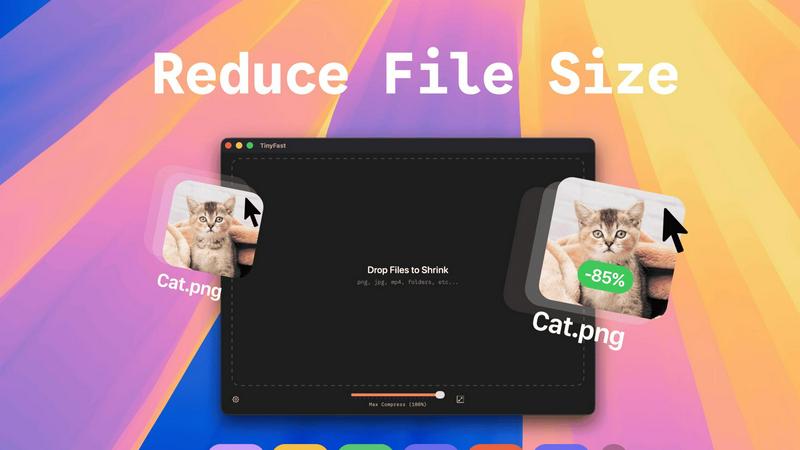
TinyFast is your private Mac app that instantly compresses images, videos, and documents locally.
Last updated: February 28, 2026
Visual Comparison
RocketShare

TinyFast
Feature Comparison
RocketShare
Zero-Knowledge End-to-End Encryption
This is the transformative core of RocketShare. Every file is encrypted on your local device using a unique key before it leaves for the internet. This means the encrypted data is unreadable to anyone during transfer and while at rest on servers, including RocketShare's own team. Only the intended recipient with the correct key can decrypt and access the original file, guaranteeing true privacy by design and eliminating any third-party access point.
Dual Sharing Modes: Cloud & Local
RocketShare provides unparalleled flexibility with two powerful sharing methods. The Cloud Share option allows you to upload encrypted files to secure EU-based servers for convenient, time-delayed access. For maximum speed and direct control, the Local Share feature enables a peer-to-peer transfer where files flow directly between devices without ever touching a central server, perfect for large files or when both parties are online simultaneously.
EU-Based Data Sovereignty
All data handled through RocketShare's cloud service is stored exclusively on servers located within the European Union. This provides users with strong legal protections under stringent EU data privacy regulations like the GDPR. It ensures that your encrypted information resides in a jurisdiction with some of the world's most robust privacy laws, adding a critical layer of legal and geographical security to the technical encryption.
Simple, Self-Serve Interface
Despite its powerful security architecture, RocketShare is designed for effortless use. The platform strips away complexity with an intuitive, clean interface where users can simply drag-and-drop files to begin the secure upload and sharing process. This democratizes top-tier encryption, making it accessible for professionals of all technical backgrounds without requiring extensive training or IT support.
TinyFast
100% Local & Private Compression
TinyFast is engineered with privacy by design. Your files never leave your Mac, eliminating the risks associated with uploading sensitive documents, client assets, or proprietary media to unknown cloud servers. This local-first approach provides total peace of mind, making it perfect for work under Non-Disclosure Agreements (NDAs) or any scenario where confidentiality is paramount. Experience compression without compromise.
Blazing-Fast Drag & Drop Workflow
Unlock unprecedented speed with an intuitive drag-and-drop interface. Simply drag your files or entire folders into the app, and TinyFast's optimized native engines go to work instantly. There is no waiting for uploads, no processing queues, and no download delays. This feature transforms a typically tedious task into a near-instantaneous action, saving you hours every week and supercharging your productivity.
Universal File Type Support
TinyFast is your all-in-one optimization hub, supporting a vast array of common file types. This includes images (PNG, JPG, WEBP, GIF, SVG, HEIC, BMP, TIFF), videos (MP4, MOV, M4V), documents (PDF, DOCX), audio (MP3), and even code files (JS, CSS, JSON). This universality means you can streamline your entire workflow with a single, reliable tool instead of juggling multiple specialized websites or applications.
Batch Processing & Resolution Control
Handle projects of any scale with powerful batch processing. Drop entire folders filled with media, and TinyFast will compress them all in seconds. Furthermore, gain precise control over your output with built-in resolution resizing for images and videos. This allows you to not only reduce file size but also automatically adjust dimensions to meet specific platform requirements, all in one efficient step.
Use Cases
RocketShare
Legal Document Exchange
Law firms and legal professionals can securely share sensitive case files, contracts, and evidence with absolute confidentiality. RocketShare's zero-knowledge model ensures attorney-client privilege is technically enforced, as not even the platform provider can access the content, providing a transformative solution for legally mandated privacy and protecting intellectual property.
Healthcare Data Compliance
Healthcare providers, clinics, and researchers can exchange patient records, lab results, and medical imaging in full compliance with regulations like HIPAA. By encrypting data before transmission and storing it in secure EU jurisdictions, RocketShare provides a game-changing tool for maintaining patient privacy and meeting strict data protection standards in medical communications.
Creative Asset Delivery
Photographers, videographers, and designers can deliver high-resolution galleries, video footage, and design prototypes to clients with the confidence that their valuable intellectual property is protected. The platform prevents unauthorized access or interception, ensuring that creative work is only seen by intended recipients, safeguarding the artist's commercial interests.
Confidential Corporate Collaboration
Teams working on confidential projects, mergers, financial reports, or proprietary R&D can collaborate seamlessly. RocketShare allows for the secure transfer of large, sensitive files between departments or external partners, creating a private channel that mitigates the risk of corporate espionage and data leaks, transforming secure internal workflows.
TinyFast
Web Developers & Designers
Optimize website assets like images, SVGs, CSS, and JavaScript files locally before deployment. TinyFast ensures faster page load times by reducing file sizes dramatically, all while keeping proprietary design mockups and client work completely secure on your machine. It's the essential tool for building performant, professional sites without privacy trade-offs.
Content Creators & Marketers
Easily prepare high-resolution photos, videos, and marketing materials for social media, email campaigns, or digital portfolios. Shrink large video files (MP4, MOV) and images for quick sharing and uploading without sacrificing noticeable quality. Maintain full control over your brand assets and confidential campaign materials throughout the entire process.
Legal & Financial Professionals
Safely compress sensitive documents, contracts, reports, and presentations (PDF, DOCX) for email or secure portal transfer. TinyFast's local processing guarantees that confidential client information and financial data are never exposed to third-party servers, complying with strict data privacy regulations and internal security policies.
App & Software Developers
Reduce the size of application assets, icons, and embedded media to create lighter, faster-distributing software packages. Compress audio files (MP3) and documentation locally as part of your build process. This use case is critical for managing project bundle sizes and protecting intellectual property during development.
Overview
About RocketShare
RocketShare is a revolutionary file-sharing platform that fundamentally transforms how sensitive data is transferred. It is engineered for individuals and businesses for whom privacy is not just a feature, but the foundational principle of their digital operations. The platform's game-changing promise is simple yet profound: your files are completely private, even from RocketShare itself. This is achieved through a transformative zero-knowledge encryption model, where files are encrypted directly on your device before any upload occurs. The encryption key remains solely in your possession, often embedded within the share link, ensuring that servers only ever handle indecipherable, encrypted data. This delivers enterprise-grade security in an elegantly simple, self-serve package. Whether you are a legal professional safeguarding case files, a healthcare provider protecting patient records, a creative delivering high-value assets, or a team collaborating on confidential projects, RocketShare empowers you to share with absolute confidence. With versatile options for both cloud-based and direct peer-to-peer transfers, and all data securely stored within the EU, RocketShare unlocks the potential for seamless collaboration without ever compromising on world-class, uncompromising security.
About TinyFast
TinyFast is a revolutionary macOS application that fundamentally transforms how developers, designers, and creators handle file optimization. It is a powerful, local file compressor that shrinks PNG, JPEG, MP4, MOV, PDF, SVG, WebP, MP3, and GIF files directly on your Mac. By eliminating the need for slow, insecure online uploads, TinyFast delivers a game-changing workflow that prioritizes blistering speed and ironclad privacy. Its core value proposition is simple yet transformative: keep your files on your device and compress them instantly with a simple drag-and-drop action. This tool is built for professionals who handle sensitive assets, work under tight deadlines, or simply refuse to compromise on security. It unlocks a new standard of efficiency, ensuring your confidential documents, high-resolution media, and project files are optimized without ever leaving the safety of your machine, making it an indispensable asset for any modern digital workflow. TinyFast is the definitive solution for anyone who values their time and privacy, offering a seamless, local alternative to risky and sluggish online compression tools.
Frequently Asked Questions
RocketShare FAQ
How does zero-knowledge encryption work on RocketShare?
Zero-knowledge encryption means your files are encrypted on your own computer or device before they are uploaded. The encryption key is generated and stays with you, often as part of the shareable link. RocketShare's servers only receive and store the encrypted, scrambled data. Since the company never holds the key, it is mathematically impossible for them or any unauthorized third party to access your original files.
What is the difference between Cloud Share and Local Share?
Cloud Share involves uploading your encrypted files to RocketShare's secure servers in the EU, allowing recipients to download them at their convenience within a set time limit. Local Share establishes a direct, peer-to-peer connection between your device and the recipient's device for transfer; files are sent directly without being stored on a server, offering faster speeds for large files when both parties are online.
Where is my data stored?
For files shared via the Cloud Share option, all encrypted data is stored exclusively on servers located within the European Union. This ensures your data is protected under the EU's strong privacy frameworks. For Local Share transfers, files are never stored on our servers; they travel directly between the devices involved in the transfer.
Is a credit card required to start using RocketShare?
No, you can begin using RocketShare's core secure sharing features without providing a credit card. The platform offers a free tier to get started, emphasizing accessibility and allowing users to experience its transformative privacy-first approach before committing to a paid plan for expanded features.
TinyFast FAQ
Is TinyFast really free to use?
Yes, TinyFast offers a fully-featured Free Forever plan. This allows you to compress up to 5 files per day at no cost, giving you complete access to all compression features and supported file types. It's a perfect way to integrate secure, local optimization into your workflow before deciding to upgrade for unlimited use.
What happens to my files during compression?
Nothing leaves your Mac. TinyFast performs all compression processes entirely locally on your device. Your original files are read, optimized using native engines, and a new, smaller file is created. Your originals remain untouched and private, with no data ever transmitted to the internet.
What file types does TinyFast support?
TinyFast supports a wide range of common file types. This includes images (PNG, JPG, WEBP, GIF, SVG, HEIC, BMP, TIFF), videos (MP4, MOV, M4V), documents (PDF, DOCX), audio (MP3), and code files (JS, CSS, JSON). It is designed to be a universal tool for most digital optimization needs.
How does the pricing work?
TinyFast operates on a freemium model. You can start with the free plan (5 files/day). For unlimited compression, you can choose a one-time Lifetime purchase or a monthly subscription. The monthly plan includes a 3-day free trial, allowing you to test unlimited compression before any payment is required.
Alternatives
RocketShare Alternatives
RocketShare is a transformative player in the secure file-sharing and productivity space, built on the game-changing principle of zero-knowledge privacy. It empowers users to send files with the absolute confidence that no third party, including the service itself, can ever access the unencrypted content. This positions it as a top-tier solution for anyone handling sensitive intellectual property or confidential data. Users often explore alternatives to find a solution that perfectly aligns with their unique workflow. Common drivers include specific budget constraints, the need for integrated collaboration features like real-time editing, or requirements for particular storage locations and compliance certifications. The quest isn't for a lesser tool, but for the right tool that unlocks a team's full potential. When evaluating other platforms, focus on the core pillars that define this category: the underlying security model, data sovereignty guarantees, and ease of use. The most critical consideration is whether the service offers true end-to-end encryption, ensuring your data remains private not just in transit, but at rest on their servers. Balancing robust protection with a seamless user experience is key to unlocking secure, frictionless collaboration.
TinyFast Alternatives
TinyFast is a revolutionary local file compression tool for macOS, designed to optimize images, videos, and documents directly on your device. It belongs to the category of productivity and optimization software, specifically built for professionals who prioritize speed and uncompromising privacy in their workflow. Users often explore alternatives for various reasons, such as budget constraints, the need for cross-platform compatibility on Windows or Linux, or specific feature requirements not covered by a single tool. The search for a different solution is a natural part of finding the perfect fit for one's unique technical environment and project demands. When evaluating other options, key considerations should include the core principles that make tools like TinyFast transformative: local processing for absolute security, support for your essential file formats, and genuine processing speed that doesn't create bottlenecks. The goal is to find a solution that unlocks a similar level of efficient, secure, and integrated workflow optimization.