
Proofapp vs Refbox
Side-by-side comparison to help you choose the right AI tool.

Proofapp
Transform feedback with visual comments on any webpage, streamlining design reviews and boosting productivity.
Last updated: March 4, 2026

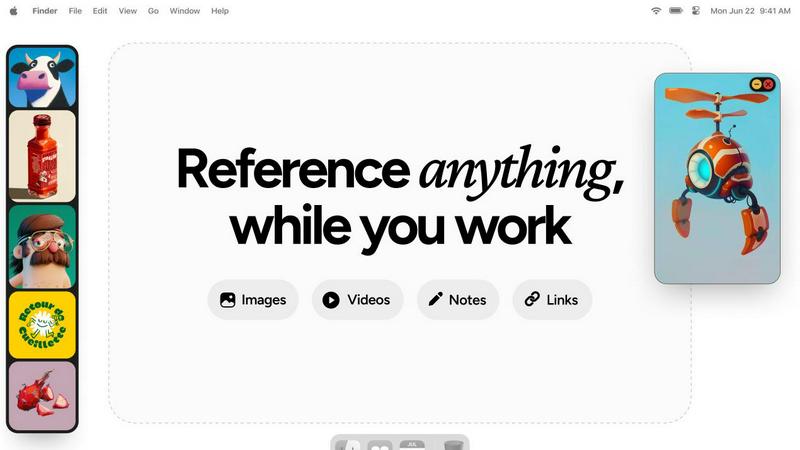
Refbox transforms your workflow by providing instant access to all your references, keeping you focused and productive.
Last updated: February 28, 2026
Visual Comparison
Proofapp

Refbox
Feature Comparison
Proofapp
Visual Commenting
With Proofapp's visual commenting feature, users can click anywhere on a screenshot to leave contextual feedback. This intuitive approach eliminates ambiguity, ensuring that comments are precisely located and easily understood. No more vague references to placements—feedback becomes crystal clear.
Multi-Breakpoint Testing
Proofapp automatically captures and reviews your website at both desktop and mobile breakpoints. This multi-breakpoint testing capability ensures that feedback is relevant and effective across devices, allowing teams to address issues that may affect user experience on different platforms.
Real-time Collaboration
Experience seamless collaboration with real-time updates on comments from your team. Proofapp allows users to reply to comments, resolve issues, and track progress together, ensuring that everyone stays on the same page throughout the design process.
Secure Share Links
Share your projects securely with clients through expirable links that require no account for reviewers. This feature enhances security while facilitating easy access for clients to view and comment on the designs, streamlining the feedback process without compromising safety.
Refbox
Always-On-Top Frames
Refbox utilizes resizable, always-on-top frames that allow users to keep their references visible over any application. This feature eliminates the need for constant window switching, enabling a more focused and uninterrupted creative workflow.
Customizable Sidebar
Users can easily add media directly from the web, computer, or clipboard into a customizable sidebar. This sidebar can be resized and rearranged to fit individual preferences, ensuring that vital inspiration is always at hand and organized for quick access.
Masonry Mode and Full-Screen Gallery
Refbox offers a Masonry Mode for a visually appealing, Pinterest-style layout, alongside a full-screen Gallery option that is perfect for dual monitor setups. This flexibility allows users to view and manage their references in a way that best suits their working style.
Markdown-Enabled Notes
The app supports markdown-enabled notes, allowing users to jot down ideas, tasks, or instructions directly within Refbox. This feature streamlines the creative process by keeping everything in one place and reducing the need to switch to different applications for note-taking.
Use Cases
Proofapp
Freelancers
Freelancers can leverage Proofapp to streamline client approvals, saving valuable time and enhancing professionalism. By using visual feedback, freelancers reduce the back-and-forth communication, leading to quicker project turnarounds and happier clients.
Design Teams
Design teams benefit greatly from Proofapp's precise visual feedback capabilities. The ability to pin comments directly onto design elements allows for focused discussions and reduces the number of revision rounds, ultimately leading to more efficient workflows and higher quality outputs.
Marketing Teams
Marketing teams can utilize Proofapp to review landing pages and campaigns visually. The platform's intuitive feedback system allows teams to collaborate effectively, ensuring that marketing materials are polished and ready for launch without unnecessary delays.
Small Development Teams
Small development teams can enhance their client interactions using Proofapp. By eliminating the confusion of traditional feedback methods, teams can secure approvals faster, making the development process smoother and more efficient, all while keeping costs manageable.
Refbox
Graphic Design Projects
For graphic designers working on multiple projects, Refbox serves as an invaluable tool by allowing them to collect and organize visual references, color palettes, and typography examples all in one place.
Animation Workflows
Animators can utilize Refbox to keep keyframes, character designs, and animation references visible while they work, enhancing their ability to create fluid and accurate animations without losing their train of thought.
UI/UX Development
UI and UX developers benefit from having access to design inspirations, user flow diagrams, and feedback notes pinned in a floating frame, enabling them to iterate on designs quickly and effectively.
Illustration and Concept Art
Illustrators and concept artists can gather inspiration from various sources and keep it organized in Refbox. With the ability to view and compare references side by side, artists can make informed decisions while they create.
Overview
About Proofapp
Proofapp is a revolutionary visual feedback and website review platform designed to transform the way designers, developers, and their clients collaborate. By simply uploading any website URL, Proofapp automatically captures both desktop and mobile screenshots, making it a breeze to gather and manage feedback. The platform empowers users to pin comments directly on the design, engaging in threaded discussions, attaching relevant files, and resolving feedback—all without the need for an account. This streamlined approach eliminates the chaos of scattered emails and unclear revision notes, allowing for a more organized and action-oriented feedback process. Whether you are a freelancer seeking client approval or part of an agency managing multiple projects, Proofapp enhances productivity by keeping all feedback visual and easily accessible, ultimately leading to faster project deliveries and improved client satisfaction.
About Refbox
Refbox is a groundbreaking floating reference app tailored specifically for creatives who seek to enhance their workflow without interruptions. This innovative tool empowers users to pin images, GIFs, videos, and notes in always-on-top frames, ensuring that essential references are readily available no matter what application is in use. With Refbox, the cumbersome task of switching between windows is a thing of the past; it's designed to seamlessly integrate inspirations into your creative process, making it ideal for artists, designers, animators, and modelers alike. The app's user-friendly interface allows for easy media addition from various sources, including the web, local storage, or even the clipboard, into a customizable sidebar that can be resized to fit your needs. With features like Masonry Mode and a full-screen Gallery for dual monitors, Refbox adapts to the diverse requirements of creative professionals. By facilitating markdown-enabled notes, clickable links, and frame-by-frame playback for videos and GIFs, Refbox stands as the ultimate companion for those who need instant access to their visual inspiration, ultimately boosting productivity and creativity.
Frequently Asked Questions
Proofapp FAQ
How does Proofapp improve the feedback process?
Proofapp enhances the feedback process by allowing users to leave visual comments directly on screenshots, eliminating confusion and miscommunication commonly associated with traditional email feedback.
Is Proofapp easy to set up?
Yes, Proofapp offers a dead-simple setup that takes just five minutes. Users can start by pasting their website URL, and the platform will automatically capture the necessary screenshots.
Can clients leave feedback without creating an account?
Absolutely! Clients can provide feedback using secure, expirable links without needing to create an account, making it convenient for them to engage in the review process.
How does Proofapp ensure data security?
Proofapp prioritizes security with role-based permissions, audit logs, and secure data handling, providing peace of mind for users and their clients while collaborating on projects.
Refbox FAQ
How does Refbox improve productivity?
Refbox enhances productivity by providing instant access to references and notes without the need to switch between multiple applications, allowing creatives to maintain their flow and focus.
Can I use Refbox on multiple monitors?
Yes, Refbox supports dual monitor setups, and its full-screen Gallery feature is designed to maximize screen real estate, making it easier to view and manage references.
What types of media can be pinned in Refbox?
Users can pin images, GIFs, videos, and notes from various sources, including the web, local files, or directly from the clipboard, ensuring a versatile workspace.
Is there a way to share collections created in Refbox?
While the primary focus of Refbox is to facilitate individual workflows, users can save or copy media to share with others, making collaboration easier when needed.
Alternatives
Proofapp Alternatives
Proofapp is a cutting-edge visual feedback and website review platform that empowers designers, developers, and their clients to collaborate seamlessly. By allowing users to upload any website URL for automatic screenshot capture on both desktop and mobile, Proof simplifies the feedback process. As a design tool, it ensures that all parties can pin comments, engage in threaded discussions, and resolve feedback easily, without the need for account creation. Users often seek alternatives to Proofapp due to various reasons such as pricing structures, specific feature requirements, or compatibility with preferred platforms. When choosing an alternative, it's essential to consider factors like user interface, integration capabilities, the robustness of feedback mechanisms, and overall value for the investment. The right choice should enhance collaboration while aligning with your project needs.
Refbox Alternatives
Refbox is a groundbreaking floating reference app that empowers creatives by providing instant access to images, videos, and notes, all without disrupting their workflow. Designed specifically for artists, designers, and animators, Refbox eliminates the hassle of switching between applications, allowing for a seamless integration of inspiration into the creative process. As professionals seek tools that enhance their productivity and creativity, they may look for alternatives due to factors like pricing, specific feature sets, or compatibility with their preferred platforms. When searching for an alternative to Refbox, it's crucial to consider what features matter most for your workflow. Look for options that offer similar floating reference capabilities, an intuitive interface, and robust note-taking functionalities. Additionally, consider the pricing models and whether the alternative meets your unique needs as a creative professional, ensuring that it enhances rather than hinders your productivity.