
OGimagen vs Quickfix AI
Side-by-side comparison to help you choose the right AI tool.

OGImagen transforms your content into perfect, AI-generated social images and ready-to-paste meta tags in seconds.
Last updated: March 11, 2026

Quickfix AI
Quickfix AI instantly diagnoses system issues and provides clear, actionable insights to enhance performance.
Last updated: February 28, 2026
Visual Comparison
OGimagen
Quickfix AI
Feature Comparison
OGimagen
AI-Powered Instant Generation
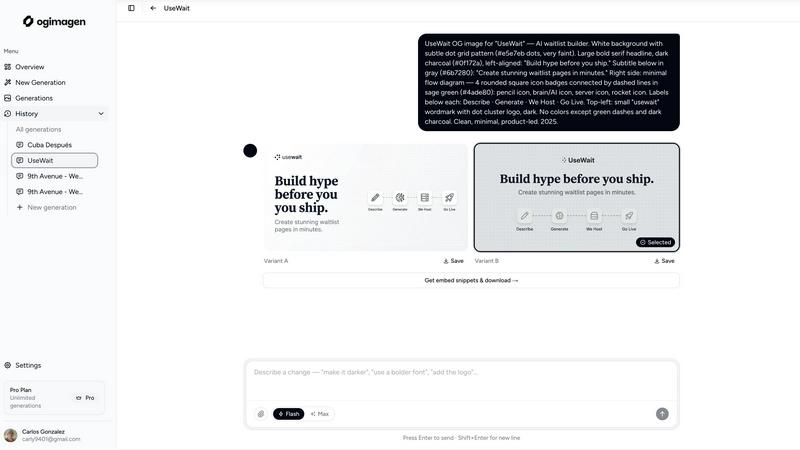
Harness the power of artificial intelligence to create beautiful, unique Open Graph images in mere seconds. Simply input your title and description, and OGimagen's AI generates two distinct, visually compelling variants (A & B). This feature removes the need for design skills or complex software, delivering pixel-perfect, production-ready images tailored to capture attention and drive clicks on any social platform.
Multi-Platform Format Export
Stop manually resizing for different networks. Each generation automatically outputs three perfectly optimized formats: a 1200x630px OG Image for Facebook and messaging apps, a 1200x600px Twitter Card for X, and a 1200x627px LinkedIn Card. This ensures your link previews look flawless and professional everywhere your content is shared, maximizing your reach and impact across the entire digital landscape.
Framework-Specific Meta Tag Snippets
Ship faster with ready-to-paste code. After generation, OGimagen provides the exact meta tag snippets you need for your stack. Free users get HTML, while Pro users unlock specialized snippets for Next.js (App and Pages Router), Astro, SvelteKit, Remix, and more. This seamless integration slashes development time and eliminates embedding errors, getting your optimized social cards live instantly.
MCP (Model Context Protocol) Integration
Transform your development workflow by integrating OGimagen directly into your editor. The Pro plan's MCP compatibility allows you to generate images, list previous generations, and copy embed snippets without leaving tools like Claude Code, Cursor, or Windsurf. This groundbreaking feature brings AI-powered social image creation into your core coding environment, unlocking unprecedented efficiency.
Quickfix AI
Comprehensive One-Click Diagnostics
Quickfix AI delivers a complete snapshot of your system's health in a single operation. The tool automatically scans and analyzes critical components including CPU performance, memory pressure, GPU load, storage disk health and capacity, battery condition, firewall status, and network connection speeds. All this vital data is compiled into an intuitive, easy-to-read dashboard, eliminating the need for multiple disparate utilities and providing unparalleled clarity at a glance.
AI-Powered Explanations & Recommendations
This is where Quickfix AI truly becomes transformative. Its integrated AI assistant reads your full diagnostic report and allows you to ask questions about your system in plain English. You receive clear, jargon-free explanations of any issues and get specific, actionable recommendations. For instance, it can pinpoint exactly which applications are slowing down your Mac and suggest immediate steps, turning complex technical data into simple, understandable guidance.
Secure Remote Diagnostics with Sharing Codes
Quickfix AI revolutionizes remote IT support. Instead of complicated remote desktop sessions, support teams can simply generate a sharing link. The user runs the scan agent themselves and enters the provided code, granting the technician instant, secure, and read-only access to the comprehensive diagnostic report. This facilitates swift, accurate troubleshooting on any machine without compromising user privacy or security.
Cross-Platform Support & Rapid Analysis
The tool is engineered for universal accessibility and speed. It offers dedicated versions for both Windows and macOS, ensuring broad compatibility for personal and professional use. The entire process—from download to completed diagnostic report—takes under a minute. This rapid analysis ensures you spend zero time waiting and all your time acting on the insights to optimize your system's performance.
Use Cases
OGimagen
Blog and Content Marketing
Content creators and marketers can instantly generate eye-catching OG images for every blog post, article, or landing page. This ensures every shared link on social media has a professional, branded preview that dramatically increases click-through rates, drives traffic, and enhances content visibility without slowing down the publishing pipeline.
SaaS and Product Launches
For startups and SaaS companies launching new features or products, OGimagen provides a rapid, brand-consistent way to create compelling social share assets. It ensures that announcement links shared by the team, influencers, or press present a polished, high-quality image that builds credibility and generates excitement from the very first click.
Developer and Technical Documentation
Developers maintaining documentation, changelogs, or technical blogs can use OGimagen to ensure their shared resources look professional. By automating OG image creation, it maintains a consistent and modern aesthetic for shared API docs or tutorial links, improving user trust and engagement directly from community forums or Discord.
E-commerce and Social Commerce
E-commerce stores can use OGimagen to create beautiful preview images for shared product pages, special offers, and seasonal campaigns. A captivating OG image turns a simple product link into a visual advertisement on social platforms, boosting engagement and conversion rates when customers share items with their networks.
Quickfix AI
Proactive Troubleshooting for Everyday Users
When your computer feels slow, makes strange noises, or behaves erratically, Quickfix AI is your first line of defense. Users without technical expertise can instantly diagnose the root cause—be it a failing drive, memory overload, or a misbehaving application—through the AI's plain-English explanations. It empowers anyone to identify and resolve common computer issues before they escalate into major problems.
Performance Optimization for Tech Enthusiasts
Gamers, developers, content creators, and power users demand peak performance from their systems. Quickfix AI provides the deep, granular insights needed to fine-tune their machines. By monitoring temperatures, GPU utilization, memory pressure, and background processes, enthusiasts can identify bottlenecks, optimize settings, and ensure their hardware is running at its absolute best for any demanding task.
Streamlined Support for IT Professionals
IT support teams and managed service providers can drastically reduce resolution times and improve service quality. By sending a secure sharing link, technicians can instantly view a client's full diagnostic report without needing physical access. This allows for accurate, first-contact diagnosis of issues ranging from performance degradation to security misconfigurations, transforming the efficiency of remote support operations.
System Security & Health Auditing
For individuals and businesses concerned with security and longevity, Quickfix AI acts as a regular health check. It audits critical security settings like firewall and encryption status, assesses storage drive health to warn of potential failures, and monitors battery degradation. This use case is essential for maintaining data integrity, ensuring system security, and planning hardware upgrades before critical failures occur.
Overview
About OGimagen
OGimagen is a game-changing AI-powered platform that transforms how developers, content creators, and marketers generate Open Graph images. It eliminates the traditional friction of graphic design by allowing users to create stunning, production-ready social card images in seconds. By simply entering a title and description, the platform's AI instantly generates two beautiful, on-brand variants perfectly optimized for every major social platform, including Facebook, X (Twitter), and LinkedIn. This tool is engineered for the modern web workflow, providing not just the images but also the ready-to-paste meta tag snippets for frameworks like Next.js, Astro, and SvelteKit. With its transformative MCP integration, developers can now generate and manage OG images directly from their code editor within tools like Claude Code and Cursor. OGimagen unlocks the potential of every shared link, ensuring a professional, click-driving preview that elevates brand presence and significantly improves social media engagement with zero design effort.
About Quickfix AI
Quickfix AI is a game-changing desktop application that transforms how you understand and optimize your computer's health and performance. This powerful, AI-driven diagnostics tool provides instant, comprehensive insight into your system's core vitals—from CPU and memory usage to storage health, battery life, security status, and network performance. Gone are the days of confusing technical reports. With a single click, Quickfix AI runs a full system scan and delivers a clear, actionable report in under a minute. Its revolutionary AI assistant then explains the findings in plain English, offering specific, tailored recommendations to resolve issues or enhance performance. Designed for everyone from everyday users and tech enthusiasts to professional IT support teams, Quickfix AI unlocks the hidden potential of your machine, ensuring it runs smoothly, securely, and at peak efficiency. It’s the ultimate tool for proactive system care and effortless troubleshooting.
Frequently Asked Questions
OGimagen FAQ
What exactly is an OG image?
An OG (Open Graph) image is the preview picture that appears when you share a website link on social media platforms like Facebook, LinkedIn, or in messaging apps like WhatsApp and Slack. It's a crucial element for engagement, as a compelling OG image significantly increases the likelihood that users will click on your shared link. OGimagen specializes in creating these images instantly and optimally.
How does AI generation work?
You provide a text input, such as a title and description. OGimagen's AI model then interprets this content and generates two unique, stylized visual representations (variants A and B) based on selected style presets and your brand color. The process happens in seconds, transforming your text into a complete, branded graphic ready for use across all social platforms.
What is MCP integration?
MCP (Model Context Protocol) integration allows OGimagen to connect directly with compatible code editors and AI assistants like Claude Code, Cursor, and Windsurf. This means developers can generate OG images, fetch past creations, and obtain embed code snippets through their editor's interface without visiting a separate website, radically streamlining the development workflow.
What happens when CDN hosting expires?
For Starter and Growth pack users, images are hosted on a fast global CDN for a set period (45 and 90 days, respectively). After this period expires, the hosted images are removed from the CDN, and the links in your meta tags will no longer display the image. You can regenerate the image or upgrade to Pro for permanent hosting to maintain your link previews indefinitely.
Quickfix AI FAQ
Is Quickfix AI free?
Yes, Quickfix AI offers a free version that includes the core one-click system diagnostics scan and access to the AI assistant for explanations and basic recommendations. This allows users to comprehensively understand their system's health at no cost. The website also mentions "Pricing" and "Enterprise" sections, indicating that advanced features or professional plans may be available for more extensive needs.
Is my data secure?
Absolutely. Security and privacy are foundational to Quickfix AI. The diagnostic scan runs locally on your machine. When using the sharing code feature for remote support, the data transmitted is a read-only report; technicians cannot control your computer. The company emphasizes data protection, with links to its Privacy Policy and Data Processing Agreement (DPA) for transparency.
Do I need technical knowledge?
Not at all. Quickfix AI is specifically designed for users of all technical levels. The interface presents information clearly, and the groundbreaking AI assistant exists to explain everything in simple, plain English. You can ask questions about your report as you would ask a person, and receive clear answers and specific recommendations without any prior technical expertise.
What platforms are supported?
Quickfix AI provides full native support for both major desktop operating systems. You can download dedicated versions for Windows and macOS. This cross-platform compatibility ensures that whether you use a PC or a Mac, for personal or professional purposes, you can leverage Quickfix AI's transformative diagnostic capabilities.
Alternatives
OGimagen Alternatives
OGimagen is a transformative AI-powered tool in the Dev Tools category, designed to generate stunning Open Graph images in seconds. It empowers creators and developers to craft production-ready social cards that ensure every shared link looks polished and professional, directly boosting engagement and click-through rates. Users often explore alternatives for various reasons, such as budget constraints, the need for different feature sets like advanced branding controls or specific integrations, or simply to find a platform that aligns more closely with their existing workflow and technical stack. The search for the right tool is a natural step in optimizing a developer's toolkit. When evaluating other options, key considerations include the quality and speed of AI generation, ease of integration with your current framework, the level of customization available for branding, and the overall value proposition regarding pricing and output. The goal is to find a solution that seamlessly turns your content links into compelling visual assets.
Quickfix AI Alternatives
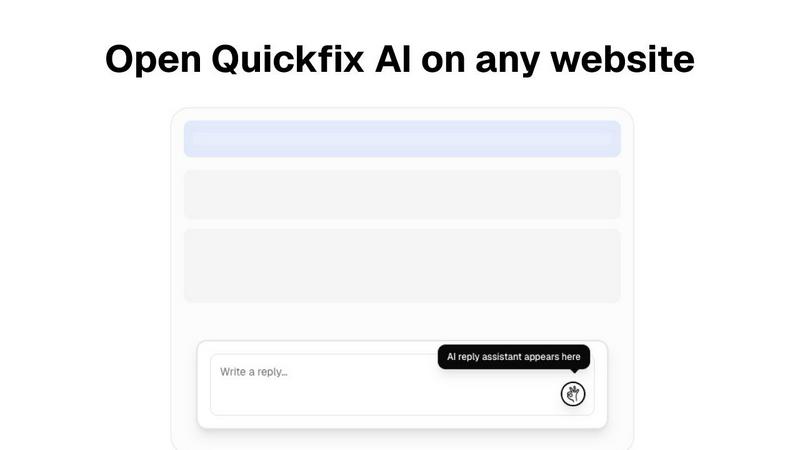
Quickfix AI is a transformative productivity tool designed to revolutionize digital communication. As a browser extension, it leverages artificial intelligence to instantly generate context-aware replies across platforms like email, social media, and team collaboration apps, saving professionals valuable time and effort. Users often explore alternatives for various reasons, such as seeking different pricing models, more specialized features, or compatibility with specific platforms not currently supported. The need for a different user experience, advanced customization, or a focus on a particular communication channel can also drive the search for other solutions. When evaluating an alternative, consider the core value of effortless, intelligent communication. Look for a tool that not only integrates seamlessly with your essential workflow platforms but also provides reliable, high-quality output. The ideal solution should feel like a natural extension of your process, unlocking new levels of efficiency without adding complexity.