
NB2 Hub vs Shrinkpad
Side-by-side comparison to help you choose the right AI tool.

NB2 Hub
Unlock stunning 4K images from text or photos with game-changing AI precision.
Last updated: March 1, 2026

Shrinkpad
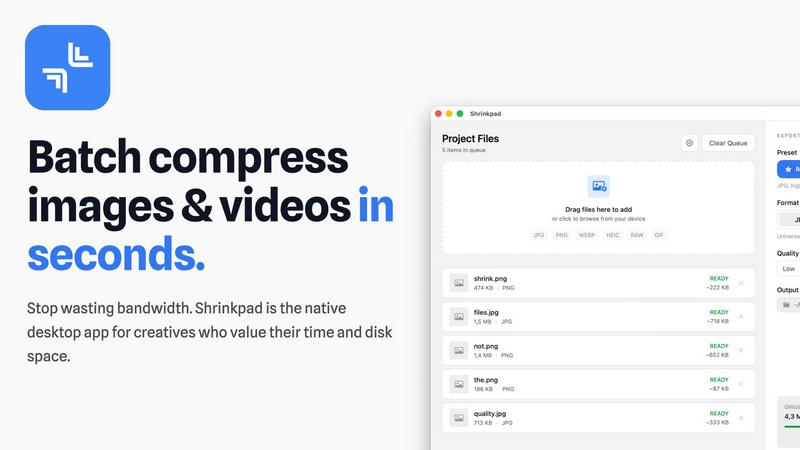
Shrinkpad effortlessly compresses images and videos in batches, optimizing your assets while saving time and space.
Last updated: February 28, 2026
Visual Comparison
NB2 Hub

Shrinkpad
Feature Comparison
NB2 Hub
Faithful Text & Image Remix
This revolutionary feature allows you to upload a reference image alongside a short prompt. Nano Banana Pro intelligently preserves the original composition, layout, and lighting while seamlessly upgrading details, textures, and overall quality. It's the perfect tool for iterating on UI designs, refining product photography, or remastering comic panels without losing the foundational structure of your original vision.
Crisp On-Image Text Generation
Break free from blurry, AI-generated text. NB2 Hub excels at creating clean, legible text directly inside your images, supporting multilingual typography for global projects. Generate everything from bold headlines to descriptive paragraphs without unsightly halos or distortion, making it ideal for crafting professional posters, advertisement creatives, and social media covers that communicate clearly and effectively.
Multi-Reference Fusion & Identity Consistency
Unlock complex creative workflows by fusing elements from multiple reference images into a single, cohesive output. More importantly, NB2 Hub maintains rigorous consistency for characters, products, and brand elements across different shots. This is indispensable for creating consistent storyboards, multi-angle product sets, and branded content where visual continuity is paramount.
Pro-Level Lighting & Camera Control
Take full creative command with advanced controls that mimic a professional photo shoot. Fine-tune lens choices, framing, depth of field, and color grading. Execute local edits and dramatic mood shifts, like transforming a scene from day to night. This feature delivers cinematic, studio-quality results on demand, putting powerful artistic direction directly in your hands.
Shrinkpad
Intelligent Compression
Shrinkpad automatically analyzes the visual complexity of your media to apply the perfect compression ratio, ensuring that your assets maintain their quality without artifacts, saving you time and effort in the process.
Batch Processing Capability
With Shrinkpad, you can batch process thousands of images and videos simultaneously, handling massive queues with ease. Unlike web-based tools, it is optimized for speed and reliability, allowing you to manage larger projects without crashing.
Folder Mode
Simply drag and drop an entire folder into Shrinkpad, and it will automatically detect and queue all supported media files for compression. This feature simplifies the process of managing multiple assets, allowing for seamless workflows.
Privacy-Focused Operation
All processing occurs locally on your device, ensuring that your sensitive media files never leave your machine. This privacy-first approach guarantees that your creative work remains secure and confidential while you optimize your assets.
Use Cases
NB2 Hub
Marketing & Advertising Creative Production
Rapidly produce high-impact ad creatives, social media visuals, and product mockups. Generate variations with consistent branding, integrate crisp marketing copy directly into images, and create polished product shots or lifestyle scenes, drastically reducing the time and cost associated with traditional photo shoots and graphic design.
UI/UX Design & Prototyping
Accelerate the design process by using image remixing to iterate on user interface mockups. Upload a wireframe or existing UI and prompt the AI to apply new styles, color schemes, or textures while maintaining perfect layout fidelity. This enables rapid visualization and client presentations for websites and applications.
Content Creation & Storytelling
Empower bloggers, social media managers, and authors to generate unique, captivating illustrations for their stories and articles. Create consistent characters for serialized content, design custom book covers, or produce detailed concept art and storyboards for video projects, all without needing advanced artistic skills.
E-commerce & Product Visualization
Generate professional, consistent product photography from multiple angles. Place products into realistic lifestyle settings or apply branding and logos onto 3D mockups. This allows e-commerce businesses to create vast, high-quality visual catalogs and marketing materials quickly and cost-effectively.
Shrinkpad
Photographers
Photographers can use Shrinkpad to quickly compress large batches of images from shoots, significantly reducing file sizes while preserving high quality, making it easier to store and share their portfolios.
Designers
For designers, Shrinkpad streamlines the process of exporting assets from software like Figma or Photoshop, allowing them to export everything at once and have Shrinkpad handle the optimization and renaming in bulk.
Content Creators
Content creators can benefit from Shrinkpad’s ability to compress videos and images together in one batch, ensuring that their media files are optimized for faster load times on websites and social media platforms.
Developers
Developers can use Shrinkpad to reduce app bundle sizes and improve website performance by compressing various media assets, leading to faster load times and enhanced user experiences for their applications.
Pricing Comparison
NB2 Hub
NB2 Hub offers a free tier to start, which includes 2 free 4K quality generations. For extended use and access to more credits and features, visit the "Pricing" page on their website to explore the available subscription plans. Currently, they are running a Holiday Sale offering 20% OFF with the code HOLIDAY20 at checkout for upgrading to Nano Banana Pro.
Shrinkpad
Shrinkpad offers simple pricing with no subscriptions. The Free Starter plan is available for casual users, while the Personal plan costs $14 for individual creators, and the Team plan is $35 for small studios, each providing distinct features to cater to different user needs.
Overview
About NB2 Hub
NB2 Hub is a transformative online platform that redefines the frontier of AI-powered visual creation. At its core, it leverages the groundbreaking Google Nano Banana Pro model, built upon the sophisticated Gemini 3 Pro Image technology. This powerful engine empowers users—from graphic designers and marketers to content creators and developers—to generate stunning, high-quality images from simple text prompts or existing photos with a single click. NB2 Hub is engineered for real production work, moving beyond simple ideation to deliver accurate, controllable, and fast results. It unlocks professional-grade capabilities like impeccable layout fidelity, generation of crisp, readable text within images, and 4K delivery, making it a game-changer for anyone who requires precision and creative fidelity. The platform democratizes advanced visual production, providing an accessible, efficient, and powerful suite of tools to bring even the most ambitious creative visions to life with unprecedented ease and quality.
About Shrinkpad
Shrinkpad is a revolutionary desktop application designed exclusively for macOS, transforming the way creative professionals optimize their media assets. This powerful tool specializes in batch compression for images and videos, allowing photographers, designers, content creators, and developers to reclaim valuable storage space while enhancing their workflow efficiency. With Shrinkpad, users can compress hundreds or even thousands of files in seconds without compromising privacy or quality. It operates entirely on your device, eliminating the need for internet connectivity, cloud uploads, or server delays. Shrinkpad intelligently processes over 50 different file formats, including standard JPGs and PNGs, as well as professional RAW files and high-resolution 4K videos, achieving file size reductions of up to 90% while maintaining visual integrity. This is not just another compression tool; it is a comprehensive, privacy-first asset optimization engine designed to empower modern creatives.
Frequently Asked Questions
NB2 Hub FAQ
What is Google Nano Banana Pro?
Google Nano Banana Pro is the cutting-edge AI model powering NB2 Hub. Built on the Gemini 3 Pro Image architecture, it is specifically engineered for high-fidelity, production-ready image generation. It excels at understanding complex prompts, maintaining layout consistency, rendering readable text, and applying real-world knowledge to create accurate and stunning visuals.
How do I start using NB2 Hub?
Getting started is simple and free. Visit the NB2 Hub website and sign up for an account using your Google credentials. You will immediately receive credits to generate 2 free images in 4K quality. From there, you can start creating by typing a text prompt or uploading an image to remix using the intuitive platform interface.
Can NB2 Hub maintain consistency across multiple images?
Yes, absolutely. A core strength of NB2 Hub is its multi-reference fusion and identity consistency feature. By using consistent reference images for characters, products, or styles, you can generate a series of images where key visual elements remain stable and recognizable, which is essential for branding, storyboarding, and product sets.
What kind of image quality and formats does it support?
NB2 Hub is built for professional output. It supports generation and export in high resolutions, specifically targeting 1K, 2K, and 4K quality for production-ready assets. You also have precise control over the aspect ratio and composition of your generated images to fit any platform or medium requirement.
Shrinkpad FAQ
Can I use Shrinkpad for free?
Yes, Shrinkpad offers a Free Starter plan that includes essential tools for casual use, allowing users to compress up to 10 files per batch in common formats like JPG and PNG.
What file formats does Shrinkpad support?
Shrinkpad supports over 50 file formats, including popular image formats like JPG, PNG, WEBP, and RAW, as well as video formats such as MP4 and MOV, making it versatile for various media types.
Does Shrinkpad support video compression?
Absolutely! Shrinkpad can compress both images and videos, allowing you to optimize all your media assets in one go, which is perfect for content creators working with mixed media.
How many files can I process at once?
With Shrinkpad, you can process thousands of assets in a single batch without crashing, making it ideal for users who need to handle large projects efficiently and effectively.
Alternatives
NB2 Hub Alternatives
NB2 Hub is a transformative AI image generation platform in the Image & Photo category, designed to turn text and photos into stunning 4K visuals. It leverages advanced technology to offer features like faithful image remixing, crisp text generation, and strong identity consistency, empowering creators to bring their visions to life with precision. Users often explore alternatives for various reasons, including budget constraints, specific feature requirements not covered, or a need for different platform integrations. The search for the right tool is a personal journey, driven by the unique demands of each project and workflow. When evaluating alternatives, consider core capabilities like output quality, text rendering accuracy, and consistency controls. Also assess factors such as pricing transparency, ease of use, and the tool's ability to handle your specific creative use cases, from marketing graphics to product visualizations.
Shrinkpad Alternatives
Shrinkpad is an innovative desktop application designed specifically for macOS that excels in batch compressing images and videos. It caters to a diverse range of users, including photographers, designers, content creators, and developers who seek to streamline their media management. Users often search for alternatives to Shrinkpad due to various reasons such as pricing concerns, feature limitations, or compatibility with different platforms. When assessing alternatives, it’s crucial to consider factors such as processing speed, file format support, privacy features, and user experience. Look for applications that maintain file quality while offering convenience and efficiency in managing your media files, ensuring they align with your specific workflow needs and preferences.