
Hush Touch | Voice-to-Text for MacOS vs StudyPal
Side-by-side comparison to help you choose the right AI tool.

Hush Touch | Voice-to-Text for MacOS
Experience smarter on-device dictation for Mac, transforming speech into text with unmatched accuracy and privacy.
Last updated: February 28, 2026

StudyPal
Unlock your learning potential by instantly transforming any PDF or topic into smart study kits.
Last updated: March 1, 2026
Visual Comparison
Hush Touch | Voice-to-Text for MacOS

StudyPal
Feature Comparison
Hush Touch | Voice-to-Text for MacOS
Dual-Engine Recognition
Hush Touch employs a unique dual-engine recognition system that combines DictationTranscriber and SFSpeechRecognizer. This allows for natural flow and accurate punctuation while also understanding and incorporating your custom vocabulary. By blending these two powerful Apple engines, the app delivers unparalleled accuracy and responsiveness in real-time dictation.
Custom Vocabulary
Hush Touch supports a custom vocabulary feature that allows users to add up to 500 terms. This is especially beneficial for professionals in specialized fields such as medicine or technology, where specific jargon is common. The app learns from corrections you make during dictation, adapting to your unique language preferences over time.
Smart Text Processing
The app's smart text processing capabilities enhance the dictation experience by removing filler words, auto-correcting common mistakes, and formatting text as you dictate. Voice snippets for repeated phrases and numbered list formatting are processed locally and in real-time, ensuring a smooth and efficient writing experience without interruptions.
100% On-Device Privacy
With Hush Touch, your privacy is paramount. The app processes all voice data locally on your Mac, eliminating any reliance on cloud services. This means zero data collection and complete control over your information, providing peace of mind while dictating sensitive content.
StudyPal
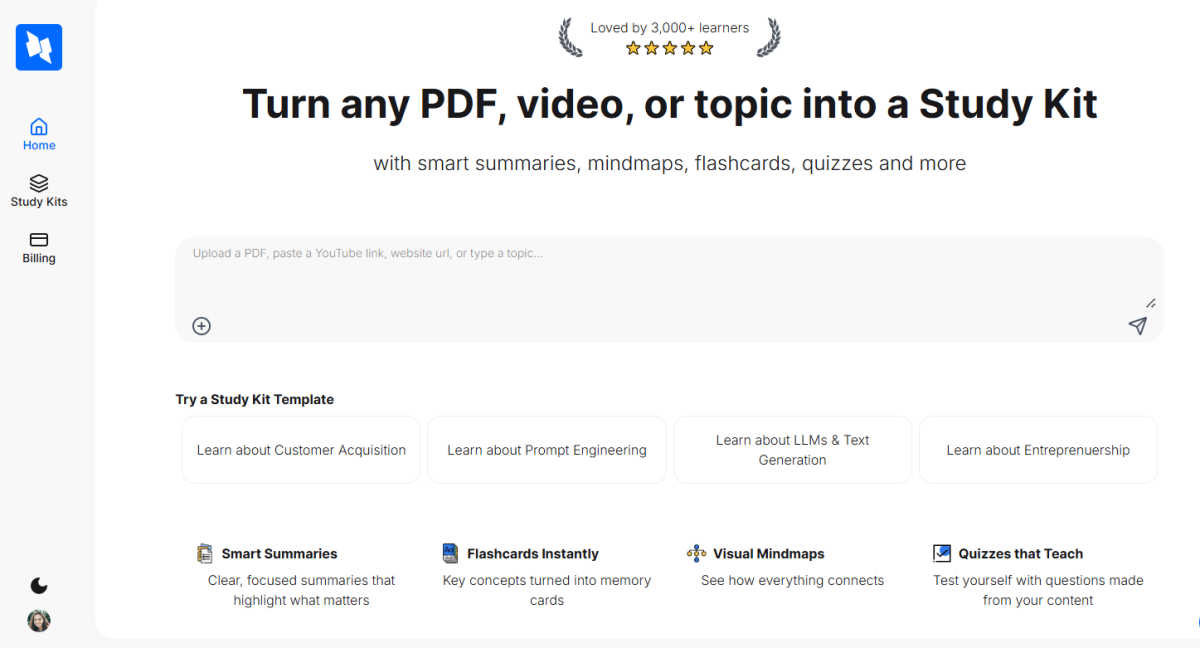
Smart Summaries
StudyPal's AI generates clear, focused summaries that distill lengthy and complex source material into its most critical points. This feature highlights what truly matters, allowing you to grasp the core concepts of any PDF, video, or topic within minutes. It eliminates information overload and provides a solid foundation for deeper exploration, ensuring you start your study session with perfect clarity and focus.
Instant Flashcards
Transform key terms, definitions, and concepts into digital flashcards with a single click. This feature automates the most tedious part of study preparation, creating ready-to-use memory cards that are perfect for spaced repetition and active recall. You can quiz yourself on-the-go, turning downtime into productive review sessions and dramatically accelerating the memorization process for exams and certifications.
Visual Mindmaps
See how everything connects with automatically generated visual mindmaps. This powerful feature illustrates the relationships between ideas, themes, and subtopics within your study material. By providing a bird's-eye view of the subject's structure, it enhances comprehension, aids in knowledge integration, and caters perfectly to visual learners who thrive on seeing the big picture.
Auto-Generated Quizzes
Test your knowledge with intelligent quizzes created directly from your content. This feature reinforces learning by challenging you with contextually relevant questions, ensuring you're not just passively reading but actively retrieving information. It provides immediate feedback on your understanding, identifies knowledge gaps, and solidifies memory through practice, making your study time exponentially more effective.
Use Cases
Hush Touch | Voice-to-Text for MacOS
Drafting Emails
Hush Touch is an excellent tool for busy professionals looking to draft emails quickly and efficiently. With hands-free dictation and customizable command phrases, users can send messages seamlessly without the need to type, allowing for more focus on the content of the email.
Taking Notes
Students and professionals alike can benefit from Hush Touch when taking notes during lectures or meetings. The ability to dictate notes in real-time allows for a more natural flow of information and ensures that important details are captured effortlessly, enhancing productivity.
Writing Documents
Whether it's a report, article, or creative writing piece, Hush Touch transforms the writing process. Users can dictate entire documents without the constraints of traditional typing, fostering creativity and allowing thoughts to flow freely.
Coding and Technical Writing
For software developers and technical writers, Hush Touch’s dual-engine recognition is invaluable. The app can accurately transcribe complex terminology and code commands, making it easier to document processes or communicate technical concepts without the hassle of typing.
StudyPal
Exam Preparation for Students
Students can upload textbook chapters, lecture slides, or research papers as PDFs and instantly create a complete, interactive study kit. From generating summaries for quick reviews to using flashcards for last-minute cramming and taking quizzes to self-assess, StudyPal streamlines the entire revision process, reducing stress and boosting confidence for midterms, finals, and standardized tests.
Professional Skill Acquisition
Professionals looking to learn a new software, understand industry reports, or grasp complex business concepts can input relevant materials. StudyPal breaks down dense professional content into manageable learning modules with mindmaps for strategic overviews and quizzes to validate understanding, enabling efficient and effective upskilling directly relevant to career growth and development.
Research and Topic Deep Dives
Researchers and curious learners can type in any topic of interest. StudyPal will curate a foundational kit and recommend videos to watch. As you feed it more information, the AI tutor can answer specific, nuanced questions, helping you navigate complex subjects, draw connections between ideas, and build a comprehensive knowledge base from the ground up.
Supplemental Learning from Video Content
Instead of passively watching educational YouTube videos, learners can paste the video link into StudyPal. The AI will analyze the audio and visual content to create summaries, extract key points for flashcards, and formulate quiz questions. This transforms video-watching into an active learning session, ensuring higher retention of the material presented.
Overview
About Hush Touch | Voice-to-Text for MacOS
Hush Touch is a revolutionary voice-to-text application designed specifically for macOS, prioritizing natural dictation, speed, and privacy. Ideal for professionals, writers, and anyone who values efficient communication, Hush Touch operates entirely on-device, ensuring that your voice data remains secure and private. With a lightweight installation of just 5.5 MB, it launches quickly and integrates seamlessly into your daily writing processes. The app utilizes two advanced Apple transcription engines combined with an Apple Intelligence final pass, resulting in remarkably accurate and clean text output. Users can easily dictate emails, notes, and documents hands-free, thanks to customizable command phrases and smart auto-insertion features. Hush Touch is perfect for those seeking a dependable dictation solution without reliance on cloud services, making it an essential tool for anyone who values both privacy and efficiency in their workflow.
About StudyPal
StudyPal is a revolutionary AI-powered study companion, meticulously engineered to transform the way you learn. It is a game-changing platform that unlocks your potential by converting static information from PDFs, YouTube videos, or typed topics into dynamic, interactive study kits. This process elevates the educational experience from passive consumption to active engagement, saving countless hours of manual note-taking and organization. Each kit is a comprehensive learning module, featuring smart summaries, visual mindmaps, instant flashcards, auto-generated quizzes, and curated video recommendations. Designed for a diverse audience, StudyPal is the perfect tool for students cramming for exams, professionals upskilling for career advancement, and lifelong learners exploring new subjects. Its core value proposition lies in its ability to personalize and supercharge the learning journey, boosting retention and understanding through adaptive, multimodal tools and an always-available AI tutor that provides instant clarification on complex concepts. StudyPal makes mastering any topic not only profoundly effective but also genuinely enjoyable, putting a world of organized knowledge at your fingertips anytime, anywhere.
Frequently Asked Questions
Hush Touch | Voice-to-Text for MacOS FAQ
How does Hush Touch ensure privacy?
Hush Touch guarantees privacy by processing all voice data entirely on your Mac. There is no reliance on cloud services or external servers, ensuring your information remains confidential and secure.
Can I customize the vocabulary?
Yes, Hush Touch allows users to add up to 500 custom terms to its vocabulary. It learns from your corrections, adapting to your specific language needs and improving accuracy over time.
Is there a trial available for Hush Touch?
Absolutely! Hush Touch offers a 7-day free trial with no credit card required. You can experience the app's functionality and performance firsthand before making a purchase.
What is the cost of Hush Touch?
Hush Touch is available for a one-time payment of $20, providing users with a lifetime license. This eliminates the need for monthly subscriptions, making it a cost-effective solution for voice-to-text dictation.
StudyPal FAQ
What types of files can I upload to create a Study Kit?
StudyPal currently supports PDF documents for file uploads. Additionally, you can create kits directly from YouTube video URLs by pasting the link, or simply by typing or pasting text on any topic you wish to learn about. This flexibility allows you to turn almost any source of information into a structured learning experience.
How does the AI tutor work?
The built-in AI tutor is available within each Study Kit you create. You can ask it questions directly related to the kit's content for instant explanations, clarifications, or deeper dives into specific concepts. It acts as your personal 24/7 study assistant, ensuring you never get stuck on a difficult topic and can learn at your own pace with constant support.
Can I use StudyPal on my mobile device?
Yes, StudyPal is designed to be fully accessible and responsive on both desktop and mobile devices. This means you can review your smart summaries, flip through flashcards, or take a quiz on your smartphone or tablet anytime, anywhere, making it easy to fit productive learning into even the busiest schedules.
Are the Study Kits customizable after they are generated?
Absolutely. While StudyPal's AI provides a powerful, automatically generated structure for your kits, you have full control to edit, add to, or personalize any element. You can modify summaries, add your own flashcards, edit quiz questions, or expand mindmap nodes to tailor the learning kit perfectly to your individual needs and preferences.
Alternatives
Hush Touch | Voice-to-Text for MacOS Alternatives
Hush Touch | Voice-to-Text for MacOS is an innovative voice-to-text application designed specifically for macOS users. It leverages advanced on-device processing, utilizing two Apple transcription engines followed by an Apple Intelligence final pass, ensuring faster and more accurate text conversion without the need for internet connectivity. As part of the AI Assistants category, it caters to individuals seeking seamless dictation experiences. Users often seek alternatives to Hush Touch due to various reasons, including pricing, feature sets, compatibility with different platforms, and specific user requirements. When selecting an alternative, it's essential to consider factors such as ease of use, the ability to work offline, transcription accuracy, and how well the software integrates into existing workflows. Additionally, assessing privacy measures and overall cost-effectiveness can significantly influence the decision-making process.
StudyPal Alternatives
StudyPal is a revolutionary AI-powered study companion that transforms PDFs, videos, and topics into interactive study kits. It belongs to the category of AI assistants designed to unlock learning potential by creating summaries, flashcards, mindmaps, and quizzes. This game-changing approach personalizes the educational journey for students, professionals, and lifelong learners. Users often explore alternatives to find the perfect fit for their unique needs. Common reasons include seeking different pricing models, requiring specific feature sets not available in one tool, or needing compatibility with certain platforms or learning management systems. The quest for the right tool is about finding a solution that aligns perfectly with one's individual workflow and goals. When evaluating alternatives, focus on core capabilities. Key considerations include the quality of AI-generated content, the range of input formats supported, the depth of interactive study aids like quizzes and mindmaps, and the overall user experience. The ideal platform should not just organize information but truly transform it into actionable knowledge, boosting retention and making the learning process both effective and engaging.