
HTML to PNG Converter vs Nani
Side-by-side comparison to help you choose the right AI tool.

HTML to PNG Converter
Transform your HTML and CSS into stunning PNG images instantly with our free, no-signup online converter.
Last updated: March 3, 2026

Nani transforms AI image generation by organizing prompts and images into reusable sets for effortless creativity.
Last updated: February 28, 2026
Visual Comparison
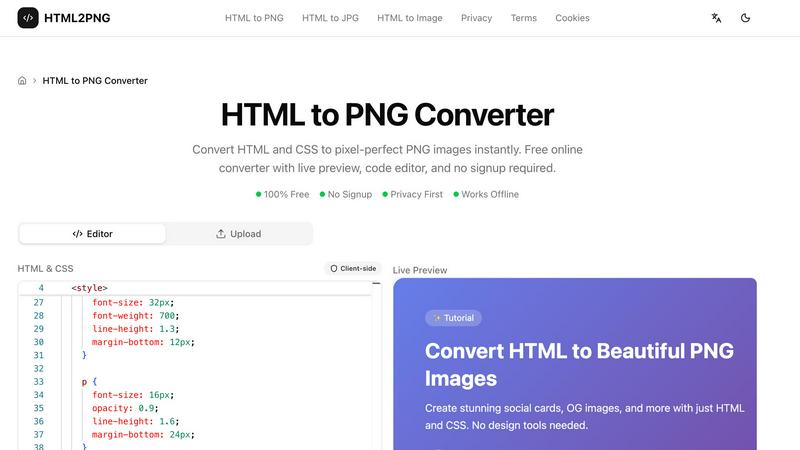
HTML to PNG Converter
Nani

Feature Comparison
HTML to PNG Converter
Live Preview
Experience the power of immediate feedback with our live preview feature. As you input your HTML and CSS code, the tool renders your design in real-time, allowing you to make adjustments on the fly. This functionality ensures that your final output matches your vision perfectly.
Code Editor
The built-in code editor provides an intuitive interface for writing and modifying HTML and CSS. You can include inline styles, utilize tags, or even link to external stylesheets, such as Google Fonts, enhancing your creative process and enabling complex designs.
Customizable Output Settings
Tailor your image output with a range of customizable settings. Choose the image width, scale (1x, 2x, or 3x for retina displays), and even select the background color. This level of customization ensures your PNG images meet your specific needs for any project.
Client-Side Processing
Our converter operates completely on the client side, meaning your data stays private and secure. This feature eliminates server costs and allows for rapid conversion without the delays associated with network requests, making it efficient and reliable.
Nani
Supercharged Image Generation
Nani empowers users to generate visually stunning images within seconds. With a simple prompt input and a click of a button, you can create images in customizable aspect ratios and resolutions, all without any visible watermark. This feature ensures that your creations stand out and are ready for professional use.
Reusable Prompt Sets
One of Nani's standout features is the ability to group images and save prompts as reusable sets. This allows users to maintain consistent characters, styles, and workflows across multiple generations. Say goodbye to repetitive typing and hello to streamlined creativity.
Organized Folders and Filtering
Nani provides robust organizational tools that help users keep their libraries tidy and efficient. Create folders, filter by favorites, and bulk-select images to streamline your workflow. This organization ensures that you can easily find and manage your creations, no matter how extensive your library becomes.
Seamless Collaboration
Collaboration is effortless with Nani. You can drag and drop images as references, share your creations via public links, and even allow others to recreate your work in their own accounts. This feature fosters a collaborative environment where ideas can flow freely and creativity can thrive.
Use Cases
HTML to PNG Converter
Social Media Graphics
Design eye-catching social media cards directly from HTML templates. With the HTML to PNG Converter, you can create engaging visuals tailored for platforms like Instagram, Facebook, and Twitter, ensuring your content stands out in crowded feeds.
Invoices and Business Documents
Generate professional-looking invoices and business documents in PNG format. This tool allows you to produce clean and polished images from your HTML templates, streamlining your business operations and enhancing your brand's professionalism.
Open Graph Images for SEO
Create optimized Open Graph images for your blog posts and web pages. By converting HTML to PNG, you can ensure that your content is visually appealing when shared on social media, enhancing click-through rates and improving your SEO strategy.
Dynamic Data Visualization
Utilize HTML and CSS to produce dynamic images that reflect real-time data. Whether for reports, dashboards, or presentations, the HTML to PNG Converter allows you to generate tailored visuals that update as your data changes, providing clarity and insight.
Nani
Professional Designers
Professional designers can leverage Nani to streamline their workflow by saving commonly used prompts and styles, allowing them to focus on creativity rather than administrative tasks. This not only saves time but also enhances the consistency of their work.
Content Creators
Content creators utilizing social media can generate eye-catching images rapidly. With Nani, they can create a series of cohesive images tailored to their brand, ensuring that their visual content remains engaging and consistent across platforms.
Marketing Teams
Marketing teams can harness Nani to produce promotional visuals quickly and efficiently. By using reusable prompt sets, they can maintain brand consistency while generating a variety of images that cater to different campaigns and audiences.
Educators and Trainers
Educators can utilize Nani to create engaging educational materials. By generating images that illustrate concepts and ideas, they can enhance the learning experience for students, making complex topics more accessible and visually appealing.
Overview
About HTML to PNG Converter
The HTML to PNG Converter is a powerful online tool designed to transform HTML and CSS code into high-quality PNG images instantly. It caters to web developers, designers, and content creators looking to generate pixel-perfect visual assets without the hassle of complex design software. This robust converter allows users to input their HTML code directly into a live editor, customize output settings, and download the resulting image in a matter of seconds. With its privacy-first approach, there is no need for signups or data sharing, making it an ideal choice for those who prioritize security. The converter operates entirely on the client side, meaning the process remains within your browser, ensuring swift and seamless execution. Whether you are crafting social media graphics, invoices, or promotional materials, the HTML to PNG Converter unlocks your potential to produce stunning visuals effortlessly.
About Nani
Nani is a groundbreaking workflow tool meticulously crafted to revolutionize the experience of AI image generation. Tailored for artists, designers, and content creators who engage in repetitive tasks, Nani stands out from traditional one-off AI image generators. Its primary aim is to streamline the entire image generation process, liberating users from the burdens of constantly rewriting prompts and navigating through endless streams of generated images. Powered by Google's state-of-the-art Nano Banana Pro (Gemini) technology, Nani provides an all-encompassing solution that enhances creative workflows. With its intuitive user interface, users can swiftly generate stunning images while leveraging unique features like reusable prompt sets and organized folders. This ensures efficiency and consistency, allowing creatives to focus on their artistic vision rather than the logistical intricacies of image production. With Nani, the path to unleashing your creativity is clearer and more accessible than ever.
Frequently Asked Questions
HTML to PNG Converter FAQ
What types of files can I convert using the HTML to PNG Converter?
You can convert HTML to PNG, JPG, or WebP formats, giving you flexibility in choosing the best file type for your needs. The tool supports various output formats to suit different applications.
Do I need to sign up to use the HTML to PNG Converter?
No, there is no signup required. You can access the converter and start creating images immediately without any registration or personal information required.
Is my data secure when using the HTML to PNG Converter?
Absolutely. The conversion process takes place entirely in your browser without sending any data to external servers. Your HTML and CSS code remains private and secure throughout the process.
Can I use the HTML to PNG Converter offline?
While the core functionality is designed for online use, the converter operates entirely client-side, allowing for rapid processing without server interactions. However, an internet connection is required to access the tool initially.
Nani FAQ
What is Nani?
Nani is an innovative workflow tool designed to enhance AI image generation by streamlining the creative process for artists, designers, and content creators.
How does Nani work?
Nani works by allowing users to input prompts and generate images quickly. It offers features like reusable prompt sets and organized folders to optimize the image generation workflow.
Is there a cost to use Nani?
Nani offers a credit-based billing system where users pay only for what they generate, starting at approximately 30 cents per image, with no subscriptions or commitments required.
Can I collaborate with others using Nani?
Yes, Nani facilitates collaboration by allowing users to share images via public links and let others recreate their work, making it easy to collaborate on creative projects.
Alternatives
HTML to PNG Converter Alternatives
HTML to PNG Converter is a powerful tool that transforms HTML and CSS into stunning, pixel-perfect PNG images, catering to designers and developers in the realm of design tools. It allows users to see their code come to life with an instant live preview and a built-in code editor, making it an invaluable asset for anyone looking to create high-quality visuals from web content without the need for extensive technical know-how. Users often seek alternatives to HTML to PNG Converter for various reasons, such as pricing concerns, specific feature requirements, or compatibility with different platforms. When exploring alternatives, it's crucial to consider factors like ease of use, speed of conversion, and the quality of the output. Additionally, potential users should evaluate whether the alternative offers a live preview and editing capabilities, ensuring they choose a solution that meets their unique needs and enhances their creative workflow.
Nani Alternatives
Nani is a revolutionary tool in the realm of AI image generation, designed specifically to simplify and enhance the workflow for artists, designers, and content creators. It organizes prompts and images into reusable sets, making it an invaluable resource for those engaged in regular and repetitive creative tasks. Users often seek alternatives to Nani due to various factors such as pricing, specific feature sets, or platform compatibility. Understanding these needs is essential, as it helps users identify tools that not only fit their budget but also align with their creative processes. When selecting an alternative, it’s crucial to consider features that streamline your workflow, such as the ability to save and reuse prompts and images. Look for platforms that offer intuitive interfaces and functionalities that promote creativity while reducing administrative burdens. Ultimately, the best choice will depend on your unique requirements and the specific complexities of your creative projects, ensuring you find a solution that truly unlocks your potential.