
HTML to PNG Converter vs Mediasaur
Side-by-side comparison to help you choose the right AI tool.

HTML to PNG Converter
Transform your HTML and CSS into stunning PNG images instantly with our free, no-signup online converter.
Last updated: March 3, 2026

Mediasaur
Mediasaur enables brands to effortlessly create endless stunning visuals and UGC with powerful AI-driven content.
Last updated: March 1, 2026
Visual Comparison
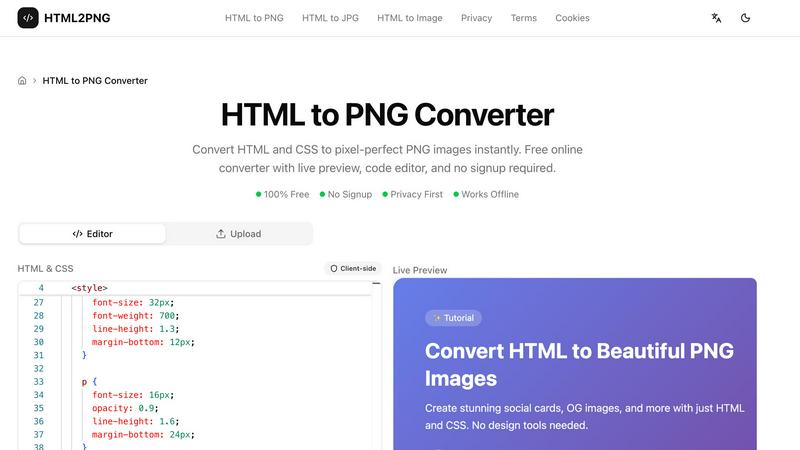
HTML to PNG Converter
Mediasaur

Feature Comparison
HTML to PNG Converter
Live Preview
Experience the power of immediate feedback with our live preview feature. As you input your HTML and CSS code, the tool renders your design in real-time, allowing you to make adjustments on the fly. This functionality ensures that your final output matches your vision perfectly.
Code Editor
The built-in code editor provides an intuitive interface for writing and modifying HTML and CSS. You can include inline styles, utilize tags, or even link to external stylesheets, such as Google Fonts, enhancing your creative process and enabling complex designs.
Customizable Output Settings
Tailor your image output with a range of customizable settings. Choose the image width, scale (1x, 2x, or 3x for retina displays), and even select the background color. This level of customization ensures your PNG images meet your specific needs for any project.
Client-Side Processing
Our converter operates completely on the client side, meaning your data stays private and secure. This feature eliminates server costs and allows for rapid conversion without the delays associated with network requests, making it efficient and reliable.
Mediasaur
Rapid Visual Generation
Mediasaur excels in generating high-quality visuals within seconds. This rapid visual generation allows users to keep pace with the fast-moving demands of digital marketing and content creation. By simply providing an input image or prompt, users can receive a multitude of visual options, enabling quick iterations and creative exploration.
Extensive Content Variety
The platform supports the creation of diverse content types, including user-generated content (UGC), product photos, and bespoke ad creatives. This extensive variety ensures that users can meet the specific needs of their projects without being limited by traditional content creation methods.
User-Friendly Workspace
Mediasaur features an intuitive workspace that organizes generated visuals and facilitates easy navigation. Users can seamlessly experiment with styles, manage assets, and access their creative outputs in one centralized location, streamlining the workflow and enhancing productivity.
Easy Asset Export
With Mediasaur, exporting assets for various platforms is a breeze. The platform allows users to export their visuals in multiple formats, ensuring that content is ready for social media, websites, or advertising campaigns, thus maximizing the reach and impact of their creative efforts.
Use Cases
HTML to PNG Converter
Social Media Graphics
Design eye-catching social media cards directly from HTML templates. With the HTML to PNG Converter, you can create engaging visuals tailored for platforms like Instagram, Facebook, and Twitter, ensuring your content stands out in crowded feeds.
Invoices and Business Documents
Generate professional-looking invoices and business documents in PNG format. This tool allows you to produce clean and polished images from your HTML templates, streamlining your business operations and enhancing your brand's professionalism.
Open Graph Images for SEO
Create optimized Open Graph images for your blog posts and web pages. By converting HTML to PNG, you can ensure that your content is visually appealing when shared on social media, enhancing click-through rates and improving your SEO strategy.
Dynamic Data Visualization
Utilize HTML and CSS to produce dynamic images that reflect real-time data. Whether for reports, dashboards, or presentations, the HTML to PNG Converter allows you to generate tailored visuals that update as your data changes, providing clarity and insight.
Mediasaur
Social Media Marketing
Marketers can utilize Mediasaur to create visually striking content tailored for social media platforms. By generating diverse visuals quickly, they can maintain a consistent posting schedule and engage their audience with fresh and compelling imagery.
E-commerce Product Photography
E-commerce businesses can benefit from Mediasaur's ability to produce high-quality product images. This feature enables online retailers to showcase their products in various settings and styles, improving customer engagement and increasing sales conversions.
Advertising Campaigns
Creative teams can leverage Mediasaur to develop unique ad creatives for their campaigns. By experimenting with different styles and concepts instantly, they can refine their messaging and visuals to resonate more effectively with their target audience.
Content Creation for Brands
Brands looking to enhance their content library can use Mediasaur to generate user-generated content (UGC) and lifestyle images. This capability allows them to create authentic and relatable visuals that align with their brand identity and appeal to their customers.
Overview
About HTML to PNG Converter
The HTML to PNG Converter is a powerful online tool designed to transform HTML and CSS code into high-quality PNG images instantly. It caters to web developers, designers, and content creators looking to generate pixel-perfect visual assets without the hassle of complex design software. This robust converter allows users to input their HTML code directly into a live editor, customize output settings, and download the resulting image in a matter of seconds. With its privacy-first approach, there is no need for signups or data sharing, making it an ideal choice for those who prioritize security. The converter operates entirely on the client side, meaning the process remains within your browser, ensuring swift and seamless execution. Whether you are crafting social media graphics, invoices, or promotional materials, the HTML to PNG Converter unlocks your potential to produce stunning visuals effortlessly.
About Mediasaur
Mediasaur is a groundbreaking AI creative engine that redefines the way content is generated. By transforming a single input—whether it is a product image, concept, or written prompt—into high-quality visuals in seconds, Mediasaur empowers users across various industries. This intuitive platform is tailored for marketers, designers, founders, and creative professionals who seek to elevate their content creation process. Mediasaur produces a wide range of content, including user-generated content (UGC), polished studio product shots, dynamic lifestyle scenes, and custom ad creatives. By shattering the constraints of traditional content creation, teams can explore limitless variations and experiment with innovative creative directions, ensuring a perpetual flow of fresh and engaging content. With an organized and user-friendly workspace, Mediasaur simplifies the creative process, making it easy to manage visual assets and export them for any platform or application. Whether you aim to rapidly test new concepts or create visually compelling social media content, Mediasaur offers a swift, adaptable, and AI-powered solution that evolves alongside your needs.
Frequently Asked Questions
HTML to PNG Converter FAQ
What types of files can I convert using the HTML to PNG Converter?
You can convert HTML to PNG, JPG, or WebP formats, giving you flexibility in choosing the best file type for your needs. The tool supports various output formats to suit different applications.
Do I need to sign up to use the HTML to PNG Converter?
No, there is no signup required. You can access the converter and start creating images immediately without any registration or personal information required.
Is my data secure when using the HTML to PNG Converter?
Absolutely. The conversion process takes place entirely in your browser without sending any data to external servers. Your HTML and CSS code remains private and secure throughout the process.
Can I use the HTML to PNG Converter offline?
While the core functionality is designed for online use, the converter operates entirely client-side, allowing for rapid processing without server interactions. However, an internet connection is required to access the tool initially.
Mediasaur FAQ
How does Mediasaur generate visuals?
Mediasaur uses advanced AI algorithms to analyze the input provided by users, such as images or text prompts, and then generates high-quality visuals based on that content. The technology allows for a rapid transformation, producing stunning images in seconds.
Can I use Mediasaur for commercial purposes?
Yes, Mediasaur is designed for both personal and commercial use. Users can create content for advertising, marketing, and other commercial applications, ensuring that the generated visuals can be utilized across various platforms and projects.
Is there a limit to how many visuals I can create?
Mediasaur offers flexibility in content creation, allowing users to generate numerous visuals based on their input. While specific limitations may depend on the pricing plan selected, the platform is designed to accommodate high-volume content generation.
What types of content can I create with Mediasaur?
With Mediasaur, users can create a wide array of content types, including product photos, user-generated content (UGC), lifestyle images, and custom advertising creatives. This diverse capability enables users to meet various creative needs with ease.
Alternatives
HTML to PNG Converter Alternatives
HTML to PNG Converter is a powerful tool that transforms HTML and CSS into stunning, pixel-perfect PNG images, catering to designers and developers in the realm of design tools. It allows users to see their code come to life with an instant live preview and a built-in code editor, making it an invaluable asset for anyone looking to create high-quality visuals from web content without the need for extensive technical know-how. Users often seek alternatives to HTML to PNG Converter for various reasons, such as pricing concerns, specific feature requirements, or compatibility with different platforms. When exploring alternatives, it's crucial to consider factors like ease of use, speed of conversion, and the quality of the output. Additionally, potential users should evaluate whether the alternative offers a live preview and editing capabilities, ensuring they choose a solution that meets their unique needs and enhances their creative workflow.
Mediasaur Alternatives
Mediasaur is a groundbreaking AI creative engine that belongs to the content creation category. It enables brands to effortlessly generate high-quality visuals, including user-generated content and product shots, in a matter of seconds. As the demand for rapid and diverse visual content grows, users often seek alternatives to Mediasaur due to factors such as pricing, specific feature sets, or compatibility with different platforms. Finding the right alternative involves considering key aspects like ease of use, the flexibility of content generation, and the ability to create tailored visuals for various marketing needs. When exploring alternatives, it is crucial to evaluate the user interface, the range of creative outputs, and the support for collaboration among teams. Additionally, assessing the scalability of the chosen solution and its alignment with your brand's unique requirements will ensure you select the best option for maintaining a steady stream of engaging content.