
DocuExtractor vs Receipt Generator
Side-by-side comparison to help you choose the right AI tool.

DocuExtractor
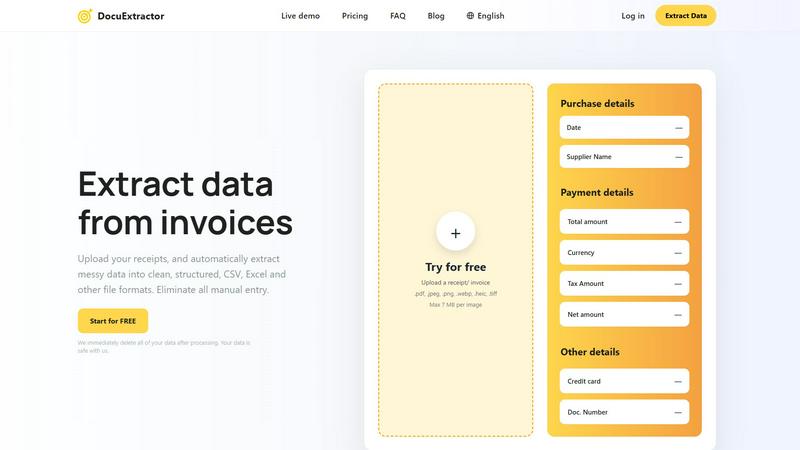
DocuExtractor instantly transforms messy receipts and invoices into clean, structured data.
Last updated: February 28, 2026

Receipt Generator
Generate realistic custom receipts in seconds with 400+ templates, perfect for business, creative, or personal use, all for free.
Last updated: April 4, 2026
Visual Comparison
DocuExtractor
Receipt Generator

Feature Comparison
DocuExtractor
Advanced AI-Powered Extraction Engine
DocuExtractor leverages a sophisticated fusion of Optical Character Recognition (OCR), Deep Learning, and Large Language Models (AI) to intelligently identify and extract key data fields. This multi-layered technology ensures unparalleled accuracy, context-aware understanding, and the ability to handle diverse document layouts and qualities, far surpassing basic OCR tools.
Specialized Presets for Financial Documents
The platform offers specialized, pre-configured extraction presets for common financial documents like receipts and invoices. These presets automatically target and pull critical information such as date, supplier name, total amount, tax, and document number, streamlining the process so you get perfectly structured data with zero configuration.
Batch Processing & High-Volume Handling
Built for scale, DocuExtractor allows you to drag, drop, and upload hundreds of documents simultaneously for batch processing. This feature is transformative for month-end closes or auditing periods, enabling the extraction of data from thousands of documents monthly with consistent speed and reliability, turning days of work into minutes.
Enterprise-Grade Security & Data Privacy
Your data's security is paramount. DocuExtractor is built with enterprise-ready protocols and a strict privacy-first policy. All uploaded documents and extracted data are automatically and immediately deleted from servers after processing, ensuring your sensitive financial information is never stored or compromised.
Receipt Generator
400+ Store-Specific Templates
With a collection exceeding 400 templates, Receipt Generator offers a wide variety of options tailored to specific stores and services. From grocery stores to restaurants, users can easily find the ideal template that suits their needs, ensuring authenticity in every receipt.
AI "Place in Scene" Feature
The cutting-edge AI "Place in Scene" feature allows users to create photorealistic images of their receipts on various surfaces. This eliminates the need for physical printing, making it an ideal solution for content creators and professionals who require high-quality visuals for presentations or marketing materials.
Full Customization Options
Receipt Generator empowers users with full control over their receipts, allowing them to customize line items, prices, taxes, and payment methods. This ensures that every receipt is tailored to match specific requirements, providing flexibility for different use cases.
Instant Download Capability
Users can download their completed receipts as high-resolution PNG or PDF files instantly. This feature guarantees that once a receipt is created, it can be accessed and utilized without delay, enhancing productivity and efficiency.
Use Cases
DocuExtractor
Automating Accounts Payable (AP) Processing
Revolutionize your AP department by automating the extraction of vendor invoice data. Simply upload invoice batches to automatically capture due dates, amounts, and PO numbers into a clean CSV file, ready for direct import into your accounting software. This slashes processing time, minimizes human error, and accelerates payment cycles.
Streamlining Expense Reporting & Reconciliation
Eliminate the headache of manual expense report entry. Employees can upload receipts, and DocuExtractor will instantly extract merchant details, dates, and totals. This data seamlessly populates expense reports, making reconciliation effortless and ensuring accurate, compliant record-keeping for tax and audit purposes.
Accelerating Month-End and Year-End Closes
Transform the most stressful periods for finance teams. By rapidly converting piles of bank statements, invoices, and receipts into structured digital data, DocuExtractor provides the clean, organized information needed for swift reconciliation and reporting, shaving days off the closing process and improving financial visibility.
Enhancing Data Migration and Audit Preparation
When migrating to new accounting systems or preparing for an audit, historical document data entry is a monumental task. DocuExtractor unlocks this data from legacy paper and PDF files, creating structured digital archives that are easily searchable, verifiable, and ready for analysis, ensuring a smooth transition and audit trail.
Receipt Generator
Expense Tracking for Freelancers
Freelancers can use Receipt Generator to create detailed invoices and receipts for their clients, making expense tracking straightforward and organized. This helps in maintaining professionalism while managing finances efficiently.
Inventory Documentation for Small Businesses
Small business owners can utilize the tool to document their inventory with accurate receipts. This aids in keeping track of purchases and sales, ensuring that financial records are precise and up to date for tax purposes.
Content Creation for Social Media
Content creators can leverage the AI "Place in Scene" feature to generate realistic images of receipts for use in social media posts or blogs. This visual appeal can enhance engagement and authenticity in their content.
Gift and Expense Mockups
For those in creative fields, Receipt Generator allows for the creation of mock receipts for projects involving gifts or expenses. This can be particularly useful in marketing campaigns or promotional materials where realistic representations are crucial.
Overview
About DocuExtractor
DocuExtractor is a game-changing AI-powered platform that transforms the tedious, error-prone world of financial data entry. It is a transformative document conversion software designed specifically for accountants, bookkeepers, and finance professionals who are burdened by manual data processing. At its core, DocuExtractor liberates you from the chaos of unstructured documents by instantly converting messy receipts, invoices, bank statements, and PDFs into clean, structured, and ready-to-use data in CSV or Excel formats. By harnessing a powerful combination of advanced Optical Character Recognition (OCR), Deep Learning, and Large Language Models (AI), it achieves a remarkable 99.6% accuracy rate. This isn't just about saving time; it's about unlocking your team's potential to focus on strategic analysis, advisory services, and high-value tasks that drive business growth. With robust security, enterprise-grade reliability, and support for over 45 languages, DocuExtractor is the definitive tool for modernizing financial workflows and eliminating the bottlenecks of manual data extraction.
About Receipt Generator
Receipt Generator is the ultimate online tool designed for effortless receipt creation, making it a must-have for small business owners, freelancers, content creators, and resellers around the globe. With an extensive library of over 400 store-specific templates, including those from popular retailers like Walmart, Target, Starbucks, and CVS, users can create professional-looking receipts that cater to a variety of needs. The platform allows for complete customization of every detail—items, prices, dates, payment methods—making it incredibly versatile for legitimate business, creative, and personal use. What truly differentiates Receipt Generator is its innovative AI "Place in Scene" feature, which enables users to generate photorealistic images of their receipts on any surface without the need for printing. This functionality is perfect for creating compelling visual content, managing inventories, and documenting expenses. With lightning-fast performance and instant downloads available, users can start generating receipts without any account sign-up, ensuring a seamless experience from start to finish.
Frequently Asked Questions
DocuExtractor FAQ
What types of documents can DocuExtractor process?
DocuExtractor is expertly designed to process a wide array of financial documents. This includes receipts, invoices, bank statements, and various PDF and image files (JPG, PNG, WEBP, HEIC, TIFF). The AI is specifically tuned to recognize and extract key financial data fields from these formats with high accuracy.
How accurate is the data extraction?
DocuExtractor boasts an industry-leading accuracy rate of 99.6% for financial documents. This exceptional precision is achieved through our specialized algorithms that combine OCR, Deep Learning, and LLM (AI) technology, which are continuously trained and refined to handle diverse layouts, fonts, and languages.
What happens to my documents after processing?
Your data security is our top priority. We operate on a strict privacy-first model. Immediately after the extraction process is complete and you have downloaded your results, all your uploaded documents and the extracted data are permanently deleted from our servers. Your data is never stored or used for any other purpose.
Can I process documents in languages other than English?
Absolutely. DocuExtractor supports automatic data extraction from documents in over 45 languages. Our system features intelligent automatic language detection, so you can upload a document in Spanish, French, German, Japanese, and many other languages, and it will accurately extract the relevant information.
Receipt Generator FAQ
Is there a cost to use Receipt Generator?
Receipt Generator offers a free tier with watermarked receipts. For users who want unlimited downloads and customization options, affordable pro plans are available.
Can I use my own branding on the receipts?
Yes, users can upload custom logos and modify fonts and colors, allowing for branding consistency across all generated receipts.
What types of receipts can I create?
Receipt Generator provides templates for a wide range of categories, including retail, restaurants, groceries, and pharmacies, ensuring that users can find the perfect template for their needs.
Do I need to create an account to start using Receipt Generator?
No account is required to begin using Receipt Generator. Users can start creating and downloading receipts immediately, which simplifies the process and encourages quick usage.
Alternatives
DocuExtractor Alternatives
DocuExtractor is a transformative document conversion software in the productivity and management category, designed to automate data extraction from financial documents. It liberates professionals from the tedious grind of manual entry, unlocking new levels of efficiency and accuracy. Users often explore alternatives for various reasons, such as seeking different pricing models, specific feature sets like integration capabilities, or solutions tailored to unique platform requirements. The quest for the perfect tool is about finding the right fit for your specific workflow and business scale. When evaluating alternatives, consider the core pillars of a game-changing solution: extraction accuracy, processing speed, output flexibility, and enterprise-grade security. The ideal choice should not just replace a task but revolutionize your entire document management process, turning chaos into structured, actionable data.
Receipt Generator Alternatives
Receipt Generator is a revolutionary online tool designed to streamline the process of creating custom receipts. It falls under the productivity and management category, catering to small business owners, freelancers, and content creators. Users often seek alternatives to Receipt Generator due to varying pricing structures, desired features, or specific platform needs that may not be met by the existing solution. When evaluating alternatives, it’s important to consider the range of templates available, customization capabilities, ease of use, and the quality of generated output. In an ever-evolving digital landscape, users are empowered to find tools that better suit their unique requirements. The right alternative should not only offer similar functionalities but also enhance productivity and creativity. Users should also look for user-friendly interfaces, instant download capabilities, and robust support to maximize their experience and ensure seamless integration into their workflow.