

DocuExtractor
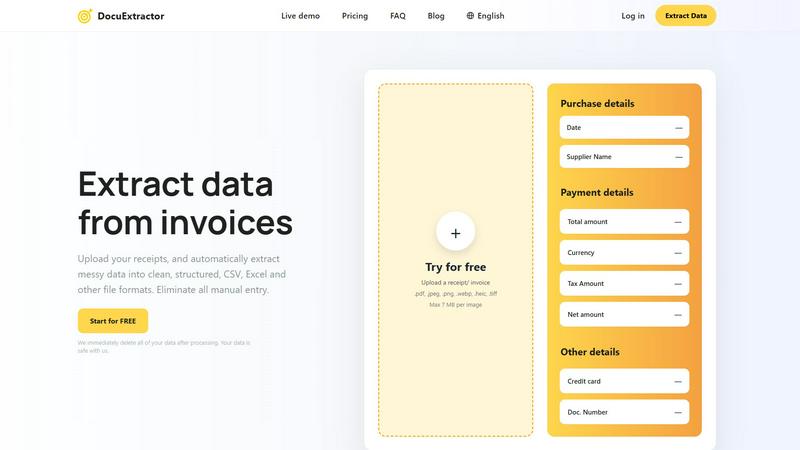
DocuExtractor instantly transforms messy receipts and invoices into clean, structured data.
About DocuExtractor
DocuExtractor is a game-changing AI-powered platform that transforms the tedious, error-prone world of financial data entry. It is a transformative document conversion software designed specifically for accountants, bookkeepers, and finance professionals who are burdened by manual data processing. At its core, DocuExtractor liberates you from the chaos of unstructured documents by instantly converting messy receipts, invoices, bank statements, and PDFs into clean, structured, and ready-to-use data in CSV or Excel formats. By harnessing a powerful combination of advanced Optical Character Recognition (OCR), Deep Learning, and Large Language Models (AI), it achieves a remarkable 99.6% accuracy rate. This isn't just about saving time; it's about unlocking your team's potential to focus on strategic analysis, advisory services, and high-value tasks that drive business growth. With robust security, enterprise-grade reliability, and support for over 45 languages, DocuExtractor is the definitive tool for modernizing financial workflows and eliminating the bottlenecks of manual data extraction.
Features
Advanced AI-Powered Extraction Engine
DocuExtractor leverages a sophisticated fusion of Optical Character Recognition (OCR), Deep Learning, and Large Language Models (AI) to intelligently identify and extract key data fields. This multi-layered technology ensures unparalleled accuracy, context-aware understanding, and the ability to handle diverse document layouts and qualities, far surpassing basic OCR tools.
Specialized Presets for Financial Documents
The platform offers specialized, pre-configured extraction presets for common financial documents like receipts and invoices. These presets automatically target and pull critical information such as date, supplier name, total amount, tax, and document number, streamlining the process so you get perfectly structured data with zero configuration.
Batch Processing & High-Volume Handling
Built for scale, DocuExtractor allows you to drag, drop, and upload hundreds of documents simultaneously for batch processing. This feature is transformative for month-end closes or auditing periods, enabling the extraction of data from thousands of documents monthly with consistent speed and reliability, turning days of work into minutes.
Enterprise-Grade Security & Data Privacy
Your data's security is paramount. DocuExtractor is built with enterprise-ready protocols and a strict privacy-first policy. All uploaded documents and extracted data are automatically and immediately deleted from servers after processing, ensuring your sensitive financial information is never stored or compromised.
Use Cases
Automating Accounts Payable (AP) Processing
Revolutionize your AP department by automating the extraction of vendor invoice data. Simply upload invoice batches to automatically capture due dates, amounts, and PO numbers into a clean CSV file, ready for direct import into your accounting software. This slashes processing time, minimizes human error, and accelerates payment cycles.
Streamlining Expense Reporting & Reconciliation
Eliminate the headache of manual expense report entry. Employees can upload receipts, and DocuExtractor will instantly extract merchant details, dates, and totals. This data seamlessly populates expense reports, making reconciliation effortless and ensuring accurate, compliant record-keeping for tax and audit purposes.
Accelerating Month-End and Year-End Closes
Transform the most stressful periods for finance teams. By rapidly converting piles of bank statements, invoices, and receipts into structured digital data, DocuExtractor provides the clean, organized information needed for swift reconciliation and reporting, shaving days off the closing process and improving financial visibility.
Enhancing Data Migration and Audit Preparation
When migrating to new accounting systems or preparing for an audit, historical document data entry is a monumental task. DocuExtractor unlocks this data from legacy paper and PDF files, creating structured digital archives that are easily searchable, verifiable, and ready for analysis, ensuring a smooth transition and audit trail.
Frequently Asked Questions
What types of documents can DocuExtractor process?
DocuExtractor is expertly designed to process a wide array of financial documents. This includes receipts, invoices, bank statements, and various PDF and image files (JPG, PNG, WEBP, HEIC, TIFF). The AI is specifically tuned to recognize and extract key financial data fields from these formats with high accuracy.
How accurate is the data extraction?
DocuExtractor boasts an industry-leading accuracy rate of 99.6% for financial documents. This exceptional precision is achieved through our specialized algorithms that combine OCR, Deep Learning, and LLM (AI) technology, which are continuously trained and refined to handle diverse layouts, fonts, and languages.
What happens to my documents after processing?
Your data security is our top priority. We operate on a strict privacy-first model. Immediately after the extraction process is complete and you have downloaded your results, all your uploaded documents and the extracted data are permanently deleted from our servers. Your data is never stored or used for any other purpose.
Can I process documents in languages other than English?
Absolutely. DocuExtractor supports automatic data extraction from documents in over 45 languages. Our system features intelligent automatic language detection, so you can upload a document in Spanish, French, German, Japanese, and many other languages, and it will accurately extract the relevant information.
Similar to DocuExtractor



IZIPAY
IZIPAY is a virtual and physical crypto card service that lets users top up with digital assets and pay online like with a regular card.



PerPageFax
PerPageFax lets you send a fax online from any browser for a flat $0.50 per page — no account, no subscription, no fax machine.
SnapPChart
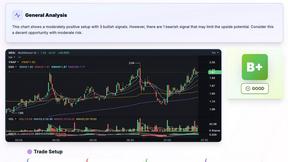
SnapPChart grades a trading chart screenshot A+ to F, with an entry, stop, targets, and risk/reward. Works on stocks, forex, crypto, futures.

Venduris
Venduris is a renewal intelligence platform that gives mid-size companies control over SaaS & AI contract renewals before leverage disappears.