
conceptviz vs Proofapp
Side-by-side comparison to help you choose the right AI tool.

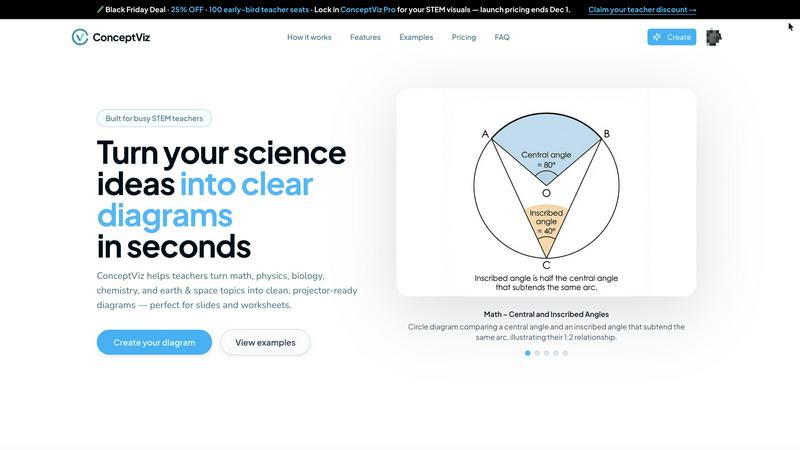
ConceptViz transforms complex ideas into clear, science-ready diagrams for any educational level.
Last updated: February 28, 2026

Proofapp
Transform feedback with visual comments on any webpage, streamlining design reviews and boosting productivity.
Last updated: March 4, 2026
Visual Comparison
conceptviz
Proofapp

Feature Comparison
conceptviz
Subject & Grade Presets
ConceptViz is built with real classrooms in mind, offering quick-start presets for core STEM subjects including Physics, Biology, Chemistry, Earth & Space, and Math. These presets are intelligently tuned to align with U.S. grade bands, from elementary to high school, ensuring the generated diagrams are age-appropriate and conceptually accurate. This feature removes all guesswork, allowing educators to generate perfectly tailored visuals without any prior design or drawing expertise, making sophisticated diagram creation accessible to everyone.
Projector-Ready Clarity
Every diagram generated by ConceptViz is optimized for real-world teaching environments. The platform prioritizes practical details that matter most in a classroom: thick, legible lines and labels, simple backgrounds with minimal visual noise, and high-contrast color schemes. This intentional design guarantees that diagrams remain sharp and comprehensible from the front row to the back, even on lower-resolution classroom projectors, ensuring every student can follow along with ease.
Slide & Worksheet Friendly Output
ConceptViz diagrams are engineered for seamless integration into your existing workflow. They are automatically generated in a widescreen aspect ratio perfect for PowerPoint and Google Slides, and are available with clean white or light backgrounds ideal for printing on worksheets. Users can download high-resolution PNG files and instantly paste them directly into their teaching materials, saving countless hours normally spent on formatting and resizing found images.
Plain-English Description to Diagram
The core transformative feature of ConceptViz is its ability to turn a simple, plain-English description into a detailed scientific diagram. Users just need to type what they need, such as "labeled plant cell cross-section for 8th grade" or "convex lens ray diagram." The AI interprets the request and generates a clean, accurate visual. This allows educators to create diagrams that match their exact teaching narrative, fostering consistency and enabling the reuse of prompts across different classes and sections.
Proofapp
Visual Commenting
With Proofapp's visual commenting feature, users can click anywhere on a screenshot to leave contextual feedback. This intuitive approach eliminates ambiguity, ensuring that comments are precisely located and easily understood. No more vague references to placements—feedback becomes crystal clear.
Multi-Breakpoint Testing
Proofapp automatically captures and reviews your website at both desktop and mobile breakpoints. This multi-breakpoint testing capability ensures that feedback is relevant and effective across devices, allowing teams to address issues that may affect user experience on different platforms.
Real-time Collaboration
Experience seamless collaboration with real-time updates on comments from your team. Proofapp allows users to reply to comments, resolve issues, and track progress together, ensuring that everyone stays on the same page throughout the design process.
Secure Share Links
Share your projects securely with clients through expirable links that require no account for reviewers. This feature enhances security while facilitating easy access for clients to view and comment on the designs, streamlining the feedback process without compromising safety.
Use Cases
conceptviz
Enhancing K-12 Lesson Plans
Elementary, middle, and high school STEM teachers can use ConceptViz to rapidly create custom diagrams for daily lesson plans, worksheets, and interactive whiteboard presentations. Instead of scouring the internet for "almost right" images, a teacher can generate a precise diagram on-demand, such as a "states of matter particle model" for elementary science or a "block on incline free body diagram" for high school physics, ensuring the visual perfectly aligns with the day's learning objective.
Accelerating Academic Research & Publishing
Graduate students, PhD candidates, and academic researchers can leverage ConceptViz to produce precise, publication-ready figures for theses, journal papers, and conference posters. The tool's ability to generate accurate schematics for complex concepts—like an acid-base titration setup or a mitosis stage sequence—streamlines the research communication process, allowing scholars to focus on their analysis rather than struggling with graphic design software.
Creating Differentiated Learning Materials
Educators can use ConceptViz to easily create multiple versions of a diagram to support differentiated instruction. For instance, a biology teacher could generate a simple animal cell diagram for some students and a more detailed, organelle-rich version for others, all from slightly adjusted text prompts. This enables personalized learning at scale, ensuring all students have access to visuals that match their comprehension level.
Supporting Student Projects and Study Aids
Students at all levels can use ConceptViz to create their own study guides, project visuals, and presentation materials. A student struggling to visualize central vs. inscribed angles in geometry can generate a clear diagram to study from. Similarly, a group working on a science fair project about potential and kinetic energy can quickly produce professional-looking visuals to enhance their display and explanation.
Proofapp
Freelancers
Freelancers can leverage Proofapp to streamline client approvals, saving valuable time and enhancing professionalism. By using visual feedback, freelancers reduce the back-and-forth communication, leading to quicker project turnarounds and happier clients.
Design Teams
Design teams benefit greatly from Proofapp's precise visual feedback capabilities. The ability to pin comments directly onto design elements allows for focused discussions and reduces the number of revision rounds, ultimately leading to more efficient workflows and higher quality outputs.
Marketing Teams
Marketing teams can utilize Proofapp to review landing pages and campaigns visually. The platform's intuitive feedback system allows teams to collaborate effectively, ensuring that marketing materials are polished and ready for launch without unnecessary delays.
Small Development Teams
Small development teams can enhance their client interactions using Proofapp. By eliminating the confusion of traditional feedback methods, teams can secure approvals faster, making the development process smoother and more efficient, all while keeping costs manageable.
Overview
About conceptviz
ConceptViz is a revolutionary AI-powered diagramming tool that is fundamentally transforming the landscape of STEM education and research. It is engineered to unlock the potential of educators, students, and researchers by instantly converting intricate scientific and mathematical concepts into crystal-clear, visually engaging diagrams. This game-changing platform eliminates the traditional barriers of time, design skill, and resource availability, empowering users to generate classroom-ready, publication-quality visuals in mere seconds with a simple text description. From K-12 teachers crafting dynamic lesson plans and worksheets to university students and researchers needing precise figures for theses and presentations, ConceptViz caters to a wide spectrum of needs. Its core value proposition lies in delivering projector-ready clarity, curriculum-aligned accuracy, and unprecedented time savings, ensuring that the focus remains on explanation and discovery rather than on tedious graphic creation. By making complex ideas accessible and visually stimulating, ConceptViz is not just a tool; it's a transformative force in democratizing high-quality scientific visualization.
About Proofapp
Proofapp is a revolutionary visual feedback and website review platform designed to transform the way designers, developers, and their clients collaborate. By simply uploading any website URL, Proofapp automatically captures both desktop and mobile screenshots, making it a breeze to gather and manage feedback. The platform empowers users to pin comments directly on the design, engaging in threaded discussions, attaching relevant files, and resolving feedback—all without the need for an account. This streamlined approach eliminates the chaos of scattered emails and unclear revision notes, allowing for a more organized and action-oriented feedback process. Whether you are a freelancer seeking client approval or part of an agency managing multiple projects, Proofapp enhances productivity by keeping all feedback visual and easily accessible, ultimately leading to faster project deliveries and improved client satisfaction.
Frequently Asked Questions
conceptviz FAQ
Do I need any design skills to use ConceptViz?
Absolutely not. ConceptViz is specifically designed for educators and researchers, not graphic designers. The entire process is driven by simple, plain-English text descriptions. You just describe the scientific diagram you need, and the AI handles all the complex drawing, labeling, and layout work, delivering a polished, classroom-ready visual in seconds without any design expertise required.
What subjects and grade levels does ConceptViz support?
ConceptViz supports a comprehensive range of STEM subjects, including Physics, Biology, Chemistry, Earth & Space, and Mathematics. It is built with grade-level appropriateness in mind, offering presets and tuning for U.S. grade bands from elementary school through to high school and even university-level research topics, making it a versatile tool for the entire educational journey.
Can I use the diagrams in printed worksheets and slides?
Yes, this is a core strength of ConceptViz. All diagrams are generated to be immediately useful in real teaching scenarios. They are provided in high-resolution PNG format with clean backgrounds, optimized for both digital use (in PowerPoint, Google Slides) and physical printing on worksheets and handouts. The widescreen aspect ratio and clear labeling ensure they look professional in any medium.
Is there a free trial available?
Yes, you can start using ConceptViz for free without a credit card. The free tier allows you to generate diagrams, including in 4K Ultra HD quality, so you can fully experience how the platform transforms your lesson preparation and research workflow before committing to a paid plan.
Proofapp FAQ
How does Proofapp improve the feedback process?
Proofapp enhances the feedback process by allowing users to leave visual comments directly on screenshots, eliminating confusion and miscommunication commonly associated with traditional email feedback.
Is Proofapp easy to set up?
Yes, Proofapp offers a dead-simple setup that takes just five minutes. Users can start by pasting their website URL, and the platform will automatically capture the necessary screenshots.
Can clients leave feedback without creating an account?
Absolutely! Clients can provide feedback using secure, expirable links without needing to create an account, making it convenient for them to engage in the review process.
How does Proofapp ensure data security?
Proofapp prioritizes security with role-based permissions, audit logs, and secure data handling, providing peace of mind for users and their clients while collaborating on projects.
Alternatives
conceptviz Alternatives
ConceptViz is a transformative AI-powered design tool that specializes in creating clear, science-ready diagrams from complex concepts. It belongs to the dynamic categories of AI assistants, content creation, and data visualization, specifically engineered to empower STEM education and research. This platform is a game-changer for educators and students seeking to unlock visual understanding without design expertise. Users often explore alternatives for various reasons, such as budget constraints, specific feature requirements not covered, or the need for integration with other platforms like learning management systems. Some may seek tools with different output formats, more advanced customization, or a broader focus beyond STEM-specific diagramming. When evaluating an alternative, consider your core need: is it rapid, AI-driven generation, subject-specific accuracy, or classroom-ready simplicity? Assess the tool's ease of use, the quality and resolution of its outputs, and how well its presets or customization align with your educational level and subject matter. The right choice should seamlessly fit into your workflow, enhancing clarity without adding complexity.
Proofapp Alternatives
Proofapp is a cutting-edge visual feedback and website review platform that empowers designers, developers, and their clients to collaborate seamlessly. By allowing users to upload any website URL for automatic screenshot capture on both desktop and mobile, Proof simplifies the feedback process. As a design tool, it ensures that all parties can pin comments, engage in threaded discussions, and resolve feedback easily, without the need for account creation. Users often seek alternatives to Proofapp due to various reasons such as pricing structures, specific feature requirements, or compatibility with preferred platforms. When choosing an alternative, it's essential to consider factors like user interface, integration capabilities, the robustness of feedback mechanisms, and overall value for the investment. The right choice should enhance collaboration while aligning with your project needs.