
Blueberry vs Shrinkpad
Side-by-side comparison to help you choose the right AI tool.

Blueberry
Blueberry unifies your code editor, terminal, and browser into one powerful workspace for seamless web app development.
Last updated: February 28, 2026

Shrinkpad
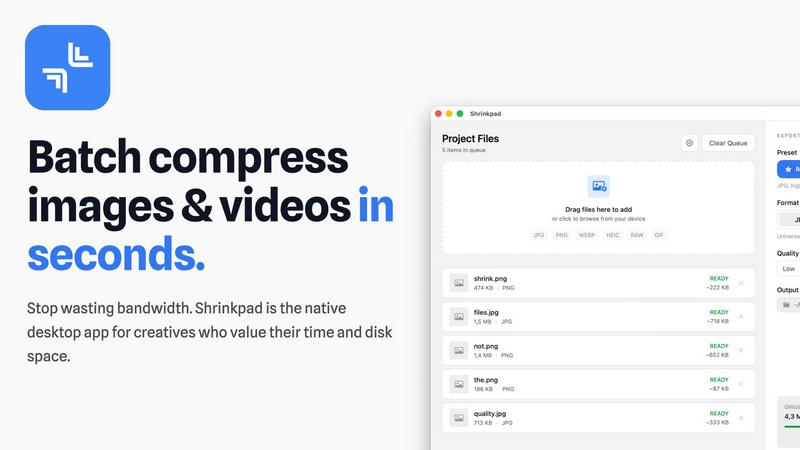
Shrinkpad effortlessly compresses images and videos in batches, optimizing your assets while saving time and space.
Last updated: February 28, 2026
Visual Comparison
Blueberry

Shrinkpad
Feature Comparison
Blueberry
Integrated Workspace
Blueberry combines a powerful code editor, a terminal, and a live preview browser into a single, focused workspace. This integrated environment empowers developers to write code, run commands, and see results without switching between different applications, thereby streamlining the development process.
Advanced AI Integration
Through the Blueberry MCP (Model Connection Protocol), developers can connect with AI models like Claude and Codex directly from the terminal. This feature provides live context and insights into your project, allowing the AI to assist with coding, debugging, and even generating new ideas based on the current state of your application.
Real-Time Preview
With built-in device previews for desktop, tablet, and mobile views, Blueberry allows developers to see exactly how their web applications will look to users in real-time. This feature eliminates guesswork and enhances the design process by providing immediate visual feedback on changes.
Pinned Apps and Tools
Blueberry enables users to keep essential tools like GitHub, Figma, and Linear docked within the workspace. These pinned apps load with your project and share live context with your AI, ensuring that you have all necessary resources at your fingertips, improving collaboration and efficiency.
Shrinkpad
Intelligent Compression
Shrinkpad automatically analyzes the visual complexity of your media to apply the perfect compression ratio, ensuring that your assets maintain their quality without artifacts, saving you time and effort in the process.
Batch Processing Capability
With Shrinkpad, you can batch process thousands of images and videos simultaneously, handling massive queues with ease. Unlike web-based tools, it is optimized for speed and reliability, allowing you to manage larger projects without crashing.
Folder Mode
Simply drag and drop an entire folder into Shrinkpad, and it will automatically detect and queue all supported media files for compression. This feature simplifies the process of managing multiple assets, allowing for seamless workflows.
Privacy-Focused Operation
All processing occurs locally on your device, ensuring that your sensitive media files never leave your machine. This privacy-first approach guarantees that your creative work remains secure and confidential while you optimize your assets.
Use Cases
Blueberry
Web Application Development
Blueberry is ideal for web developers looking to create applications efficiently. By providing a single workspace that integrates coding, testing, and previewing, developers can streamline their workflow and enhance productivity, ultimately speeding up the development cycle.
Collaborative Projects
For teams working on collaborative projects, Blueberry offers a shared workspace where all members can access the same tools and context. This fosters teamwork by allowing developers to see real-time changes and feedback, making it easier to coordinate efforts and maintain project momentum.
Educational Purposes
Blueberry is also suitable for educators and students in software development programs. The integrated tools and AI assistance help learners understand coding concepts better, allowing them to experiment with code, receive instant feedback, and visualize their work in real-time.
Prototyping and Design
Designers and product managers can utilize Blueberry to prototype web applications quickly. The ability to preview designs instantly while iterating on code allows for rapid testing and refinement of ideas, ensuring that the final product aligns with user expectations and needs.
Shrinkpad
Photographers
Photographers can use Shrinkpad to quickly compress large batches of images from shoots, significantly reducing file sizes while preserving high quality, making it easier to store and share their portfolios.
Designers
For designers, Shrinkpad streamlines the process of exporting assets from software like Figma or Photoshop, allowing them to export everything at once and have Shrinkpad handle the optimization and renaming in bulk.
Content Creators
Content creators can benefit from Shrinkpad’s ability to compress videos and images together in one batch, ensuring that their media files are optimized for faster load times on websites and social media platforms.
Developers
Developers can use Shrinkpad to reduce app bundle sizes and improve website performance by compressing various media assets, leading to faster load times and enhanced user experiences for their applications.
Overview
About Blueberry
Blueberry is a revolutionary macOS application crafted specifically for modern product builders who seek efficiency and focus in their workflows. By integrating an editor, terminal, and browser into one cohesive workspace, Blueberry eliminates the chaotic juggling of multiple windows and applications. Developers can now concentrate on what truly matters: creating exceptional web applications that captivate users. With Blueberry, you have the power to connect with advanced AI models like Claude, Gemini, and Codex through its built-in MCP server, enabling real-time access to project files, terminal output, and live previews. This seamless integration allows developers to stop the tedious copy-pasting of context, thereby enhancing productivity and creativity. As a free beta offering, Blueberry is designed to empower developers at all levels to build and ship applications that not only function well but also delight users. Join a community of pioneers who have already discovered the transformative potential of this AI-native product development platform.
About Shrinkpad
Shrinkpad is a revolutionary desktop application designed exclusively for macOS, transforming the way creative professionals optimize their media assets. This powerful tool specializes in batch compression for images and videos, allowing photographers, designers, content creators, and developers to reclaim valuable storage space while enhancing their workflow efficiency. With Shrinkpad, users can compress hundreds or even thousands of files in seconds without compromising privacy or quality. It operates entirely on your device, eliminating the need for internet connectivity, cloud uploads, or server delays. Shrinkpad intelligently processes over 50 different file formats, including standard JPGs and PNGs, as well as professional RAW files and high-resolution 4K videos, achieving file size reductions of up to 90% while maintaining visual integrity. This is not just another compression tool; it is a comprehensive, privacy-first asset optimization engine designed to empower modern creatives.
Frequently Asked Questions
Blueberry FAQ
What platforms does Blueberry support?
Blueberry is currently available exclusively for macOS, designed to cater to developers who work on this operating system.
Is Blueberry really free during the beta phase?
Yes, Blueberry is 100% free during its beta phase, allowing users to explore its features without any financial commitment while the team gathers feedback for improvements.
Can I use Blueberry for collaborative development?
Absolutely! Blueberry's integrated tools and features make it an excellent choice for collaborative projects, allowing teams to work together seamlessly in one workspace.
How does the AI integration work in Blueberry?
Blueberry's AI integration allows developers to connect with various AI models through its MCP server. These models can access your project files, providing insights and assistance tailored to your current coding context. This means the AI can help with coding tasks, debugging, and more, all within the same workspace.
Shrinkpad FAQ
Can I use Shrinkpad for free?
Yes, Shrinkpad offers a Free Starter plan that includes essential tools for casual use, allowing users to compress up to 10 files per batch in common formats like JPG and PNG.
What file formats does Shrinkpad support?
Shrinkpad supports over 50 file formats, including popular image formats like JPG, PNG, WEBP, and RAW, as well as video formats such as MP4 and MOV, making it versatile for various media types.
Does Shrinkpad support video compression?
Absolutely! Shrinkpad can compress both images and videos, allowing you to optimize all your media assets in one go, which is perfect for content creators working with mixed media.
How many files can I process at once?
With Shrinkpad, you can process thousands of assets in a single batch without crashing, making it ideal for users who need to handle large projects efficiently and effectively.
Alternatives
Blueberry Alternatives
Blueberry is a revolutionary Mac app that seamlessly integrates your editor, terminal, and browser into one cohesive workspace. It is designed for developers seeking an efficient and focused environment, eliminating the hassle of switching between multiple applications. By providing a unified platform, Blueberry enhances productivity and streamlines the coding process. Users often seek alternatives to Blueberry for various reasons such as pricing, specific feature sets, or compatibility with different operating systems. When exploring alternatives, it is essential to consider factors such as ease of use, integration capabilities with other tools, and the overall user experience. A well-rounded alternative should not only meet your functional needs but also elevate your workflow in a transformative way.
Shrinkpad Alternatives
Shrinkpad is an innovative desktop application designed specifically for macOS that excels in batch compressing images and videos. It caters to a diverse range of users, including photographers, designers, content creators, and developers who seek to streamline their media management. Users often search for alternatives to Shrinkpad due to various reasons such as pricing concerns, feature limitations, or compatibility with different platforms. When assessing alternatives, it’s crucial to consider factors such as processing speed, file format support, privacy features, and user experience. Look for applications that maintain file quality while offering convenience and efficiency in managing your media files, ensuring they align with your specific workflow needs and preferences.