

Subclip
Subclip is an AI video editor that simplifies editing, captioning, and dubbing in multiple languages, saving you time and enhancing your creativity.
AI tool Details
Explore More
Alternatives
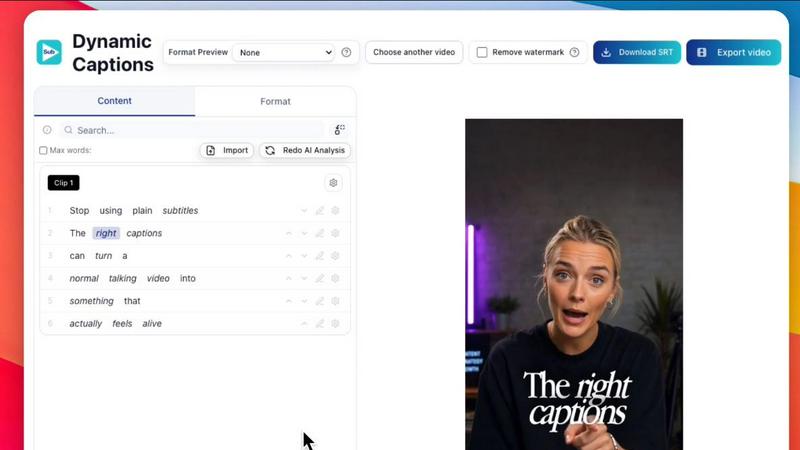
About Subclip
Subclip is a revolutionary AI-powered video editing tool designed specifically for creators, marketers, and educators who seek to streamline their video production process. Unlike traditional video editing software that can be complex and time-consuming, Subclip allows users to edit videos as easily as editing a document. By simply dragging and dropping a transcript, users can make precise edits to their videos, enhancing efficiency and creativity. With remarkable features such as voice cloning, automatic silence and filler word removal, and multi-language dubbing, Subclip caters to a diverse audience including YouTubers, podcasters, course creators, and content teams. Its intuitive interface and powerful AI capabilities ensure that users can reclaim up to 80% of their time, transforming the way they create and share video content. Whether you need to add captions, generate subtitles, or collaborate with your team, Subclip makes it all possible in one integrated platform, empowering you to focus on what truly matters: your message.
Features
AI Clipping
With Subclip's AI clipping feature, the platform intelligently scans your videos for high-energy segments, punchlines, and emotional shifts, automatically identifying the best clips for you. This saves you countless hours of manual scrubbing through raw footage, allowing you to focus on creating engaging content.
One-Click Dynamic Captions
Generate unlimited subtitles with just one click. Subclip's dynamic captioning feature automatically creates accurate subtitles in over 48 languages, ensuring that your message reaches a global audience. You can also customize the text and formatting to match your brand's style, enhancing viewer engagement.
Voice Cloning and Dubbing
Subclip offers advanced voice cloning technology that enables you to dub your videos into more than 21 languages while maintaining your original tone and emotion. This feature is perfect for creators looking to expand their audience internationally without the need for extensive re-recording.
Silence and Filler Word Removal
Say goodbye to tedious editing with Subclip’s one-click silence and filler word removal feature. This powerful tool automatically detects and eliminates unwanted pauses and filler words from your videos, ensuring a polished final product that keeps viewers engaged.
Use Cases
For YouTubers
YouTubers can leverage Subclip to effortlessly create engaging short clips from long-form videos, maximizing viewer engagement and reach. With AI-powered features, they can focus on content creation rather than complex editing, driving higher viewership with minimal effort.
For Educators and Coaches
Educators and coaches can use Subclip to dub their recorded courses into over 20 languages, enabling them to reach a wider audience while maintaining their unique voice. This feature enhances accessibility and engagement for learners around the globe.
For Podcasters
Podcasters can benefit from Subclip by easily editing their episodes, removing background noise, and generating high-quality audio. The platform’s collaboration tools allow teams to share projects, gather feedback, and streamline the editing process, resulting in high-quality podcast episodes.
For Agencies and Freelancers
Agencies and freelancers can increase their output significantly without compromising quality. Subclip's unlimited transcription and export capabilities, combined with team collaboration features, empower them to deliver exceptional video content efficiently and affordably.
Frequently Asked Questions
How does Subclip simplify the video editing process?
Subclip simplifies video editing by allowing users to edit their videos using a transcript, much like a document. This eliminates the need for complex timelines and manual editing, saving valuable time while enabling intuitive editing.
Can I use my own voice for dubbing in multiple languages?
Yes, Subclip's voice cloning technology allows you to dub your videos into over 21 languages using your own voice, ensuring that your tone and emotional delivery are preserved in every translation.
Is there a limit to the number of subtitles I can generate?
No, Subclip offers unlimited subtitle generation, allowing you to create and export an infinite number of subtitles without extra costs. This feature ensures that your content can be accessible to audiences worldwide.
What platforms can I export my edited videos to?
Subclip supports instant export to major social media platforms like YouTube and X (formerly Twitter), with more platforms being added soon. This makes it easy to publish your content directly from the platform without the need for additional downloads.
Similar to Subclip

Speechable
Speechable transforms any document into natural audio you can listen to and chat with.

Hush Touch | Voice-to-Text for MacOS
Experience smarter on-device dictation for Mac, transforming speech into text with unmatched accuracy and privacy.

Glossa
Glossa provides real-time AI translation of sermons in 100+ languages, breaking language barriers for your church.

Bantr: Offline & Unlimited TTS for Mac
Bantr transforms your Mac into a private, unlimited offline text-to-speech studio.

KaiCalls
KaiCalls is your 24/7 AI voice agent, capturing and qualifying leads while providing instant answers to customers.

Vowen
Vowen empowers you to streamline your workflow by transforming your voice into dictation, automation, and smart.
Bargou One
Bargou One is your all-in-one AI suite to create, translate, and communicate effortlessly.