

Comics Maker
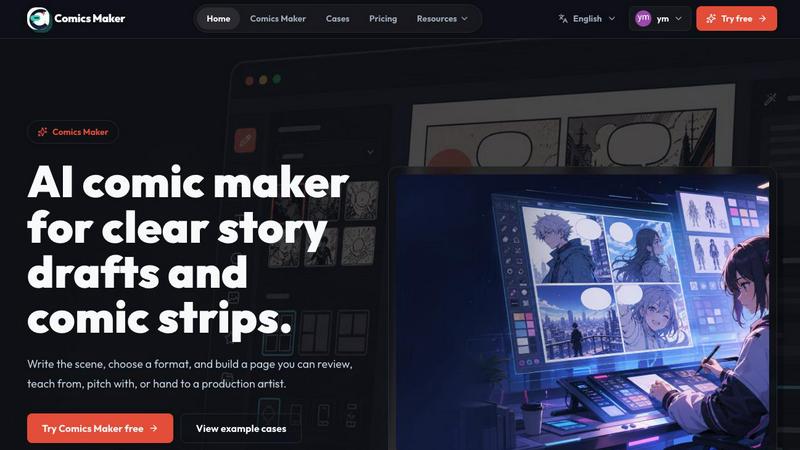
Comics Maker transforms your raw scene ideas into structured comic drafts, letting you plan beats, generate panels, and arrange pages for review or.
AI tool Details
About Comics Maker
Comics Maker is a transformative AI-powered comic creation studio that unlocks the potential of storytellers, educators, marketers, and teams who want to turn raw ideas into readable comic drafts without the daunting challenge of starting from a blank canvas. This game-changing platform allows users to begin with a simple scene, character concept, product story, classroom topic, or dialogue prompt, then harness the power of artificial intelligence to shape it into coherent comic panels, captions, layouts, and visual direction. Unlike a general image generator, Comics Maker is built around the complete comic workflow, supporting comic strips, 2x2 story pages, single-panel scenes, vertical webtoon drafts, storyboards, and export-ready panel sets. Users can choose from diverse visual styles including manga, western comic, noir, cyberpunk, watercolor, or chibi, while maintaining consistent characters, palettes, and story context across all panels. This tool is invaluable for independent creators testing comic ideas, teachers making visual lessons, marketers creating product stories, and teams building storyboards or campaign concepts. Comics Maker helps users move from prompt to panel faster while preserving essential room for editing, refining, and exporting the final draft, making it a truly revolutionary solution for visual storytelling.
Features
Scene to Panel Planning
This game-changing feature allows users to start with one scene and transform it into a structured comic page. You can name the character, setting, visible action, and change, then let the AI plan the beats and generate panels. The system supports single-panel, three-panel, or 2x2 page formats, keeping captions and dialogue close to the panel plan. This unlocks the potential for rapid ideation, turning a raw idea or line of dialogue into a simple comic structure you can immediately work with and refine.
Consistent Visual Style Control
Comics Maker revolutionizes the comic creation process by ensuring visual consistency across all panels. Users can lock the visual direction before generating, reuse character and environment notes, and choose from styles like manga, western comic, noir, cyberpunk, watercolor, or chibi. This feature maintains character appearances, color palettes, and story context throughout the entire project, eliminating the jarring inconsistencies common with general image generators and creating a cohesive world that feels professionally crafted.
Flexible Layout and Pacing Studio
The transformative studio interface keeps panel count, pacing, shot type, and reading order visible before you invest time in polish. It supports single panel, 3-panel strip, 2x2 page, and vertical flow formats with simple controls for size, tone, and production notes. This clean middle panel for making layout decisions ensures every panel has one clear job, allowing creators to review pacing and structure before generating more images, fundamentally changing how efficiently comics can be drafted.
Export and Project Management
This feature unlocks the potential for seamless collaboration and project continuity. Comics Maker allows users to export drafts that an artist or teammate can understand, hand off prompts, notes, and panels as project data, and maintain JSON project export functionality. The editor and workflow remain consistent across all plans, ensuring that whether you are an individual creator or part of a team, you can move a scene from rough idea to a reviewable comic page that is ready for the next production phase.
Use Cases
Independent Comic Creation
For independent creators testing comic ideas, Comics Maker is a game-changing tool that eliminates the barrier of the blank page. Artists and writers can quickly prototype story concepts, experiment with different visual styles, and generate multiple panel layouts to find the perfect pacing for their narrative. This transformative approach allows creators to iterate rapidly, checking story clarity and panel order before committing to a longer production pass, ultimately accelerating the journey from concept to finished comic.
Educational Visual Lessons
Teachers and educators can harness the power of Comics Maker to create compelling visual lessons that enhance student engagement and comprehension. By turning classroom topics into comic strips or story pages, educators can explain complex subjects in an accessible, narrative format. This use case unlocks the potential for differentiated instruction, allowing teachers to generate custom visual aids that cater to various learning styles, making abstract concepts concrete and memorable through the universal language of comics.
Marketing and Product Storytelling
Marketers can use this transformative platform to create engaging product stories and campaign concepts that cut through the noise. By starting with a product moment or customer journey, teams can organize narratives into clear comic sequences that demonstrate value propositions in an emotionally resonant way. Comics Maker enables marketers to produce shareable visual content quickly, from social media campaigns to explainer comics, fundamentally changing how brands communicate their stories and connect with audiences.
Team Storyboarding and Collaboration
For production teams, Comics Maker is a revolutionary tool for building storyboards and campaign concepts collaboratively. The platform allows multiple stakeholders to review panel structure, dialogue placement, and visual direction before investing in full production. This use case streamlines the approval process, ensures everyone is aligned on the creative vision, and provides exportable project data that can be handed off to artists, animators, or other team members, unlocking unprecedented efficiency in creative workflows.
Pricing
Comics Maker offers a tiered pricing structure designed to accommodate different user needs, from individual testing to team production. The free plan includes 10 starter credits for testing image generation, allowing you to experience the transformative power of the platform without commitment. Paid plans primarily increase monthly credits while maintaining the same editor and JSON project export workflow. The Creator plan is priced at $15 per month for creators making comic strips, lessons, and social campaigns every week. The Studio plan is available at $39 per month for teams producing brand comics, campaigns, and classroom content. All plans follow the same core workflow, ensuring that as you upgrade, you unlock more creative potential without having to relearn the tool.
Frequently Asked Questions
How is Comics Maker different from a general AI image generator?
Comics Maker is specifically built around the complete comic workflow, unlike general image generators that produce single images without narrative context. It supports comic strips, 2x2 story pages, vertical webtoon drafts, and storyboards with consistent characters, palettes, and story context across panels. The platform focuses on panel planning, pacing, shot type, and reading order, ensuring that every panel has one clear job and contributes to a coherent story. This specialized approach makes it a game-changing tool for creating readable, structured comic drafts rather than just isolated images.
Can I maintain consistent character appearances across multiple panels?
Yes, this is one of the transformative features of Comics Maker. The platform allows you to lock the visual direction before generating panels and reuse character and environment notes throughout your project. You can provide detailed character descriptions and style preferences, and the AI will maintain consistency across all generated panels. This ensures that characters look the same from panel to panel, creating a professional, cohesive comic that feels like it belongs to the same world, which is a fundamental requirement for any serious comic project.
What types of comic formats and layouts does Comics Maker support?
Comics Maker is built for versatility, supporting a wide range of formats to unlock your creative potential. You can create single-panel scenes, 3-panel strips, 2x2 story pages, and vertical webtoon drafts. The studio keeps panel count, pacing, shot type, and reading order visible, allowing you to make layout decisions before generating images. This flexibility makes it suitable for everything from quick social media comics to detailed storyboards and full narrative pages, fundamentally changing how quickly you can move from idea to a structured visual story.
Is Comics Maker suitable for team collaboration and project handoffs?
Absolutely. Comics Maker is designed with team workflows in mind, making it a game-changing tool for creative collaboration. The platform allows you to export drafts that an artist or teammate can understand, including prompts, notes, and panels as project data. The JSON project export functionality ensures that all creative decisions and structure are preserved for handoff. Whether you are working on a campaign with marketers or a storyboard with a production team, Comics Maker provides the structure and export capabilities needed for seamless collaboration and project continuity.
Similar to Comics Maker

AI Album Cover Maker
Create release-ready album covers from a prompt or photo. Generate, refine, and export art for singles, EPs, mixtapes, and playlists.
Sprite Sheet Maker
A free browser-based toolkit for creating, cutting, converting, and previewing sprite sheet animations.
Cursive Text Generator
Cursive Text Generator is a free browser-based tool that converts regular text into beautiful cursive and stylish Unicode fonts. Users can instantly p


Presentation Intelligence
AI-native presentation and visual content platform that turns prompts, documents, images, videos, and data into polished, shareable decks.

Vismuse
Create polished AI images and videos from prompts or references for social posts, ads, flyers, album covers, and campaigns.

Magic Eraser
AI photo editor for removing objects and backgrounds, enhancing images, and creating polished visuals.
Imagine2
Private browser-based AI image generation and editing with text-to-image, targeted edits, and multi-image references.