
documentorium vs Vibrantsnap
Side-by-side comparison to help you choose the right AI tool.

documentorium
Documentorium transforms your workflow with guided forms that generate professional contractor documents and PDFs in seconds.
Last updated: March 26, 2026

Vibrantsnap
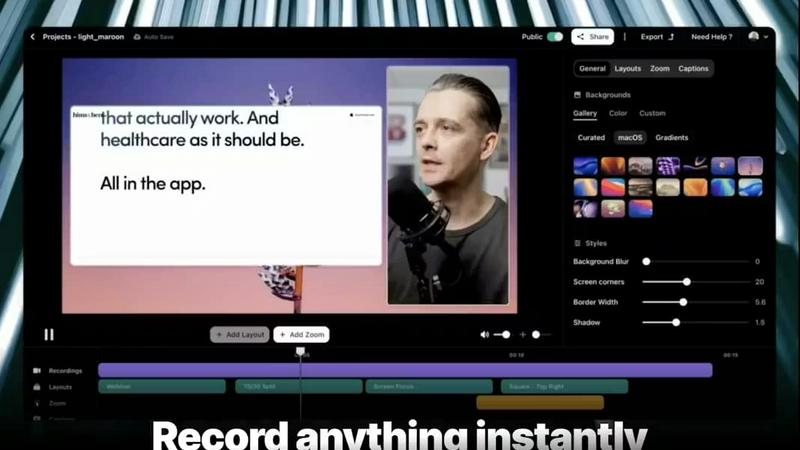
Transform screen recordings into polished, high-converting videos in minutes with Vibrantsnap's AI editing magic.
Last updated: February 28, 2026
Visual Comparison
documentorium

Vibrantsnap
Feature Comparison
documentorium
Trade-Specific Guided Forms
Forget generic blanks that force you to adapt. documentorium features over 200 templates with fields and terminology built exclusively for your trade. Whether you're a solar installer drafting a proposal or an electrician outlining a service report, every form guides you with the right questions, ensuring no critical detail is missed and every document speaks the language of your profession.
Instant Professional PDF Generation
The moment you complete a guided form, documentorium's engine works its magic. In seconds, it transforms your inputs into a polished, print-ready PDF document. There is no manual formatting, no wrestling with design software, and no second-guessing the layout. You get a client-ready document that projects competence and credibility instantly.
Complete Document History & Prefill
Every quote, invoice, work order, and report you create is automatically saved in your personal document history. This powerful feature allows you to quickly reference past jobs and, more importantly, prefill information for repeat clients or similar projects. This dramatically cuts down data entry time and ensures consistency across all your business documentation.
Comprehensive Template Catalog
With access to a vast library spanning 26 trade categories, you have every professional document you need at your fingertips. The catalog includes quotes, estimates, invoices, work orders, bids, contracts, service reports, inspection reports, proposals, warranties, change orders, and more, all organized for easy discovery and use.
Vibrantsnap
Built-in Video Analytics
Gain valuable insights into viewer engagement with our built-in analytics. Track who watched your videos, how many times they were viewed, and pinpoint where attention drops. This feature eliminates the guesswork, allowing you to understand viewer behavior and optimize your content for better conversion rates.
Auto-Cut + Auto-Layout
Save time and effort with our Auto-Cut and Auto-Layout features. In just two clicks, Vibrantsnap automatically trims unnecessary silences and applies professional layouts to your videos. This means you can create polished, ready-to-share content without needing any prior editing skills, streamlining your production process significantly.
Magic Edit
Our Magic Edit function automatically cleans up your videos, removing filler words and enhancing overall quality. This feature ensures that your videos maintain a professional standard, allowing your message to shine through without distractions. It's perfect for those who want high-quality content without the hassle of manual editing.
AI Voiceover
Enhance your videos with our AI voiceover capabilities. Vibrantsnap provides professional-grade voiceovers that complement your visuals and add a polished touch to your content. This feature is especially beneficial for creators who want to ensure their message is communicated clearly and effectively, without the need for expensive voiceover services.
Use Cases
documentorium
Creating Winning Proposals and Bids
When competing for a new roofing project or a commercial HVAC installation, a professional proposal can make all the difference. documentorium enables you to quickly assemble a detailed, trade-specific bid that clearly outlines scope, materials, labor, and terms, presenting a compelling and trustworthy case to your potential client within minutes.
Streamlining Service and Inspection Reporting
After completing a job, generating the necessary paperwork can be a chore. HVAC techs and electricians can use documentorium to swiftly fill out guided service or inspection report forms on-site or immediately after. This ensures accurate, legible, and professional documentation is delivered to the client without delay, enhancing service quality.
Managing Project Changes with Change Orders
For contractors and builders, project scope often evolves. documentorium simplifies the formal process of creating and issuing change orders. Using a trade-specific template, you can clearly document alterations, associated costs, and client approvals, protecting your business and maintaining clear communication throughout the project lifecycle.
Issuing Invoices and Tracking Warranties
Turning completed work into paid invoices is crucial. documentorium allows plumbers, solar installers, and other tradespeople to generate detailed invoices directly from job information. Similarly, you can instantly create professional warranty documents for installed equipment, providing added value to your clients and streamlining your administrative follow-up.
Vibrantsnap
Product Demos
Vibrantsnap is perfect for creating engaging product demos that highlight your offerings. By capturing your screen while demonstrating features, you can quickly convey the value of your product to potential customers, turning interest into action.
Tutorials and Walkthroughs
Whether you are teaching a new software feature or guiding users through a process, Vibrantsnap allows you to create informative tutorials in minutes. Its auto-editing features ensure your content is concise and engaging, making learning easier for your audience.
Marketing Campaigns
Utilize Vibrantsnap to produce videos for marketing campaigns that convert. By incorporating calls-to-action and tracking engagement, you can create impactful content that drives traffic and boosts sales, all while maintaining a professional appearance.
Customer Support
Create helpful customer support videos that address common issues or FAQs. Vibrantsnap’s ability to produce quick, clear, and polished video content can enhance your support strategy, providing customers with visual solutions that are easy to follow.
Overview
About documentorium
documentorium is a transformative document engine designed to revolutionize how skilled tradespeople and service professionals manage their business paperwork. It eliminates the frustrating, time-consuming process of starting from a blank page or wrestling with generic templates that don't fit the job. Built specifically for electricians, plumbers, contractors, HVAC technicians, roofers, and dozens of other trades, documentorium provides a game-changing library of over 200 guided templates across 26 distinct trade categories. The platform's core value proposition is simple yet powerful: choose a professionally crafted template, fill out an intuitive form with fields built for your specific trade, and generate a clean, print-ready PDF document in seconds. This isn't just about creating documents; it's about unlocking potential by streamlining administrative overhead, ensuring absolute professionalism in every client interaction, and reclaiming valuable hours to focus on the skilled work that grows your business. With a complete history of all documents and a straightforward annual subscription, documentorium is the definitive tool for turning complex job documentation into a simple, seamless process.
About Vibrantsnap
Vibrantsnap is a revolutionary AI-powered tool designed to transform screen recordings into polished, professional videos that captivate and convert viewers. Ideal for founders, creators, and marketers, Vibrantsnap addresses a common challenge: the difficulty in conveying product value quickly and effectively. With its intuitive interface, users can effortlessly record demos, tutorials, and presentations, capturing their screen seamlessly. The magic happens with Vibrantsnap's auto-editing capabilities, which automatically refine videos by removing silences, applying professional layouts, and enhancing audio with AI voiceovers. This means that in just minutes, users can produce high-quality videos that not only showcase their products but also drive signups and engagement. Trusted by over 1,827 founders, Vibrantsnap promises to elevate your video content, making it an indispensable part of any digital marketing strategy.
Frequently Asked Questions
documentorium FAQ
Can I cancel my subscription anytime?
Absolutely. You maintain full control and can cancel your subscription directly from your account at any time. Your access will remain active until the end of the current billing period, with no penalties or lock-in contracts. We believe in providing value that earns your business.
What happens when my free trial ends?
When your one-month free trial concludes, all the documents you created remain securely stored in your account. To begin creating and editing new documents, you would need to activate a paid subscription. No data or document history is deleted when the trial expires.
Do I lose my documents if I don't subscribe?
No, you do not lose your documents. Your entire document history is preserved, and you can view and download your existing PDFs at any time, even without an active subscription. A paid subscription is required to create and edit new documents, but your past work is always accessible.
Does documentorium provide legal advice?
No. documentorium is a powerful platform for document creation and PDF generation, providing tools and templates to streamline your business paperwork. It is not a substitute for professional legal advice. We recommend consulting with a legal professional for advice on contract terms or other legally binding documents.
Vibrantsnap FAQ
How does Vibrantsnap enhance video quality?
Vibrantsnap enhances video quality through its Magic Edit feature, which automatically removes silences and filler words. Additionally, it applies professional layouts and offers AI voiceovers, ensuring your videos are polished and engaging.
Is there a learning curve to using Vibrantsnap?
Not at all! Vibrantsnap is designed with user-friendliness in mind. With its intuitive interface and automated features, users can create high-quality videos without needing extensive editing skills or training.
Can I track the performance of my videos?
Yes, Vibrantsnap includes built-in video analytics that allows you to track views, clicks, and engagement in real time. This functionality helps you understand viewer behavior and refine your content strategy accordingly.
What types of videos can I create with Vibrantsnap?
You can create a variety of videos with Vibrantsnap, including product demos, tutorials, marketing videos, and customer support content. The tool is versatile and adaptable, making it suitable for various use cases in your business.
Alternatives
documentorium Alternatives
documentorium is a specialized document engine in the productivity and management category, designed to help tradespeople generate professional PDFs like quotes and invoices from guided, trade-specific templates. Users often explore alternatives for various reasons, such as seeking different pricing models, needing more advanced features like inventory management, or requiring a solution that integrates with their existing accounting or scheduling platforms. When evaluating other options, it's crucial to consider the depth of trade-specific content, the quality and customization of the final documents, and how seamlessly the tool fits into your daily workflow. The right alternative should not just create a document but should elevate your professional image and save you significant administrative time, allowing you to focus on the skilled work that grows your business.
Vibrantsnap Alternatives
Vibrantsnap is a powerful tool designed to help users create engaging product demo videos quickly and efficiently. It falls under the category of productivity and management software, specifically aimed at enhancing the way businesses showcase their products. Users often seek alternatives to Vibrantsnap for various reasons, such as pricing, specific feature needs, or compatibility with different operating systems. As you explore alternatives, consider factors such as ease of use, editing capabilities, and the ability to generate insights through analytics, all of which play a crucial role in crafting effective video content. When choosing an alternative, it's essential to prioritize features that align with your objectives, such as automatic editing, voiceover integration, and platform accessibility. Additionally, think about the quality of the final product, the learning curve associated with the software, and the overall support provided by the company. By focusing on these criteria, you can find a solution that not only meets your needs but also empowers you to create impactful visual content that resonates with your audience.