
Changeflow vs SupaSidebar
Side-by-side comparison to help you choose the right AI tool.

Changeflow
Changeflow uses AI to track and summarize only the critical website changes that matter to your business.
Last updated: March 4, 2026

SupaSidebar
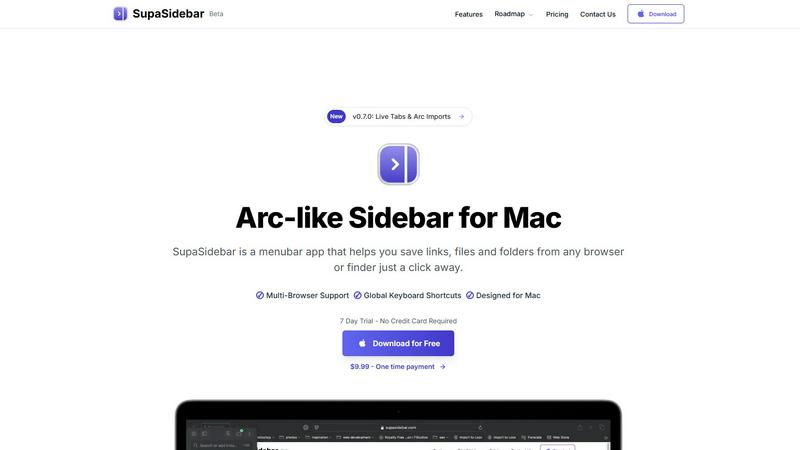
SupaSidebar transforms your Mac with an Arc-style sidebar for instant access to your favorite links, files, and folders.
Last updated: February 28, 2026
Visual Comparison
Changeflow

SupaSidebar
Feature Comparison
Changeflow
AI-Powered Contextual Intelligence
Changeflow's core engine uses sophisticated AI to do more than just spot differences. It reads the content, understands the context of your specific monitoring goals, and filters out irrelevant noise. This means you receive clear, concise summaries of only the meaningful changes, explaining not just what changed but why it matters to your business, dramatically reducing false positives and saving valuable time.
Natural Language & Smart Link Following
Setup requires zero technical expertise. Simply describe what you want to track in plain English. Furthermore, Changeflow's intelligence extends to turning any page with links into a dynamic feed. It automatically follows new links, reads the target pages, determines their relevance based on your criteria, and summarizes the important content, effectively creating an intelligent, self-updating information network from a single starting point.
Enterprise-Grade Reliability & Anti-Blocking
Built on over a decade of experience tracking billions of pages, Changeflow offers enterprise-level reliability. Its advanced anti-blocking technology ensures a 99.9% success rate on challenging sites that commonly thwart other monitors, including those with complex JavaScript, login requirements, or aggressive bot detection. This guarantees consistent, uninterrupted monitoring for mission-critical intelligence.
Interactive Change Viewer & Team Collaboration
Go beyond summaries with the interactive Site Version Control feature. This allows for forensic analysis by providing timestamped archives of every page version. You can navigate through time and see changes highlighted directly on the page. Combined with shared workspaces, centralized user admin, and flexible notifications, it keeps entire teams perfectly synchronized on the latest intelligence.
SupaSidebar
Arc-Inspired Sidebar
The unique, Arc-inspired sidebar design offers a visually appealing and intuitive interface, giving you instant access to your favorite links, files, and applications without the clutter of traditional tab management.
Global Keyboard Shortcuts
SupaSidebar enhances your productivity with customizable global keyboard shortcuts, allowing you to save links and files or switch between applications with simple key combinations, making your workflow faster and smoother.
Recents Tracking
Keep track of your recent activity effortlessly. SupaSidebar automatically logs every website accessed in the last 48 hours, allowing you to find and revisit your work instantly, eliminating the frustration of lost tabs.
Unlimited Spaces in Pro Version
With the Pro version, users can create unlimited spaces to organize links and files according to personal preferences. This feature allows for a tailored experience, ensuring that you can access information exactly how you want it.
Use Cases
Changeflow
Competitive & Pricing Intelligence
Business and pricing teams use Changeflow to gain a decisive edge by automatically tracking competitor websites, product catalogs, and pricing pages. The AI filters out minor blog updates or promotional banners, alerting you only to critical changes in price, product features, terms of service, or strategic announcements, enabling rapid and informed competitive responses.
Legal & Regulatory Compliance Monitoring
Legal librarians at top law firms and compliance officers at Fortune 500 companies rely on Changeflow to monitor crucial sources like court dockets, SEC filings, FDA guidance documents, and regulatory body websites. It ensures they never miss a filing deadline or regulatory update by providing AI-summarized alerts on the exact legal citations or procedural changes that matter.
Market & News Surveillance
Marketing, PR, and executive teams stay ahead of market movements and brand mentions by using Changeflow to track industry news, analyst reports, and media outlets. The platform transforms these sources into a noise-free feed of relevant updates, summarizing key developments, emerging trends, or significant news mentions without requiring manual daily review of dozens of sites.
Supply Chain & Vendor Monitoring
Procurement and operations teams leverage Changeflow to monitor key vendor websites for changes to lead times, material specifications, service terms, or outage notices. By tracking these digital footprints, companies can proactively manage supply chain risks, anticipate disruptions, and maintain operational continuity based on real-time updates from partner sites.
SupaSidebar
Efficient Research Workflow
Researchers can utilize SupaSidebar to save and organize numerous links and references, making it easier to access critical information quickly without switching between multiple tabs or applications.
Streamlined Creative Process
Creators benefit from the quick access to tools and resources that SupaSidebar provides. Whether it's links to design inspirations or files for ongoing projects, everything is just a keyboard shortcut away.
Developer Resource Management
For developers, SupaSidebar serves as a command center for managing coding resources, documentation, and frequently used tools, fostering a more efficient coding environment that reduces time spent searching for assets.
Simplified Daily Task Management
Anyone with a busy schedule can leverage SupaSidebar to keep important files and links at their fingertips. By organizing daily tasks and reminders in the sidebar, users can maintain focus and productivity throughout their workday.
Overview
About Changeflow
Changeflow is a transformative AI-powered web monitoring platform that redefines how businesses track online information. It moves far beyond basic change detection, eliminating the noise of "something changed" alerts to deliver precise, contextual intelligence on what actually matters. By leveraging advanced AI that reads and understands page context, Changeflow summarizes critical updates, saving professionals from the tedious and error-prone task of manual checking. Its game-changing simplicity allows users to set up monitors in plain English—just describe what you care about and point it at a page. The platform expertly handles complex technical barriers like login walls and JavaScript-heavy sites with a 99.9% success rate, reaching pages other tools cannot. Designed for serious business applications, it is trusted by Fortune 500 compliance teams, Am Law 200 legal librarians, and business strategists to track competitor pricing, regulatory shifts, news mentions, and market movements. With features like shared workspaces, a robust API, and Site Version Control for timestamped archives, Changeflow unlocks potential by turning the chaotic web into a structured, actionable feed of strategic intelligence.
About SupaSidebar
SupaSidebar is a revolutionary productivity tool meticulously designed for Mac users, aiming to enhance your digital efficiency and streamline your workflow. This innovative menubar app introduces an Arc-inspired sidebar that offers instant access to your essential links, files, folders, and applications—all within a beautifully crafted interface. SupaSidebar empowers researchers, creators, developers, and anyone who juggles multiple browsers and apps by eliminating the chaos of tab overload and cumbersome bookmark managers. With its core philosophy centered around profound simplicity, it provides a unified space that houses your entire digital context, all accessible through lightning-fast global keyboard shortcuts. Committed to user privacy, SupaSidebar ensures that your data remains secure on your Mac, while its native macOS design integrates seamlessly with your existing environment. Experience a paradigm shift in productivity, as SupaSidebar transforms how you interact with your computer, allowing you to stay organized, focused, and in your creative flow.
Frequently Asked Questions
Changeflow FAQ
How does Changeflow differ from traditional website change detectors?
Traditional tools often simply take screenshots or detect HTML differences, flooding you with alerts for every minor change like a shifted image or updated timestamp. Changeflow is transformative because it employs AI to read and comprehend the page's content like a human would. It understands context, filters out irrelevant noise, and delivers a plain-English summary of only the substantive changes that align with your monitoring goals, saving you hours of manual verification.
Can Changeflow monitor websites that require a login or have complex JavaScript?
Yes, this is one of Changeflow's key advantages. The platform is built with sophisticated anti-blocking technology that allows it to successfully navigate and monitor pages behind login walls, those with complex JavaScript rendering, and other challenging structures that typically block simpler bots. It boasts a 99.9% success rate, making it reliable for the most critical business sources that other tools cannot reach.
What kind of notifications will I receive?
You receive concise, AI-generated notifications that clearly describe the update and its significance. These alerts can be delivered to your Changeflow dashboard, to specified email addresses, or to hundreds of other apps like Slack or Microsoft Teams via Zapier integration. You have full control over the frequency, ensuring you stay informed without being overwhelmed by noise.
How do I get started with monitoring a large list of URLs?
Getting started is simple even with a large volume of sources. You can use the built-in AI chatbot to quickly add pages one by one. For bulk operations, Changeflow offers import capabilities from CSV or Excel files. For extensive website monitoring, the platform can even perform a site crawl based on a root URL to discover and add relevant pages automatically, streamlining the initial setup process.
SupaSidebar FAQ
Is SupaSidebar a browser extension?
No, SupaSidebar is a standalone menubar application designed specifically for macOS, providing seamless integration with all major browsers without needing a browser extension.
Which browsers does SupaSidebar work with?
SupaSidebar supports all major browsers including Safari, Chrome, Firefox, and Arc, ensuring that you can manage your links and files no matter your preferred browsing tool.
What macOS version do I need?
To use SupaSidebar, you need macOS version 13 or later, ensuring compatibility with the latest features and updates provided by the app.
Where is my data stored?
All user data is stored locally on your Mac, ensuring privacy and security. SupaSidebar does not transmit any data to external servers, maintaining a strong commitment to user confidentiality.
Alternatives
Changeflow Alternatives
Changeflow is an AI-driven market and competitor insights platform, a transformative tool in the competitive intelligence and web monitoring category. It goes beyond simple change detection to understand context and deliver summaries of what truly matters, unlocking a new level of market awareness. Users often explore alternatives for various reasons, such as budget constraints, specific feature requirements, or the need for a different platform integration. The quest for the right tool is about finding the perfect fit for your team's unique workflow and strategic goals. When evaluating options, prioritize solutions that offer not just alerts but intelligent analysis, robust handling of complex web pages, and collaborative features. Look for a tool that acts as a true partner in your workflow, seamlessly turning vast data into actionable insights.
SupaSidebar Alternatives
SupaSidebar is a revolutionary productivity tool designed exclusively for Mac users, featuring an elegant, Arc-style sidebar that streamlines access to links, files, folders, and applications. This innovative utility falls under the category of productivity and management software, catering to individuals who thrive on organization and efficiency in their digital workflows. Users often seek alternatives to SupaSidebar for various reasons, including pricing considerations, specific feature requirements, or compatibility with different platforms. When selecting an alternative, it is essential to evaluate its core functionalities, user interface, and how well it integrates into your existing workflow, ensuring it enhances your productivity rather than disrupts it.