
Stunning vs TemplateFox
Side-by-side comparison to help you choose the right AI tool.

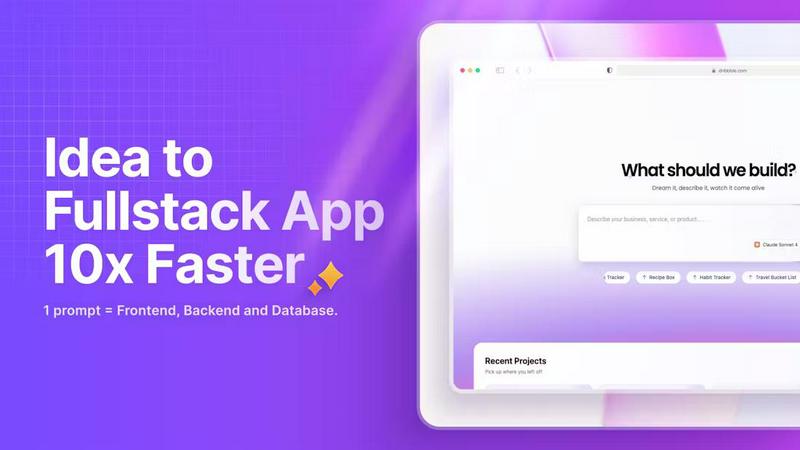
Stunning unlocks your potential to build full-stack web apps instantly with just a description.
Last updated: March 1, 2026

TemplateFox
Effortlessly create stunning, dynamic PDFs with TemplateFox's no-code automation and powerful API integration.
Last updated: February 28, 2026
Visual Comparison
Stunning
TemplateFox

Feature Comparison
Stunning
AI-Powered Full-Stack Generation
Describe your application idea in plain English, and watch as Stunning's AI constructs the entire codebase. This feature automates the creation of frontend interfaces, backend logic, and database schemas simultaneously, turning a simple prompt into a complete, deployable web application in minutes, not weeks. It dramatically reduces development time and technical complexity.
No-Code/Low-Code Visual Environment
Stunning provides an intuitive visual interface that empowers users with little to no coding expertise to build sophisticated applications. You can drag, drop, and configure elements while the platform handles the underlying code. This democratizes app development, making it accessible to entrepreneurs, designers, and business professionals who need to prototype or build without relying on a dedicated development team.
Integrated Backend & Database
Every application built on Stunning comes with a fully integrated and managed backend and database out of the box. There's no need to set up separate servers, APIs, or cloud database instances. The platform seamlessly connects your frontend to a robust backend, handling data storage, user authentication, and server-side logic automatically, ensuring your app is fully functional from the start.
RTL Language & Global Community Support
Stunning is built for a global audience, featuring comprehensive support for right-to-left (RTL) languages like Arabic. This ensures creators worldwide can build applications tailored to their local markets. Coupled with this is a thriving community platform where users showcase projects, exchange feedback, and collaborate, turning solo building into a shared, enriching experience.
TemplateFox
Intuitive Drag-and-Drop Editor
TemplateFox features a user-friendly drag-and-drop editor that allows users to design dynamic PDF templates in minutes. This simplifies the process of creating professional documents, making it accessible to individuals without any coding skills.
Dynamic Data Binding
This feature allows users to inject various data types into their templates effortlessly. Whether it's names, addresses, prices, or other data points, everything updates automatically, ensuring that your documents always reflect the most current information.
Automatic Table Management
Tables within TemplateFox are designed to grow and adapt according to your data. Whether you have 3 items or 300, the tables automatically adjust, spanning multiple pages if necessary, which is essential for handling extensive data sets without losing clarity.
Built-in QR Codes and Barcodes
TemplateFox can generate QR codes and barcodes on the fly, supporting various formats such as Code128 and EAN-13. This functionality is crucial for creating documents that require scannable elements, enhancing the utility of your PDFs in real-world applications.
Use Cases
Stunning
Rapid Startup Prototyping
Entrepreneurs and startup founders can use Stunning to transform their business ideas into interactive prototypes or minimum viable products (MVPs) in record time. This allows for quick validation of concepts with real users, securing early feedback and investor interest without the high cost and slow pace of traditional software development.
Freelance Web Development
Freelancers and digital agencies can leverage Stunning to deliver high-quality websites and web applications to clients faster and more efficiently. The platform enables them to take on more projects, reduce development overhead, and offer competitive pricing, all while maintaining stunning, professional results that satisfy client needs.
Internal Business Tools
Business professionals and non-technical teams can build custom internal tools, dashboards, or portals to streamline operations. Whether it's a project management interface, a customer database viewer, or a reporting dashboard, Stunning allows teams to create exactly what they need without waiting for the IT department's backlog.
Educational Projects & Portfolios
Students, educators, and aspiring developers can use Stunning to build projects for learning, teaching, or portfolio demonstration. It provides a practical, hands-on way to understand full-stack application concepts and showcase the ability to bring ideas to life, serving as a powerful asset for academic and career advancement.
TemplateFox
Invoice Generation for Businesses
Businesses can leverage TemplateFox to automate the generation of invoices. By integrating with their existing systems, they can produce customized invoices at scale, reducing manual effort and minimizing errors.
Certificate Creation for Educational Institutions
Educational institutions can utilize TemplateFox to create certificates for students. The platform's dynamic templates allow for easy customization, ensuring each certificate is personalized while maintaining a professional appearance.
Reports for Data Analysis
Data analysts can generate comprehensive reports using TemplateFox. The dynamic data binding feature ensures that reports reflect the latest data, making it easier to present findings without tedious manual updates.
Shipping Labels for E-commerce
E-commerce businesses can automate the creation of shipping labels using TemplateFox. This feature streamlines the fulfillment process by allowing for the quick generation of labels that include necessary tracking information and barcodes.
Overview
About Stunning
Stunning is a revolutionary, AI-powered full-stack development platform that is fundamentally changing how web applications are built. It unlocks the potential of creators, entrepreneurs, and developers by transforming simple text descriptions into fully functional, production-ready web apps with integrated backend and database capabilities. This game-changing tool eliminates the traditional barriers of complex coding, allowing users to focus purely on their vision. By harnessing advanced language models, Stunning interprets your ideas and automatically generates the code, design, and architecture needed to bring them to life at unprecedented speed. It champions global inclusivity with built-in support for right-to-left (RTL) languages, ensuring a diverse audience can build without limitation. More than just a tool, Stunning fosters a vibrant, collaborative community where builders share projects, insights, and feedback, creating a powerful ecosystem for innovation. For anyone looking to streamline their development process from concept to launch and create stunning digital products without the technical hassle, Stunning is the definitive solution.
About TemplateFox
TemplateFox is a groundbreaking SaaS solution designed to revolutionize the way businesses and developers generate professional PDFs. Through its powerful API, TemplateFox enables users to create stunning documents from visually designed templates without requiring expertise in HTML or CSS. This innovative platform caters to a diverse audience, including indie hackers, startups, and established enterprises. The main value proposition of TemplateFox lies in its ability to automate document workflows effortlessly. Users can generate thousands of invoices, certificates, reports, and more with a simple API call or by integrating with automation tools like Zapier. With results delivered in just 1-3 seconds, TemplateFox ensures a seamless experience by providing signed URLs or direct binary downloads for easy integration into existing systems. Start your journey with 100 free PDFs each month and discover scalable, affordable paid plans tailored to meet the needs of every user.
Frequently Asked Questions
Stunning FAQ
Do I need to know how to code to use Stunning?
No, extensive coding knowledge is not required. Stunning is designed as a no-code/low-code platform. You can build complete applications using its visual builder and AI prompt system. However, having a basic understanding of web concepts can be helpful for more advanced customization, but it is not a prerequisite to start creating.
What kind of applications can I build with Stunning?
You can build a wide range of full-stack web applications, including business websites, landing pages, SaaS platforms, customer portals, internal admin tools, and interactive web apps. The platform generates the frontend, backend, and database, making it suitable for most data-driven and interactive web projects.
How does the AI code generation work?
You describe what you want to build in a text prompt (e.g., "Create a project management app with user login, tasks, and a dashboard"). Stunning's AI, powered by advanced language models, interprets your description, plans the architecture, and writes the necessary code for all layers of the application, presenting you with a working prototype.
Is Stunning suitable for building production-ready applications?
Yes, applications built with Stunning are designed to be functional and deployable. The platform handles the core infrastructure, including backend and database integration. For large-scale, enterprise-grade applications, some professional customization and scaling considerations may be needed, but Stunning provides a robust foundation for live, production projects.
TemplateFox FAQ
How does TemplateFox automate PDF generation?
TemplateFox enables automation through its API and integration with tools like Zapier. Users can set up workflows that generate PDFs automatically based on triggers, eliminating the need for manual document creation.
Is there a limit to the number of PDFs I can generate?
Users can start with 100 free PDFs per month, allowing them to explore the platform's features. Paid plans are available for those who require higher volumes, ensuring scalability to meet growing demands.
What types of documents can I create with TemplateFox?
TemplateFox supports the creation of a wide variety of documents including invoices, certificates, reports, and packing slips. The platform is versatile, catering to the needs of different industries.
Do I need coding skills to use TemplateFox?
No, TemplateFox is designed for users of all skill levels. Its intuitive drag-and-drop editor and built-in functions allow anyone to create professional templates without writing a single line of code.
Alternatives
Stunning Alternatives
Stunning is a transformative full-stack, no-code development platform that empowers users to build complete web applications with integrated backend and database capabilities in minutes. It represents a game-changing leap in the app development category, unlocking potential for creators by leveraging advanced AI to simplify the entire process. Users often explore alternatives for various reasons, such as specific budget constraints, the need for different feature sets like specialized integrations, or platform preferences that align with their existing tech stack. The search for the right tool is a natural step in finding the perfect fit for a project's unique requirements and scale. When evaluating alternatives, key considerations include the depth of full-stack integration, the sophistication of the AI and automation features, the strength and support of the user community, and the overall flexibility to adapt to your creative vision. The goal is to find a platform that not only builds apps but accelerates your ability to innovate.
TemplateFox Alternatives
TemplateFox is a revolutionary SaaS solution that sits squarely in the Productivity & Management category, designed to help businesses and developers create stunning templates and generate dynamic PDFs effortlessly. With its intuitive drag-and-drop editor and powerful API, users can produce professional documents without any coding skills, making it an appealing choice for a wide range of users, from startups to established enterprises. As users explore their options, they often seek alternatives due to factors such as pricing, specific feature sets, or unique platform requirements. When searching for an alternative, it's essential to consider the ease of use, the ability to customize templates, and the level of automation available for document workflows. This ensures that the chosen solution aligns perfectly with the user's operational needs and goals, unlocking their full potential.