
Dokie AI vs SimpleDraw
Side-by-side comparison to help you choose the right AI tool.

Dokie AI
Dokie AI transforms your ideas into professional presentations in minutes using advanced Claude Opus AI.
Last updated: March 19, 2026

SimpleDraw
Transform your space effortlessly with SimpleDraw, the free tool for creating precise floor plans and scale drawings.
Last updated: March 1, 2026
Visual Comparison
Dokie AI

SimpleDraw
Feature Comparison
Dokie AI
True AI-Powered Generation
Unlike basic template fillers, Dokie AI uses the cutting-edge Claude Opus 4.6 model for true generative creation. You simply describe your topic in plain text, and the AI autonomously builds a complete slide deck. It intelligently structures your content, selects complementary layouts, incorporates relevant charts, and crafts compelling narratives, delivering a presentation that rivals the work of professional designers without any manual input.
One-Click Presentation Beautification
Transform lackluster slides into visually stunning presentations instantly. With the AI Beautify PPT feature, you upload any existing PowerPoint file, and Dokie AI's advanced algorithms analyze and enhance it. It fixes awkward layouts, applies cohesive and professional styling, refines typography, and improves visual hierarchy, all while meticulously preserving your original core content and message.
Multi-Format Document Conversion
Dokie AI breaks down barriers between content formats. Seamlessly convert PDFs, Word documents, HTML web pages, and even YouTube videos directly into editable PowerPoint presentations. This feature liberates valuable information trapped in static formats, automatically structuring content into a logical slide deck ready for refinement and presentation.
Intelligent Speaker Notes & Reverse Prompting
Go beyond slide creation to masterful delivery. The AI automatically generates detailed speaker notes and talking points for each slide, helping you present with confidence. Uniquely, the PPT Reverse Prompt tool extracts the underlying design and content prompts from any presentation, providing invaluable insights for learning and replicating successful styles.
SimpleDraw
Accurate Measurements & Scale Drawing
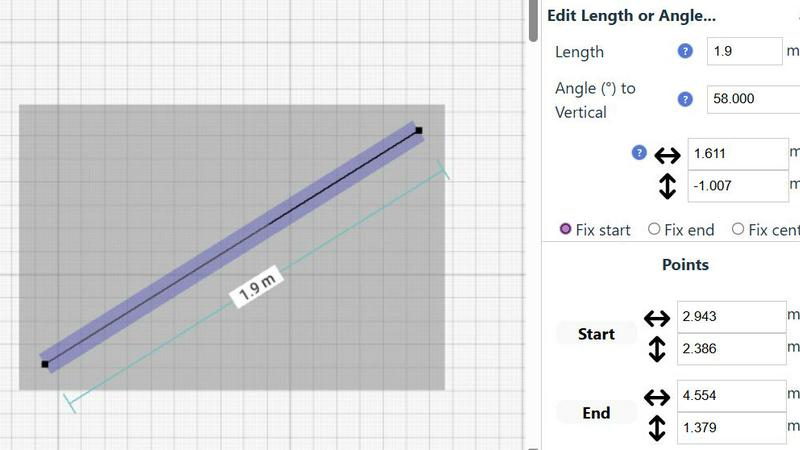
SimpleDraw ensures that every drawing is both accurate and to scale, allowing users to create precise designs effortlessly. The platform features smart alignment tools that help in placing points and lines exactly as desired, providing visual feedback throughout the drawing process.
Specialized Floor Plan Creator
With a dedicated Floor Plan Mode, SimpleDraw allows users to create intricate floor plans complete with walls, doors, and windows. This feature enables quick visualization of layouts, facilitating informed decisions for renovations and interior design projects.
Smart Alignment System
The innovative Smart Alignment System assists users in positioning elements with pinpoint accuracy. By simply hovering over desired areas, users receive clear visual cues to help them align points and lines correctly, enhancing the overall drawing experience.
Comprehensive Measurement System
SimpleDraw boasts a comprehensive measurement system that allows users to toggle between metric and standard US units. Contextual measurements are displayed dynamically, ensuring users can create their designs with the exact specifications they envision.
Use Cases
Dokie AI
Startup Founder Fundraising Pitches
Startup founders can transform their business plans and visions into compelling investor pitch decks in minutes. Dokie AI structures complex information, highlights key metrics with professional charts, and applies a sleek, credible design aesthetic that captures attention and communicates professionalism, accelerating the path to securing crucial funding.
Marketing Team Campaign Reports
Marketing professionals can instantly generate stunning performance review and campaign proposal presentations. By inputting data points and strategy notes, Dokie AI creates visually engaging slides that effectively communicate ROI, market analysis, and creative concepts to stakeholders, saving countless hours on manual design and formatting.
Educators & Trainers Creating Course Material
Educators and corporate trainers can rapidly develop engaging lecture slides and training modules from their lesson plans or textbooks. The AI organizes content into digestible segments, incorporates relevant imagery and diagrams for better knowledge retention, and maintains a consistent, professional format across all educational materials.
Consultants Delivering Client Proposals
Management and business consultants can convert detailed analysis documents and project outlines into polished client proposals and review presentations. Dokie AI ensures a high-standard, consistent branding and layout that reinforces expertise and clarity, allowing consultants to focus on strategy and client relationships instead of slide design.
SimpleDraw
Kitchen & Bathroom Floor Plans
Users can leverage SimpleDraw to plan their kitchen and bathroom renovations with accurate measurements and clear visualizations, ensuring that every detail is accounted for before starting any physical work.
Room Layouts & Furniture Planning
Whether designing a bedroom, living room, or office, SimpleDraw helps users visualize furniture arrangements and check spatial compatibility, ensuring that new purchases fit perfectly into existing layouts.
House & Apartment Plans
With SimpleDraw, creating complete floor plans for homes or rental listings is straightforward. Users can easily design layouts that optimize space usage, making it an invaluable tool for both homeowners and real estate agents.
Community-Driven Development
As an evolving platform, SimpleDraw encourages user feedback through its community-driven development approach. By engaging with users on platforms like Discord, it continuously adapts and improves based on real-world needs.
Overview
About Dokie AI
Dokie AI is a revolutionary, game-changing AI presentation maker that completely transforms how professionals create and deliver visual content. It is not just another template-based tool; it is a true AI-powered design partner that automates the entire presentation creation process. Powered by the advanced Claude Opus 4.6 model, Dokie AI intelligently handles everything from content structuring and layout selection to typography and visual design, delivering polished, professional Dokie AI PPT slides in minutes. It is designed for business professionals, educators, marketers, and startup founders who need to produce high-impact presentations but lack the time, budget, or specialized design skills. The core value proposition is unlocking unprecedented productivity and creative potential, allowing users to move from a simple idea or an existing document to a stunning, presentation-ready deck with zero manual design work. This transformative platform supports multiple workflows, including generating from scratch, beautifying existing slides, and converting various document formats, making it the ultimate all-in-one solution for modern presentation needs.
About SimpleDraw
SimpleDraw is a revolutionary browser-based platform that redefines the complex landscape of scale drawing, making it accessible to everyone, from casual users to skilled DIY enthusiasts and aspiring designers. With its user-friendly interface, SimpleDraw empowers individuals to create precise and professional-grade technical drawings without requiring any prior CAD experience. It effectively democratizes the design process by offering a completely free, no-login-required solution that stands in stark contrast to traditional, expensive software. The core value of SimpleDraw lies in its ability to combine powerful functionalities with effortless simplicity, enabling users to visualize their ideas, whether they are drafting room layouts, planning garden renovations, or conceptualizing furniture designs. By eliminating barriers like cost, complexity, and installation requirements, SimpleDraw places transformative design capabilities directly in the hands of users, all within a modern web browser.
Frequently Asked Questions
Dokie AI FAQ
How is Dokie AI different from traditional PowerPoint or Google Slides?
Dokie AI is fundamentally different because it is an AI design partner, not just a blank canvas or template library. Traditional tools require you to manually design every element. Dokie AI automates the entire creative process—from structuring your content and choosing layouts to applying professional design principles—using advanced AI. You provide the idea, and it delivers a complete, polished presentation.
What AI model does Dokie AI use, and why does it matter?
Dokie AI is powered by Claude Opus 4.6, one of the most advanced large language models available. This matters because its superior reasoning and creative capabilities enable true understanding of your topic, allowing it to generate coherent, well-structured, and contextually appropriate content and designs, far surpassing the capabilities of simpler AI tools or basic templates.
Can I edit the presentations after Dokie AI creates them?
Absolutely. Dokie AI generates fully editable PowerPoint (PPT/PPTX) files. You have complete control to tweak the text, adjust images, modify colors, or change any element to perfectly match your needs. The AI provides a powerful, professional first draft that you can then customize as much or as little as you wish.
What file formats can I use with the Beautify and Convert tools?
The platform is highly versatile. You can beautify existing PowerPoint files. For conversions, Dokie AI supports PDF to PPT, Word (DOC/DOCX) to PPT, HTML to PPT, and even YouTube to PPT by analyzing video content. This makes it a central hub for transforming almost any source material into a presentation.
SimpleDraw FAQ
What makes SimpleDraw different from traditional CAD software?
SimpleDraw stands out by offering a completely free and accessible platform that requires no installation or login. Unlike traditional CAD software, it combines advanced drawing capabilities with an intuitive interface suitable for users of all skill levels.
Do I need to create an account to use SimpleDraw?
No, SimpleDraw is designed to be user-friendly and accessible; therefore, it does not require any account creation. Users can start drawing immediately in their web browser without any barriers.
Can I use SimpleDraw on any device?
Yes, SimpleDraw is a browser-based tool, meaning it can be accessed from any modern web browser on various devices, including desktops, laptops, tablets, and even smartphones.
Is there customer support available for SimpleDraw users?
Yes, SimpleDraw provides support through its community-driven channels. Users are encouraged to join the Discord server for updates, assistance, and to participate in discussions about future feature developments.
Alternatives
Dokie AI Alternatives
Dokie AI stands as a pioneering force in the AI presentation maker category, transforming how professionals create slide decks. It leverages advanced AI, specifically Claude Opus 4.6, to generate not just content but the entire visual design and structure from a simple text prompt, moving beyond static templates to offer a truly intelligent design partner. Users often explore alternatives for various reasons, including budget considerations, specific feature requirements not covered by their current tool, or a need for integration with other platforms in their workflow. The search for a different solution is a natural part of finding the perfect fit for one's unique presentation style and professional demands. When evaluating other options, it's crucial to look beyond surface-level claims. Consider the depth of AI integration—does it merely suggest templates or genuinely understand and build your narrative? Assess the flexibility of output, the quality of automated design, and how well the tool adapts to different use cases, from business pitches to academic lectures. The right alternative should feel like a seamless extension of your creative process.
SimpleDraw Alternatives
SimpleDraw is a powerful, free, browser-based tool designed for creating precise scale drawings and floor plans. It falls within the category of design tools, specifically tailored for casual users, DIY enthusiasts, and aspiring designers who wish to bring their creative visions to life without needing extensive CAD experience. Users often seek alternatives to SimpleDraw for various reasons, including the desire for additional features, specific platform compatibility, or even pricing considerations. When exploring options, it's essential to look for tools that maintain the balance between user-friendliness and powerful capabilities, ensuring they can meet your specific design needs without overwhelming complexity.