
JobHustler vs Refbox
Side-by-side comparison to help you choose the right AI tool.

JobHustler
JobHustler instantly creates tailored resumes and cover letters, optimizing your job applications effortlessly.
Last updated: March 4, 2026

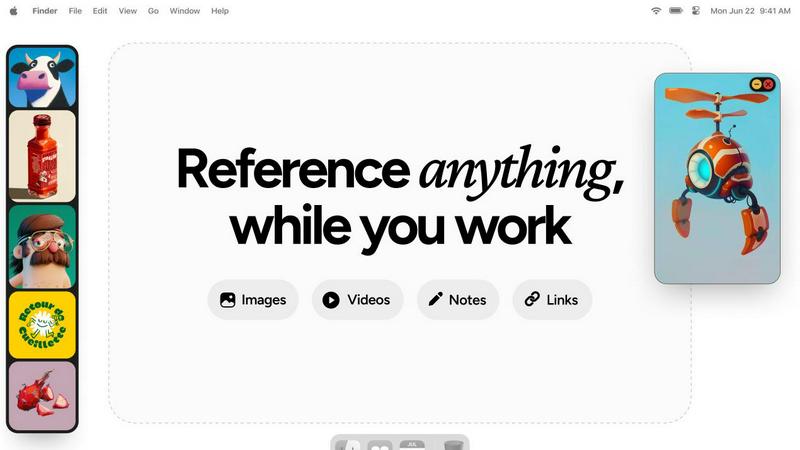
Refbox transforms your workflow by providing instant access to all your references, keeping you focused and productive.
Last updated: February 28, 2026
Visual Comparison
JobHustler

Refbox
Feature Comparison
JobHustler
AI-Powered Tailoring
JobHustler employs advanced AI technology to analyze job postings and extract key requirements, enabling it to create tailored resumes and cover letters that align perfectly with what employers seek. This feature significantly enhances the chances of getting noticed by hiring managers.
ATS-Friendly Formatting
Understanding the importance of Applicant Tracking Systems in the hiring process, JobHustler optimizes resumes and cover letters with ATS-friendly formatting. This means that the documents are structured in a way that ensures they pass through automated filters, increasing the likelihood of reaching human recruiters.
Customized Cover Letters
With JobHustler, users can generate customized cover letters that are specifically designed for the company and position they are applying for. This personalized approach not only showcases the applicant's interest in the role but also highlights their relevant skills and experiences in a professional tone.
Free Usage and Easy Access
JobHustler allows users to generate documents without needing to set up an account, making it quick and easy to use. Additionally, the platform offers free usage that recharges over time, allowing job seekers to test and refine their applications without upfront costs.
Refbox
Always-On-Top Frames
Refbox utilizes resizable, always-on-top frames that allow users to keep their references visible over any application. This feature eliminates the need for constant window switching, enabling a more focused and uninterrupted creative workflow.
Customizable Sidebar
Users can easily add media directly from the web, computer, or clipboard into a customizable sidebar. This sidebar can be resized and rearranged to fit individual preferences, ensuring that vital inspiration is always at hand and organized for quick access.
Masonry Mode and Full-Screen Gallery
Refbox offers a Masonry Mode for a visually appealing, Pinterest-style layout, alongside a full-screen Gallery option that is perfect for dual monitor setups. This flexibility allows users to view and manage their references in a way that best suits their working style.
Markdown-Enabled Notes
The app supports markdown-enabled notes, allowing users to jot down ideas, tasks, or instructions directly within Refbox. This feature streamlines the creative process by keeping everything in one place and reducing the need to switch to different applications for note-taking.
Use Cases
JobHustler
Job Seekers
JobHustler is ideal for individuals actively seeking employment who want to create standout resumes and cover letters that cater to specific roles. By utilizing the tool, they can significantly improve their chances of landing interviews.
Career Changers
For professionals looking to transition into a new industry or role, JobHustler's tailored approach enables them to highlight transferable skills and relevant experiences, making it easier to position themselves as strong candidates in unfamiliar job markets.
Recent Graduates
Fresh graduates entering the job market can benefit immensely from JobHustler, as it helps them craft polished resumes and cover letters that emphasize their academic achievements and internships, even when they have limited work experience.
Freelancers and Contractors
Freelancers and contractors can use JobHustler to create customized proposals and resumes that cater to specific gigs or clients, ensuring they present their skills and experiences in the most relevant light to secure opportunities.
Refbox
Graphic Design Projects
For graphic designers working on multiple projects, Refbox serves as an invaluable tool by allowing them to collect and organize visual references, color palettes, and typography examples all in one place.
Animation Workflows
Animators can utilize Refbox to keep keyframes, character designs, and animation references visible while they work, enhancing their ability to create fluid and accurate animations without losing their train of thought.
UI/UX Development
UI and UX developers benefit from having access to design inspirations, user flow diagrams, and feedback notes pinned in a floating frame, enabling them to iterate on designs quickly and effectively.
Illustration and Concept Art
Illustrators and concept artists can gather inspiration from various sources and keep it organized in Refbox. With the ability to view and compare references side by side, artists can make informed decisions while they create.
Overview
About JobHustler
JobHustler is an innovative, AI-powered tool designed to streamline the job application process by generating professional resumes and cover letters in mere minutes. By allowing users to simply paste job descriptions into the platform, JobHustler tailors resumes and cover letters to meet the specific requirements and expectations of employers. It is particularly beneficial for job seekers who want to enhance their chances of landing an interview by producing ATS-friendly documents that are optimized for Applicant Tracking Systems. This ensures that resumes and cover letters not only look professional but also pass through automated filters used by many employers. Additionally, JobHustler refines language for greater clarity and impact, ensuring that users present their qualifications effectively. The platform's unique features include role-specific bullet points and customized cover letters that reflect the tone and values of the target company. With no account setup required and free uses that recharge over time, JobHustler is accessible and user-friendly, making it an essential tool for anyone navigating the job market.
About Refbox
Refbox is a groundbreaking floating reference app tailored specifically for creatives who seek to enhance their workflow without interruptions. This innovative tool empowers users to pin images, GIFs, videos, and notes in always-on-top frames, ensuring that essential references are readily available no matter what application is in use. With Refbox, the cumbersome task of switching between windows is a thing of the past; it's designed to seamlessly integrate inspirations into your creative process, making it ideal for artists, designers, animators, and modelers alike. The app's user-friendly interface allows for easy media addition from various sources, including the web, local storage, or even the clipboard, into a customizable sidebar that can be resized to fit your needs. With features like Masonry Mode and a full-screen Gallery for dual monitors, Refbox adapts to the diverse requirements of creative professionals. By facilitating markdown-enabled notes, clickable links, and frame-by-frame playback for videos and GIFs, Refbox stands as the ultimate companion for those who need instant access to their visual inspiration, ultimately boosting productivity and creativity.
Frequently Asked Questions
JobHustler FAQ
How does JobHustler ensure my documents are ATS-friendly?
JobHustler utilizes AI algorithms to format resumes and cover letters according to ATS standards, ensuring that your documents are structured correctly to pass through automated systems without issues.
Is there a limit to how many resumes or cover letters I can generate?
While the first generation of a resume and cover letter is free, there are various plans available, including a single purchase option for additional generations, making it easy to create multiple tailored documents as needed.
Do I need to create an account to use JobHustler?
No, JobHustler allows users to generate documents without any account setup, making it a hassle-free solution for job seekers who want to start quickly.
Can I customize the tone and style of my documents?
Yes, JobHustler offers multiple tones and cover letter types, allowing users to choose the style that best reflects their personality and the nature of the job they are applying for, ensuring a personalized touch in their applications.
Refbox FAQ
How does Refbox improve productivity?
Refbox enhances productivity by providing instant access to references and notes without the need to switch between multiple applications, allowing creatives to maintain their flow and focus.
Can I use Refbox on multiple monitors?
Yes, Refbox supports dual monitor setups, and its full-screen Gallery feature is designed to maximize screen real estate, making it easier to view and manage references.
What types of media can be pinned in Refbox?
Users can pin images, GIFs, videos, and notes from various sources, including the web, local files, or directly from the clipboard, ensuring a versatile workspace.
Is there a way to share collections created in Refbox?
While the primary focus of Refbox is to facilitate individual workflows, users can save or copy media to share with others, making collaboration easier when needed.
Alternatives
JobHustler Alternatives
JobHustler is an innovative AI-powered tool designed to streamline the job application process by generating tailored resumes and cover letters in minutes. Belonging to the Productivity & Management category, it focuses on creating professional, ATS-friendly documents that resonate with what employers seek. Users often explore alternatives to JobHustler for various reasons, including pricing, additional features, or specific platform compatibility that better meets their individual needs. When selecting an alternative, it's crucial to consider ease of use, the quality of generated documents, and whether the tool aligns with your career goals and application strategies.
Refbox Alternatives
Refbox is a groundbreaking floating reference app that empowers creatives by providing instant access to images, videos, and notes, all without disrupting their workflow. Designed specifically for artists, designers, and animators, Refbox eliminates the hassle of switching between applications, allowing for a seamless integration of inspiration into the creative process. As professionals seek tools that enhance their productivity and creativity, they may look for alternatives due to factors like pricing, specific feature sets, or compatibility with their preferred platforms. When searching for an alternative to Refbox, it's crucial to consider what features matter most for your workflow. Look for options that offer similar floating reference capabilities, an intuitive interface, and robust note-taking functionalities. Additionally, consider the pricing models and whether the alternative meets your unique needs as a creative professional, ensuring that it enhances rather than hinders your productivity.