
Code Word Solver - Missing Words Finder vs PseudoRun
Side-by-side comparison to help you choose the right AI tool.

Code Word Solver - Missing Words Finder
Unlock any codeword puzzle instantly with our powerful pattern-matching solver.
Last updated: February 28, 2026

PseudoRun
PseudoRun is the premier free online platform for mastering IGCSE pseudocode with real-time validation and practice.
Last updated: March 1, 2026
Visual Comparison
Code Word Solver - Missing Words Finder

PseudoRun
Feature Comparison
Code Word Solver - Missing Words Finder
Advanced Pattern Recognition Engine
This isn't just a simple wildcard search. The solver's core intelligence lies in its sophisticated pattern-matching system. You can use dots or question marks for unique unknown letters, but the real game-changer is using numbers to denote repeated unknown letters. For instance, inputting "112.2" tells the solver to find words where the first two letters are the same, the third is different, and the fourth matches the second letter—perfectly matching a word like "llama." This ensures logical consistency across the entire puzzle grid, mirroring the codeword's fundamental rule that the same number always represents the same letter.
Dual-Mode Solving Flexibility
The tool offers two transformative ways to tackle your puzzle, adapting to your specific sticking point. Use Single Pattern Solving to break down one troublesome word at a time by entering its known pattern. For more complex breakthroughs, employ Multi-Pattern Solving to input two linked word patterns simultaneously. This side-by-side analysis is incredibly powerful for cross-referencing shared number/letter relationships, allowing you to solve interconnected words and rapidly accelerate your progress through the entire puzzle grid.
Tiered Difficulty Dictionaries
Understanding that not all puzzles—or solvers—are created equal, this feature provides personalized word lists. Choose from an Easy dictionary (20k words) for common vocabulary, a Normal dictionary (115k words) for standard challenges, or a Hard dictionary (260k words) for the most obscure and demanding puzzles. This adaptive approach ensures you get relevant, accurate suggestions tailored to the specific difficulty you're facing, eliminating irrelevant clutter and focusing only on viable answers.
Community-Powered Word Database
The solver evolves with its community. If you encounter a valid word that isn't currently in the database, or you wish to add a specific definition for clarity, you can submit it directly through the tool. This collaborative feature means the word coverage continuously improves and expands over time, driven by real user experiences. It transforms a static tool into a living resource that grows smarter and more comprehensive with every puzzle solved by its community.
PseudoRun
IGCSE Exam Focused
PseudoRun is meticulously aligned with the Cambridge IGCSE Computer Science pseudocode specifications and exam patterns. This ensures that students are not only learning effectively but also preparing optimally for their exams. The platform's focus on IGCSE content provides users with confidence and clarity as they tackle their studies.
Real-Time Validation
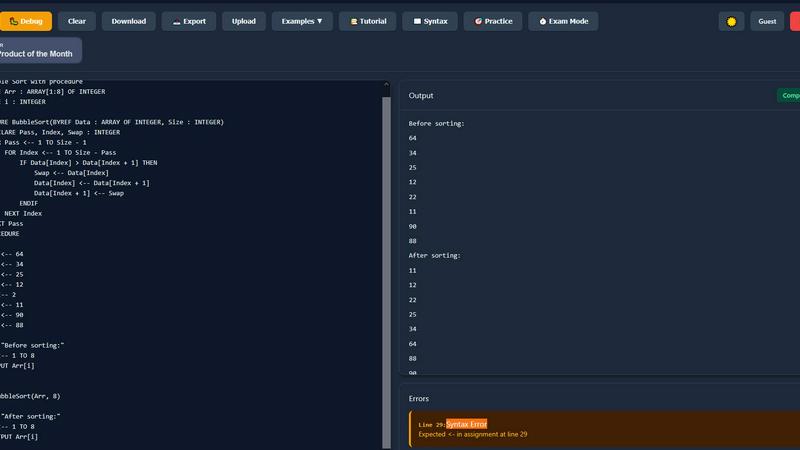
One of the standout features of PseudoRun is its real-time validation system. As users write their pseudocode, the platform instantly checks for syntax errors and provides immediate feedback. This capability allows learners to correct mistakes on the spot, fostering a deeper understanding of correct coding practices and improving their overall coding skills.
Step-by-Step Debugger
The step-by-step debugger in PseudoRun is a powerful tool for enhancing learning. It enables users to execute their pseudocode line-by-line, tracking variable changes along the way. This feature demystifies complex algorithms, allowing students to visualize how their code works in real-time and reinforcing their grasp of programming logic.
Free Cloud Storage
With PseudoRun, users can save an unlimited number of pseudocode programs directly to the cloud. This feature allows students to access their work from any device, ensuring that they can continue their practice and review their progress anytime, anywhere. This flexibility is essential for effective exam preparation.
Use Cases
Code Word Solver - Missing Words Finder
Breaking Through a Stubborn Mental Block
Every solver reaches a point where a single word halts all progress. Instead of resorting to random guesses that could derail the entire puzzle, input the known letter pattern (e.g., ".A..Y") into the Single Pattern Solver. Instantly, you'll receive a manageable list of candidate words like "DAISY" or "HAZY." This targeted assistance provides the crucial clue needed to unlock that word and, by extension, reveal new letter mappings that cascade through the rest of the grid, restarting your flow.
Solving Interconnected Word Clusters
When you have partial letters in two or more words that share common number codes, the Multi-Pattern Solver becomes indispensable. For example, if you know the patterns for a 5-letter and a 7-letter word share certain number positions, inputting both patterns together allows the tool to find word pairs that satisfy all shared relationships simultaneously. This method efficiently solves linked words that would be incredibly time-consuming to figure out in isolation, providing a strategic shortcut.
Tailoring Support to Puzzle Difficulty
Facing a gentle puzzle in a daily newspaper? Switch to the Easy dictionary for quick, common-word suggestions. Tackling a cryptic weekend puzzle known for obscure vocabulary? Select the Hard dictionary to ensure the solver considers a vast lexicon of possibilities. This use case allows you to calibrate the tool's assistance to match the challenge at hand, ensuring the help you receive is always appropriate and never gives away answers too easily on simpler puzzles.
Learning and Improving Solving Techniques
Beyond just getting an answer, the solver is an excellent educational tool. By experimenting with different pattern inputs and observing the resulting word lists, you can learn common letter patterns, word structures, and frequency distributions. Seeing how a pattern like "11.E" generates words such as "OOZE" teaches you about letter repetition and endings, actively improving your own innate codeword solving skills and pattern recognition for future puzzles.
PseudoRun
Exam Preparation
Students can utilize PseudoRun to prepare for their IGCSE Computer Science exams effectively. The platform's alignment with exam specifications, coupled with its practice problems, allows learners to focus on the topics that matter most, enhancing their readiness for exam day.
Learning Algorithm Concepts
Educators can use PseudoRun as a teaching aid to illustrate algorithm concepts in a clear and engaging manner. By encouraging students to experiment with pseudocode, teachers can facilitate deeper understanding and retention of algorithm principles, making lessons more impactful.
Debugging Practice
PseudoRun serves as an excellent environment for students to hone their debugging skills. The step-by-step execution and variable tracking features allow learners to experiment with their code, understand errors, and develop problem-solving strategies crucial for programming success.
Collaborative Learning
PseudoRun can be used in group settings where students collaborate on pseudocode projects. This fosters teamwork, encourages discussion around coding concepts, and helps students learn from one another, making the learning experience more enriching and comprehensive.
Overview
About Code Word Solver - Missing Words Finder
Tired of hitting a frustrating wall in your codeword puzzle? The Code Word Solver - Missing Words Finder is your game-changing companion, designed to transform guesswork into strategic, confident solving. This powerful online tool is built specifically for codeword (or code-cracker) puzzles, where letters are replaced by numbers from 1 to 26. Its core mission is to unlock the puzzle's potential by intelligently narrowing down possible word matches based on the letter patterns you've already uncovered. Instead of staring blankly at a grid of numbers, you input what you know—using a smart pattern system—and the solver instantly provides a curated list of candidate words that fit the exact cryptographic pattern. It's built for puzzle enthusiasts of all levels, from beginners seeking a helpful nudge to seasoned solvers tackling the most challenging grids. The tool's transformative power lies in its dual-solving modes and adaptive dictionaries, empowering you to decode the grid with precision and speed, turning a daunting challenge into a satisfying and achievable victory.
About PseudoRun
PseudoRun is a groundbreaking online platform designed to transform the learning experience for students and educators in the realm of pseudocode and algorithms. Tailored specifically for beginners and those preparing for the Cambridge IGCSE Computer Science exams, it offers an interactive space where users can write, run, and test their pseudocode in real-time. PseudoRun eliminates the distractions often found in traditional programming environments, allowing learners to focus solely on mastering core concepts. With features such as instant feedback, step-by-step debugging, and a clean interface, PseudoRun empowers users to explore their creativity, debug ideas, and solidify their understanding of programming fundamentals. The platform is designed to bridge the gap between theory and practical application, making it an invaluable resource for anyone looking to excel in IGCSE Computer Science. With PseudoRun, students can confidently approach their studies, knowing they have the ultimate tool at their fingertips for mastering pseudocode.
Frequently Asked Questions
Code Word Solver - Missing Words Finder FAQ
How do I enter a pattern for unknown letters?
You enter patterns using a combination of known letters, placeholders, and numbers. Use any known letters you have uncovered. For unique unknown letters (each a different letter), use a dot (.) or question mark (?). The key feature is using the same number to represent the same unknown letter. For example, the pattern "1.2.2.1" would find words where the first and last letters are identical, and the third and fourth letters are also identical to each other, like "ABBA".
What is the difference between the Easy, Normal, and Hard dictionaries?
The dictionaries differ in the size and complexity of their word lists, allowing you to match the solver's suggestions to your puzzle's difficulty. The Easy dictionary contains approximately 20,000 common words, ideal for simpler puzzles. The Normal dictionary has about 115,000 words, suitable for standard crosswords and codewords. The Hard dictionary is the most comprehensive with around 260,000 words, including obscure and less common vocabulary for the toughest challenges.
Can I use the solver for an entire puzzle at once?
The Code Word Solver is designed as a strategic aid for specific words or word pairs, not an automatic full-puzzle solver. You use it to find candidates for individual words or linked words that are blocking your progress. This approach preserves the fun and challenge of the puzzle while giving you a powerful tool to overcome specific obstacles, ensuring you remain the active solver.
What happens if the word I need isn't in the database?
The tool features a community-powered submission system. If you confirm a word is correct (e.g., from a puzzle's answer key) but it doesn't appear in the results, you can use the "Submit a new word or definition" feature. This allows you to contribute the missing word, helping to expand and improve the database for yourself and all future users.
PseudoRun FAQ
How does PseudoRun help with IGCSE exam preparation?
PseudoRun is specifically designed to align with the Cambridge IGCSE Computer Science pseudocode specifications, offering practice problems and features that prepare students effectively for their exams.
Is PseudoRun free to use?
Yes, PseudoRun is completely free to use. There are no hidden fees or premium features, allowing all students to access all tools and resources without any financial barriers.
Can I access my work from multiple devices?
Absolutely! PseudoRun offers free cloud storage that allows users to save their pseudocode programs and access them from any device, ensuring seamless learning and practice.
Does PseudoRun provide support for debugging?
Yes, PseudoRun features a powerful step-by-step debugger that allows users to execute their pseudocode line-by-line, track variable changes, and debug their code effectively. This feature enhances the learning process and builds stronger programming skills.
Alternatives
Code Word Solver - Missing Words Finder Alternatives
Code Word Solver - Missing Words Finder is a specialized digital tool designed for puzzle enthusiasts, specifically those tackling codeword or code-cracker puzzles. It belongs to the niche category of word game solvers and aids, transforming a frustrating guessing game into a logical deduction process. By analyzing letter patterns and number mappings, it provides targeted word suggestions to help users confidently complete their grids. Users often explore alternatives for various reasons. Some may seek different pricing models, such as a one-time purchase versus a subscription. Others might need specific features, like mobile app integration for on-the-go solving or a more extensive dictionary for advanced puzzles. Platform compatibility, user interface design, and the depth of solving logic are also common deciding factors. When evaluating an alternative, consider the core solver's intelligence. Does it handle complex pattern matching and repeated letters effectively? Assess the dictionary's breadth and the ability to customize word lists. Finally, look for a tool that empowers your solving journey without removing the satisfaction of the puzzle, offering clarity and control rather than just spitting out an answer.
PseudoRun Alternatives
PseudoRun is a groundbreaking pseudocode platform specifically designed for IGCSE students and educators, allowing users to write, test, and master algorithms effortlessly. This innovative tool has gained popularity for its focus on enhancing the learning experience through real-time feedback and a distraction-free interface. However, users often seek alternatives due to various reasons such as pricing, specific feature sets, or compatibility with different learning styles and platforms. When looking for alternatives, it is essential to consider factors such as alignment with educational standards, user interface simplicity, interactive capabilities, and community support. The right alternative should not only offer comparable features but also cater to individual learning needs, making the journey of mastering algorithms as engaging and effective as possible.