
poseup vs RemoveTexts
Side-by-side comparison to help you choose the right AI tool.

poseup
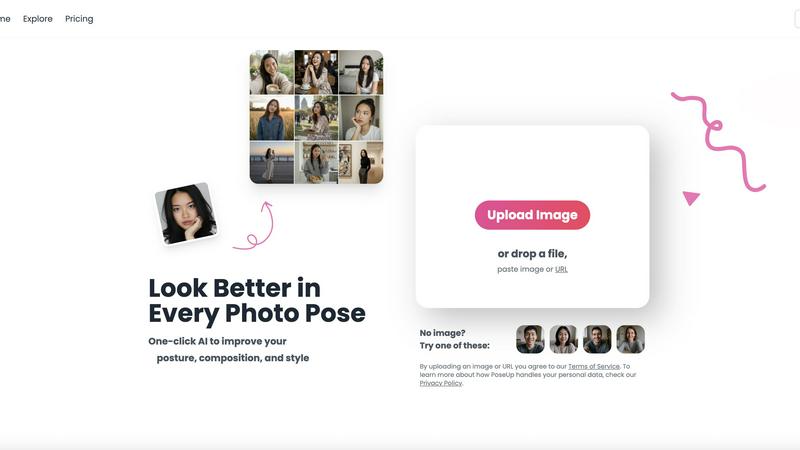
PoseUp instantly perfects your posture and composition in any photo with one click of AI.
Last updated: March 1, 2026

RemoveTexts
Effortlessly erase text and watermarks from images in seconds with RemoveTexts, the AI-powered tool that requires no design skills.
Last updated: March 11, 2026
Visual Comparison
poseup
RemoveTexts

Feature Comparison
poseup
One-Click AI Pose Enhancement
With a single click, PoseUp's advanced AI engine comprehensively analyzes your photo to automatically improve poses, correct posture, and optimize the overall composition. It intelligently suggests better body positioning and alignment, transforming awkward stances into natural, confident, and visually appealing postures without any manual effort or technical skill required from the user.
Intelligent Posture Correction Technology
This feature specifically targets and corrects poor posture within images. The AI meticulously analyzes the subject's stance, identifying slouches, uneven shoulders, or unflattering angles. It then applies precise adjustments to straighten the spine, align the body, and project an aura of confidence and professionalism, turning a subpar snapshot into a powerful portrait.
Universal Composition Optimization
PoseUp goes beyond just the subject to enhance the entire photo's composition. The AI evaluates elements like framing, balance, and negative space to ensure the subject is perfectly positioned within the scene. This creates a more harmonious, engaging, and professionally composed image that draws the viewer's eye correctly, elevating amateur shots to an artistic standard.
Multi-Scene Versatility & Support
The platform is engineered to deliver exceptional results across a wide array of scenarios. Whether it's a casual coffee shop work photo, an outdoor adventure shot, a professional headshot, a fitness progress picture, or a cozy lifestyle moment, PoseUp's AI is trained to understand and enhance the context-specific nuances of each setting for consistently professional outcomes.
RemoveTexts
Paint to Remove
This feature allows users to have precise control over the text removal process. By simply brushing over the specific text areas they want to eliminate, users can ensure that only the intended sections are erased, leaving the rest of the image intact.
Auto Remove All
Leveraging the power of AI, this feature automatically detects and removes every text element in an image with just one click. This time-saving option is ideal for users who need to quickly clean up images without the hassle of manual selection.
Edit & Replace Text
With this feature, users can not only remove text but also edit and replace existing text in images. RemoveTexts intelligently matches the original font style, ensuring that any changes blend perfectly into the image, maintaining its visual integrity.
Remove Objects
Beyond text removal, this feature allows users to erase unwanted objects, logos, or visual elements from their images. This versatility makes RemoveTexts a powerful tool for enhancing photos, whether for personal use or professional projects.
Use Cases
poseup
Elevating Professional Headshots and LinkedIn Profiles
Individuals and professionals can transform basic self-taken photos into polished, credible headshots suitable for LinkedIn, company websites, and professional portfolios. PoseUp corrects posture, ensures a confident stance, and optimizes lighting, creating a strong first impression that conveys competence and approachability without the cost of a photographer.
Enhancing Social Media and Content Creation
Content creators, influencers, and social media enthusiasts can instantly upgrade their feed quality. PoseUp fixes unflattering angles in selfies, improves couple pose ideas for engagement photos, and refines full-body shots for fashion or fitness content. This ensures every post looks meticulously crafted, boosting engagement and personal brand aesthetic.
Perfecting Family and Event Photography
Capture the magic of family gatherings, vacations, and milestones without worrying about imperfect poses. PoseUp can analyze group photos, suggest better positioning, and correct the posture of individuals, ensuring that cherished memories are preserved in beautiful, balanced, and professionally composed images that everyone will love to share and frame.
Optimizing Fitness and Wellness Portfolios
Fitness trainers, athletes, and wellness coaches can showcase their progress and professionalism with enhanced photos. PoseUp helps define and correct form in action shots, improves muscle definition through better lighting and posture analysis, and creates compelling before-and-after visuals that are crucial for marketing and client motivation in the health industry.
RemoveTexts
Cleaning Screenshots
Professionals often need to share screenshots for presentations or reports. RemoveTexts allows them to quickly eliminate unnecessary text or watermarks, ensuring that only relevant information is showcased, enhancing clarity and professionalism.
E-commerce Image Optimization
E-commerce sellers can use RemoveTexts to clean product images by removing distracting text elements, logos, or watermarks. This leads to polished visuals that attract customers and promote better sales.
Social Media Content Creation
Content creators on platforms like Instagram and Facebook can benefit from RemoveTexts to quickly refine their images. By removing unwanted text or overlays, creators can produce visually appealing posts that engage their audience without distractions.
Legal Document Redaction
Legal professionals often need to redact sensitive information from documents. RemoveTexts enables them to efficiently remove text without leaving traces, ensuring confidentiality while maintaining the document's overall layout and appearance.
Overview
About poseup
PoseUp is a game-changing AI-powered platform that unlocks the professional potential hidden within every photograph. It transforms ordinary, awkward, or poorly composed images into stunning, polished portraits with a single click. By leveraging advanced artificial intelligence, PoseUp automatically analyzes critical elements like human posture, body positioning, lighting, and overall composition to provide intelligent, transformative enhancements. This tool is built for anyone who wants to look their best, from social media enthusiasts and content creators to professionals needing headshots and families capturing precious moments. Its core, revolutionary value proposition lies in democratizing professional photography skills; it completely eliminates the need for extensive technical knowledge, expensive equipment, or costly photo shoots. Whether you're fixing a slouched posture in a casual selfie, optimizing the composition of a couple's photo, or refining a full-body shot for a portfolio, PoseUp delivers studio-quality results instantly. Supporting various scenarios from casual lifestyle shots and outdoor adventures to fitness photos and professional settings, PoseUp is the versatile companion you need for all your visual storytelling, ensuring you look confident and composed in every frame.
About RemoveTexts
RemoveTexts is an innovative AI-powered online tool designed to effortlessly remove unwanted text from images. It simplifies the image editing process by allowing users to upload images and eliminate text without requiring any prior design skills. Whether you're dealing with watermarks, meme text, subtitles, or branded overlays, RemoveTexts harnesses advanced deep learning technology to detect and erase text while seamlessly reconstructing the original background. This tool is perfect for a wide range of users, including designers, marketers, and everyday individuals needing clean visuals quickly. With the capability to process images in various formats and languages, RemoveTexts delivers high-quality results in under 30 seconds, making it an essential tool for anyone looking to enhance their visual content efficiently.
Frequently Asked Questions
poseup FAQ
How does PoseUp work?
PoseUp uses sophisticated artificial intelligence models trained on vast datasets of professional photography. When you upload an image, the AI automatically analyzes key elements like human posture, body joint positioning, composition, and lighting. It then applies intelligent enhancements to adjust the pose, correct alignment, and optimize the overall aesthetic, delivering a transformed image in seconds.
What kind of photos can I upload?
You can upload a wide variety of photos including selfies, portraits, couple photos, group shots, and full-body images. The platform supports common file formats like JPG, PNG, WEBP, and HEIC, with images up to 5MB in size. It is designed for casual lifestyle, outdoor, professional, and fitness scenarios, making it versatile for most personal photography needs.
Is my data and privacy protected?
Yes. PoseUp states that by uploading an image, you agree to their Terms of Service, and they encourage users to review their Privacy Policy to understand how personal data is handled. The platform is designed with data security in mind, though users should avoid uploading highly sensitive or confidential images as a general best practice.
Do I need any photography skills to use PoseUp?
Absolutely not. This is the core game-changing value of PoseUp. It is specifically designed to democratize professional photo enhancement. No prior photography skills, technical knowledge, or editing experience is required. The entire process is automated—you simply upload your photo, and the AI handles all the complex adjustments to deliver a professionally enhanced result.
RemoveTexts FAQ
How does RemoveTexts work?
RemoveTexts uses advanced AI technology to analyze images and intelligently reconstruct backgrounds where text has been removed. It utilizes deep learning inpainting techniques to ensure seamless results.
What file formats does RemoveTexts support?
RemoveTexts accepts images in JPG, PNG, and WebP formats, accommodating a variety of image types for user convenience.
Is there a limit to the image size I can upload?
Yes, images must be up to 10 MB in size for optimal processing. This ensures that the tool can efficiently handle the uploads without compromising quality.
Can I use RemoveTexts for commercial projects?
Absolutely! RemoveTexts is trusted by many professionals, including marketers and designers, making it suitable for commercial use in various industries.
Alternatives
poseup Alternatives
PoseUp is a transformative AI-powered platform in the image enhancement category, designed to instantly perfect posture and composition in any photograph. It unlocks professional potential by automatically analyzing and correcting human poses, making polished portraits accessible to everyone. Users often explore alternatives for various reasons, such as seeking different pricing models, specific feature sets not covered by one tool, or compatibility with their preferred platform or workflow. The need might stem from budget constraints, a desire for more manual control, or requirements for batch processing. When evaluating other solutions, consider the core AI capabilities for posture and composition correction, the ease of use and speed of results, the privacy and security measures for your photos, and the overall value for your specific use cases, whether for professional branding or personal social media.
RemoveTexts Alternatives
RemoveTexts is an innovative AI-powered tool designed to streamline the process of removing unwanted text from images. Falling under the category of image and photo editing, this tool allows users to effortlessly clean screenshots, eliminate watermarks, and erase any distracting text elements with remarkable efficiency. Users often seek alternatives to RemoveTexts due to various reasons, including pricing structures, specific feature requirements, or compatibility with different platforms. When searching for an alternative, consider factors such as ease of use, the precision of text removal, and the ability to maintain image quality. Additionally, evaluate the range of features offered, such as object removal and language support, to ensure the chosen solution aligns with your specific needs and enhances your creative workflows.