
Finsi OS vs Playwriter
Side-by-side comparison to help you choose the right AI tool.

Finsi OS
Finsi OS empowers e-commerce by automating insights and actions to maximize customer lifetime value effortlessly.
Last updated: February 27, 2026

Visual Comparison
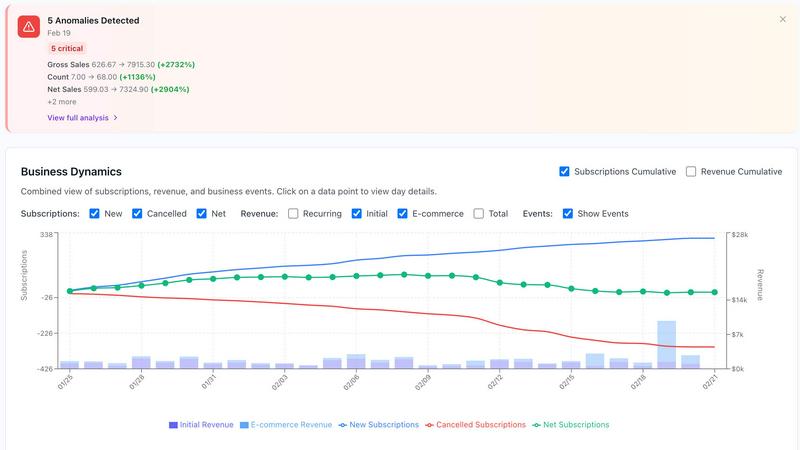
Finsi OS
Playwriter

Overview
About Finsi OS
Finsi OS is a groundbreaking AI Revenue Intelligence platform tailored specifically for direct-to-consumer (DTC) brands in the e-commerce and subscription sectors. Its primary goal is to empower businesses to minimize customer churn while maximizing customer lifetime value (LTV) through intelligent automation and actionable insights derived from data. By seamlessly integrating with popular tech stacks such as Shopify, Recharge, Klaviyo, Stripe, and Chargebee, Finsi OS adeptly identifies at-risk customers and initiates proactive retention strategies. The platform employs advanced AI agents to analyze customer behavior patterns, predict churn risks, and automatically execute personalized retention campaigns. This automation liberates marketing and customer success teams from tedious manual tasks, allowing them to focus on strategic initiatives. Developed by the visionary team that propelled Scentbird to millions of subscribers, Finsi OS encapsulates over a decade of retention expertise, making it an invaluable resource for brands of all sizes, from emerging startups to established enterprises. With proven results—including a 20% increase in LTV and a 50% reduction in customer acquisition costs (CAC)—Finsi OS enables brands to act on insights effectively rather than merely searching for them.
About Playwriter
AI agents cannot browse the web properly. They either have no browser access, or they get a fresh Chrome with no logins, no extensions, and instant bot detection. Playwriter gives them your actual browser session instead. One Chrome extension, full automation API, everything you are already logged into. Includes accessibility snapshots (5-20KB instead of 100KB+ screenshots), a debugger with breakpoints, live code editing, network interception, and video recording. Works with any MCP client: Cursor, Claude, VS Code, and more. Open source, MIT licensed.