
Photomaxxer vs RemoveTexts
Side-by-side comparison to help you choose the right AI tool.

Photomaxxer
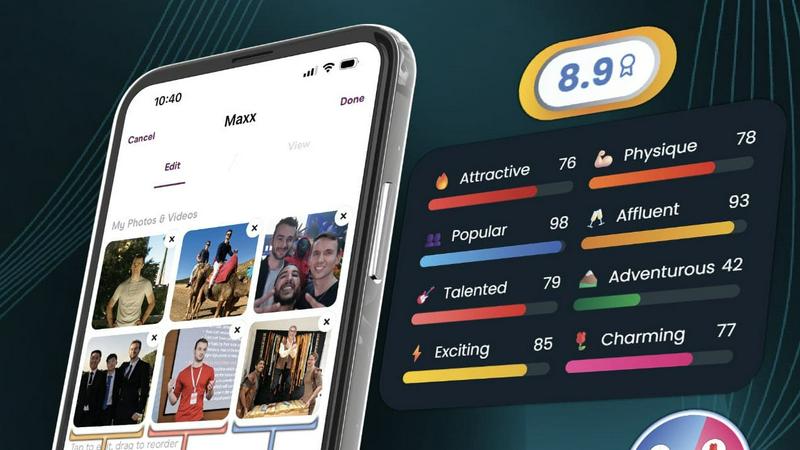
Photomaxxer uses AI to analyze your dating photos and select the best ones for more matches and meaningful connections.
Last updated: February 28, 2026

RemoveTexts
Effortlessly erase text and watermarks from images in seconds with RemoveTexts, the AI-powered tool that requires no design skills.
Last updated: March 11, 2026
Visual Comparison
Photomaxxer
RemoveTexts

Feature Comparison
Photomaxxer
AI Trained on Real Data
Photomaxxer utilizes advanced AI technology trained on real-world swipe data from successful dating profiles. This ensures that the insights you receive are grounded in actual user behavior, allowing for a more relevant and effective analysis.
8 Core Traits
The platform evaluates your photos using eight scientifically validated core traits, providing a comprehensive overview of how your images are likely to perform. This feature ensures that you understand the essential factors contributing to your dating success.
100+ Micro-Traits
Photomaxxer dives deep into the details by analyzing over 100 micro-traits for each photo. This extensive analysis uncovers subtle aspects that could make a significant difference in how potential matches perceive you, giving you a competitive edge.
Tailored Feedback
With Photomaxxer, you receive personalized feedback specifically tailored to your unique situation and dating goals. This bespoke guidance empowers you to make informed decisions about your profile, ensuring that you stand out from the competition.
RemoveTexts
Paint to Remove
This feature allows users to have precise control over the text removal process. By simply brushing over the specific text areas they want to eliminate, users can ensure that only the intended sections are erased, leaving the rest of the image intact.
Auto Remove All
Leveraging the power of AI, this feature automatically detects and removes every text element in an image with just one click. This time-saving option is ideal for users who need to quickly clean up images without the hassle of manual selection.
Edit & Replace Text
With this feature, users can not only remove text but also edit and replace existing text in images. RemoveTexts intelligently matches the original font style, ensuring that any changes blend perfectly into the image, maintaining its visual integrity.
Remove Objects
Beyond text removal, this feature allows users to erase unwanted objects, logos, or visual elements from their images. This versatility makes RemoveTexts a powerful tool for enhancing photos, whether for personal use or professional projects.
Use Cases
Photomaxxer
Enhancing Your Dating Profile
Photomaxxer is perfect for individuals looking to elevate their online dating profiles. By analyzing their existing photos, users can receive valuable feedback to refine and enhance their image selection, making them more appealing to potential matches.
Preparing for a First Date
Before stepping into the dating scene, users can utilize Photomaxxer's insights to understand which photos resonate best. This preparation helps boost confidence and ensures that they present their best selves when meeting someone new.
Fine-Tuning Existing Profiles
For those who have already been using dating apps but are not seeing desired results, Photomaxxer offers a solution. By revisiting their photo choices and applying the AI's feedback, users can transform their profiles and significantly increase their chances of success.
Understanding Female Preferences
Men often struggle to understand what women find attractive in photos. Photomaxxer bridges this gap by providing insights based on real swipe data, allowing users to align their photo choices with female preferences and improve their dating outcomes.
RemoveTexts
Cleaning Screenshots
Professionals often need to share screenshots for presentations or reports. RemoveTexts allows them to quickly eliminate unnecessary text or watermarks, ensuring that only relevant information is showcased, enhancing clarity and professionalism.
E-commerce Image Optimization
E-commerce sellers can use RemoveTexts to clean product images by removing distracting text elements, logos, or watermarks. This leads to polished visuals that attract customers and promote better sales.
Social Media Content Creation
Content creators on platforms like Instagram and Facebook can benefit from RemoveTexts to quickly refine their images. By removing unwanted text or overlays, creators can produce visually appealing posts that engage their audience without distractions.
Legal Document Redaction
Legal professionals often need to redact sensitive information from documents. RemoveTexts enables them to efficiently remove text without leaving traces, ensuring confidentiality while maintaining the document's overall layout and appearance.
Overview
About Photomaxxer
Photomaxxer is the groundbreaking solution for men venturing into the often frustrating landscape of online dating. It is the world's first AI designed to think like a woman, effectively transforming the often subjective process of profile creation into a precise, data-driven science. Tailored for men who feel overlooked or disheartened by traditional dating apps, Photomaxxer equips users with the insights needed to unlock their true dating potential and foster meaningful connections. By meticulously analyzing your photos against the real-life swipe data of thousands of women, this powerful tool provides unmatched insights into what works. With a unique scoring system that evaluates images across eight scientifically proven core traits and over 100 underlying micro-traits, Photomaxxer boasts an impressive 95% accuracy rate in predicting your dating success. The core value proposition is clear: stop leaving your matches to chance. This AI-powered dating coach empowers you to enhance your profile using existing photos, systematically increasing your chances of matches and dates. Photomaxxer is not just another app; it is your dedicated partner in the quest for irresistible appeal.
About RemoveTexts
RemoveTexts is an innovative AI-powered online tool designed to effortlessly remove unwanted text from images. It simplifies the image editing process by allowing users to upload images and eliminate text without requiring any prior design skills. Whether you're dealing with watermarks, meme text, subtitles, or branded overlays, RemoveTexts harnesses advanced deep learning technology to detect and erase text while seamlessly reconstructing the original background. This tool is perfect for a wide range of users, including designers, marketers, and everyday individuals needing clean visuals quickly. With the capability to process images in various formats and languages, RemoveTexts delivers high-quality results in under 30 seconds, making it an essential tool for anyone looking to enhance their visual content efficiently.
Frequently Asked Questions
Photomaxxer FAQ
How does Photomaxxer analyze my photos?
Photomaxxer employs advanced AI technology trained on real swipe data from successful dating profiles. It evaluates each photo against eight core traits and over 100 micro-traits to provide an accurate assessment.
What kind of feedback can I expect?
You will receive tailored feedback that includes a score for each of your photos based on their attractiveness and potential success in dating scenarios. This feedback is actionable, helping you make informed decisions.
How quickly will I receive my results?
You can expect to receive your results in just three minutes after uploading your photos. This quick turnaround allows you to start making improvements immediately.
Can I use the photos I already have?
Absolutely! Photomaxxer is designed to enhance the photos you already own. You do not need to take new pictures; instead, you can optimize your existing images for better results in online dating.
RemoveTexts FAQ
How does RemoveTexts work?
RemoveTexts uses advanced AI technology to analyze images and intelligently reconstruct backgrounds where text has been removed. It utilizes deep learning inpainting techniques to ensure seamless results.
What file formats does RemoveTexts support?
RemoveTexts accepts images in JPG, PNG, and WebP formats, accommodating a variety of image types for user convenience.
Is there a limit to the image size I can upload?
Yes, images must be up to 10 MB in size for optimal processing. This ensures that the tool can efficiently handle the uploads without compromising quality.
Can I use RemoveTexts for commercial projects?
Absolutely! RemoveTexts is trusted by many professionals, including marketers and designers, making it suitable for commercial use in various industries.
Alternatives
Photomaxxer Alternatives
Photomaxxer is a groundbreaking AI tool designed to enhance online dating experiences by selecting the best photos for users. This innovative platform falls within the AI Assistants category, specifically tailored for men seeking to improve their dating profiles. Users often search for alternatives to Photomaxxer due to various reasons, including pricing concerns, the desire for different features, or compatibility with various platforms. When looking for an alternative, it is crucial to consider the accuracy of the AI, the depth of analysis provided, and whether the tool is grounded in real user data. Additionally, evaluate how user-friendly the interface is and what kind of support is offered to ensure an optimal experience.
RemoveTexts Alternatives
RemoveTexts is an innovative AI-powered tool designed to streamline the process of removing unwanted text from images. Falling under the category of image and photo editing, this tool allows users to effortlessly clean screenshots, eliminate watermarks, and erase any distracting text elements with remarkable efficiency. Users often seek alternatives to RemoveTexts due to various reasons, including pricing structures, specific feature requirements, or compatibility with different platforms. When searching for an alternative, consider factors such as ease of use, the precision of text removal, and the ability to maintain image quality. Additionally, evaluate the range of features offered, such as object removal and language support, to ensure the chosen solution aligns with your specific needs and enhances your creative workflows.