
MeetingMind vs Perkoon
Side-by-side comparison to help you choose the right AI tool.

MeetingMind
MeetingMind is your AI assistant that automatically records and summarizes Zoom meetings, ensuring you never miss a.
Last updated: March 1, 2026

Perkoon enables free and unlimited peer-to-peer file transfers without signup, ensuring your files stay private and.
Last updated: March 4, 2026
Visual Comparison
MeetingMind
Perkoon

Feature Comparison
MeetingMind
Automatic Detection
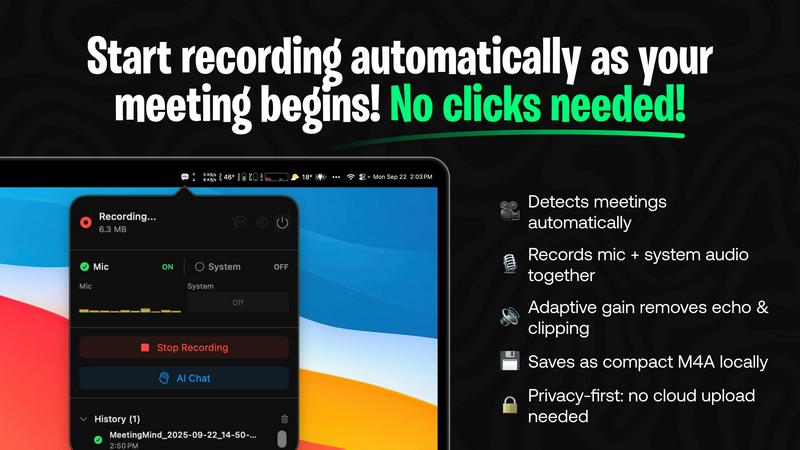
MeetingMind seamlessly detects and records your Zoom meetings automatically, eliminating the need for manual clicks. This feature ensures that you never miss a moment of your discussions, allowing you to concentrate on the conversation rather than worrying about starting the recording.
Comprehensive Recording
The application captures both microphone and system audio with adaptive gain control, ensuring that every participant's voice is clear and comprehensible. This comprehensive recording capability means that no important detail is lost during your meetings, making it easier to refer back to discussions later.
AI Assistant Options
You have the choice of utilizing a local Ollama model or the cloud-based OpenRouter for AI-generated summaries and insights. This flexibility allows you to tailor the AI assistant experience to your specific needs, enhancing how you receive and interpret meeting information.
Markdown Export
MeetingMind offers AI-generated summaries and transcripts that can be saved in formatted markdown files. This feature makes it easy to organize and share notes with your team, allowing for quick access to important information and action items from past meetings.
Perkoon
Peer-to-Peer (P2P) File Transfer
Perkoon’s flagship feature leverages peer-to-peer technology, enabling users to send files directly between browsers without intermediary servers. This means no file size limits and complete privacy, as your data is never stored on a central server. It's a hassle-free solution for real-time file sharing.
Encrypted Cloud Storage
For instances when recipients are offline, Perkoon offers a secure cloud storage option. This feature ensures that files are encrypted and safely stored until the recipient is ready to access them. This paid service is designed to be straightforward and honest, covering the costs of server maintenance.
AI Integration
Perkoon is designed for the age of AI, featuring built-in capabilities that allow AI agents to interact directly with the service. This native design eliminates the need for screen scraping, allowing for smoother automation and integration of AI tools into your workflow.
User-Friendly CLI Tool
For tech-savvy users, Perkoon includes a command-line interface (CLI) tool that enables advanced file transfer operations. This straightforward tool enhances the user experience, providing flexibility and control over file transfers without a graphical interface.
Use Cases
MeetingMind
Project Management
For project managers, MeetingMind serves as an invaluable tool to keep track of discussions and decisions made during team meetings. With accurate transcripts and summaries, project managers can ensure that action items are clearly identified and followed up on, leading to improved project outcomes.
Remote Team Collaboration
In a remote work environment, effective communication is critical. MeetingMind facilitates better collaboration among remote teams by providing clear and comprehensive meeting records. Team members can revisit discussions, ensuring everyone is aligned on objectives and tasks.
Client Consultations
Consultants can leverage MeetingMind to document client meetings thoroughly. By recording and transcribing these consultations, consultants can focus on building relationships and providing value without the distraction of note-taking, ultimately leading to stronger client connections.
Training and Onboarding
For organizations involved in training and onboarding, MeetingMind can be a game-changer. By recording training sessions, new hires can revisit materials at their own pace, ensuring they grasp essential concepts and processes. This leads to more effective onboarding experiences.
Perkoon
Personal File Sharing
Perkoon is perfect for individuals looking to share large files with friends or family without the complications of traditional file transfer services. The P2P feature allows for quick and easy sharing, ensuring that files are sent directly and securely.
Business Collaborations
For teams working on collaborative projects, Perkoon offers a reliable way to transfer large documents, presentations, or media files quickly. The absence of size limits and account requirements streamlines the process, allowing teams to focus on their work rather than on file-sharing logistics.
AI-Driven Automation
Businesses leveraging AI can utilize Perkoon’s built-in integration for seamless file transfers. This feature allows AI agents to send and receive files without manual intervention, making it an ideal solution for automated workflows and operations.
Secure Data Transfer
For users concerned about privacy and data security, Perkoon provides peace of mind with its P2P transfers and encrypted cloud storage. Whether sharing sensitive documents or large files, users can trust that their data remains confidential and protected from unauthorized access.
Overview
About MeetingMind
MeetingMind is a revolutionary intelligent meeting assistant tailored exclusively for macOS, designed to transform the way professionals engage with their conversations. This innovative tool automatically detects and records your Zoom meetings without any manual intervention, ensuring that you can focus on the discussion at hand. With real-time, speaker-attributed transcripts and AI-driven insights delivered right on your device, MeetingMind is perfect for anyone who participates in meetings—whether you are a project manager, developer, consultant, or part of a remote team. The core value proposition lies in its powerful, privacy-first architecture, leveraging on-device AI technologies. By utilizing WhisperKit for accurate transcription and optional local Ollama models, MeetingMind guarantees that your sensitive conversations remain secure on your Mac. This means you can be an active participant, knowing that every detail, action item, and key takeaway is intelligently captured and instantly searchable. MeetingMind transforms every meeting into an actionable asset, empowering you to never miss a detail again.
About Perkoon
Perkoon is a revolutionary file transfer service that breaks away from the clutter of conventional solutions, offering users a seamless experience for moving files from point A to point B without the usual hassles. Designed for individuals and businesses alike, it caters to anyone who is fed up with artificial limitations, mandatory sign-ups, and the commodification of their data. At its core, Perkoon utilizes innovative peer-to-peer (P2P) technology, allowing users to send files directly between browsers when both parties are online. This approach eliminates size restrictions and account requirements, ensuring that your data remains private and free of charge. For situations when the recipient is offline, Perkoon offers encrypted cloud storage as a paid feature, which is transparently priced to cover operational costs. What truly distinguishes Perkoon is its native integration with AI tools, allowing for seamless automation and interaction without the need for cumbersome screen scraping. With an easy-to-use CLI tool available, Perkoon stands out as the powerful, straightforward, and privacy-focused solution for transferring files in today's digital landscape.
Frequently Asked Questions
MeetingMind FAQ
What platforms does MeetingMind support?
MeetingMind is exclusively designed for macOS, ensuring a seamless integration experience for Mac users. This focused approach allows for optimal performance and user experience on Apple devices.
How does the automatic detection feature work?
The automatic detection feature uses intelligent algorithms to identify when a Zoom meeting starts. Once detected, MeetingMind begins recording without requiring any manual input, allowing you to focus on your meeting.
Is my data secure with MeetingMind?
Yes, MeetingMind prioritizes your privacy. All processing occurs locally on your Mac, meaning your meetings and sensitive information never leave your device. This architecture ensures that your data remains secure and confidential.
Can I upgrade from the free version?
Yes, users can start with the free version, which offers 60 minutes of recording per day. When you need more, you can easily upgrade to the unlimited version through a one-time purchase, giving you access to all features without ongoing subscription fees.
Perkoon FAQ
Is Perkoon really free?
Yes, Perkoon’s P2P file transfer service is completely free. This is possible because the direct streaming of files between browsers incurs minimal costs, allowing Perkoon to offer this feature without charge.
How does cloud storage work?
When the recipient is offline, Perkoon holds files in encrypted cloud storage. This paid feature ensures that your files are safe and accessible once the recipient is available to download them.
Can I use Perkoon on all browsers?
Perkoon supports Chrome, Edge, and Brave without limitations. However, users of Firefox and Safari may encounter some restrictions due to browser-specific limitations.
How does Perkoon ensure my files remain private?
Perkoon prioritizes your privacy by ensuring that P2P transfers never touch their servers. Even for cloud storage, files are encrypted, meaning that Perkoon cannot see or access the content of your transfers.
Alternatives
MeetingMind Alternatives
MeetingMind is a revolutionary AI meeting assistant that operates seamlessly on macOS, designed to enhance productivity by automatically recording and summarizing conversations. This tool is particularly beneficial for professionals engaged in remote work, such as project managers and consultants, who often participate in virtual meetings. While MeetingMind offers impressive features, users may seek alternatives due to various reasons, including pricing concerns, the need for additional functionalities, or compatibility with different platforms. When exploring alternatives, it's essential to consider factors such as ease of use, security measures, and the ability to integrate with existing workflows. Choosing the right alternative involves assessing your specific needs and the features that will best support your meeting documentation process. Look for options that provide robust audio capture, intuitive user interfaces, and strong privacy protections. Ultimately, the ideal solution should empower you to focus on your discussions without the burden of manual note-taking, ensuring that every meeting becomes a valuable resource for your projects.
Perkoon Alternatives
Perkoon is an innovative file transfer service that operates within the productivity and management category, offering users a seamless way to share files without the burden of sign-ups or artificial limits. Its core functionality revolves around peer-to-peer (P2P) technology, allowing for direct file transfers between browsers when both sender and recipient are online, while also providing an encrypted cloud storage option for offline scenarios. As users seek alternatives, they often look for solutions that enhance their file transfer experience, whether due to pricing models, feature sets, or platform compatibility. When searching for alternatives to Perkoon, it's essential to evaluate several factors, including ease of use, security features, and the overall value offered. Users may prioritize services that provide similar privacy assurances, no size limitations, or flexible transfer options. Additionally, the ability to integrate with other tools or platforms can play a significant role in determining the best fit for an individual's or organization's unique needs.