
Image3D AI vs MakeAIVideo
Side-by-side comparison to help you choose the right AI tool.

Image3D AI
Transform any 2D image into high-quality 3D models for printing or game development in just minutes with Image3D AI.
Last updated: March 1, 2026

MakeAIVideo
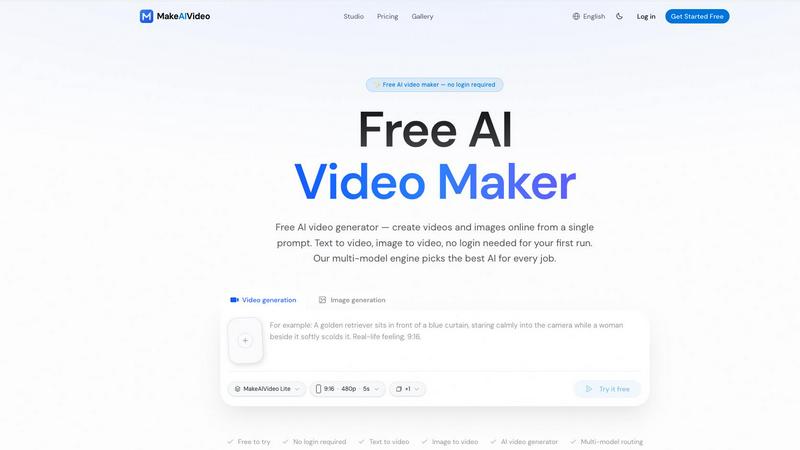
MakeAIVideo empowers you to effortlessly create stunning videos from text or images using advanced multi-model AI technology.
Last updated: March 18, 2026
Visual Comparison
Image3D AI

MakeAIVideo
Feature Comparison
Image3D AI
Rapid Mode
Rapid Mode allows users to generate quick 3D models from a single image, perfect for those who need fast results without compromising on quality. In just moments, you can transform a flat image into a 3D model, making it ideal for rapid prototyping or quick visualizations.
Pro Mode
Pro Mode is designed for professionals who require high precision and detail in their 3D models. By utilizing multi-view images, this feature ensures that the generated models are not only accurate but also production-ready, catering to the needs of industries that demand higher fidelity.
Supported File Formats
Image3D AI supports various file formats such as STL, OBJ, and GLB, providing flexibility for different applications. Whether for 3D printing, game development, or web integration, you can choose the format that best suits your project requirements without any hassle.
User-Friendly Interface
The intuitive interface of Image3D AI makes it easy for anyone to start creating 3D models, regardless of their experience level. With straightforward upload options and clear instructions, users can begin generating stunning 3D assets in just a few clicks, streamlining their creative process.
MakeAIVideo
Smart Multi-Model Routing
MakeAIVideo's intelligent routing system utilizes more than eight advanced models including Seedance 2.0, Kling 3.0, and Veo 3.1. This feature ensures that regardless of your prompt, the most suitable AI model is selected automatically, optimizing the video quality and creative output.
Constantly Updated Model Pool
With a model pool that is regularly updated, users can trust that they are always working with the latest and best technologies available. This eliminates the need for users to track which models perform best, as MakeAIVideo manages this for you seamlessly.
Support for Multiple Languages
Catering to a global audience, MakeAIVideo supports 16 languages, allowing users from diverse linguistic backgrounds to create videos in their preferred language. This feature enhances accessibility and broadens the usability of the platform for international users.
Zero Sign-Up for Initial Use
One of the standout features of MakeAIVideo is that you can start generating videos without the hassle of signing up. This no-login-required approach allows users to experience the capabilities of the platform instantly, making it a truly user-friendly option for anyone looking to create videos.
Use Cases
Image3D AI
Game Development
Game developers can significantly enhance their workflow by using Image3D AI to quickly generate game-ready 3D assets from concept art or sketches. The rapid production capabilities allow for faster prototyping and iteration, ultimately improving game development timelines.
E-Commerce
For e-commerce businesses, converting product images into interactive 3D models enables customers to engage with products in a more immersive way. This feature enhances online shopping experiences, allowing for AR previews and detailed product showcases that can drive sales.
3D Printing
Image3D AI serves as a powerful tool for 3D printing enthusiasts, converting images into high-precision STL files that are ready for printing. This feature eliminates the need for complex modeling software, making 3D printing more accessible to hobbyists and professionals alike.
Architectural Visualization
Architects can benefit from Image3D AI by generating architectural models quickly, saving time on traditional modeling from scratch. This efficiency allows architects to focus on design and innovation, facilitating better presentations and client communications.
MakeAIVideo
Marketing Campaigns
Businesses can leverage MakeAIVideo to quickly generate promotional videos that captivate their audience. Whether it's a product launch or a seasonal campaign, the platform enables fast production of high-quality content to keep your brand fresh and engaging.
Social Media Content
Social media managers can utilize MakeAIVideo to create eye-catching videos tailored for platforms like Instagram, TikTok, and Facebook. The ease and speed of video generation allow for regular updates and fresh content to keep followers engaged.
Educational Videos
Educators and content creators can harness the power of MakeAIVideo to produce informative and engaging educational content. The platform's multi-model capabilities ensure that complex concepts can be visually represented in a way that enhances learning.
Personal Projects
Individuals looking to create personal videos, such as vlogs, family events, or special memories, can benefit from MakeAIVideo's intuitive interface. The ability to generate videos quickly and without prior experience makes it ideal for personal storytelling.
Overview
About Image3D AI
Image3D AI is an innovative, AI-driven tool that transforms the way we create and interact with digital assets. By converting static 2D images into breathtaking 3D models in mere seconds, it democratizes 3D modeling, making it accessible to everyone, from experienced designers to casual hobbyists. Harnessing the power of Tencent's state-of-the-art Hunyuan 3D engine, this tool simplifies the complex challenges associated with 3D model generation. Whether you aim to create high-fidelity assets from a single photograph or multiple viewpoints, Image3D AI is tailored to meet your specific needs efficiently. Its main value proposition lies in delivering production-ready 3D models quickly and effortlessly, streamlining workflows across diverse industries such as gaming, e-commerce, architecture, and 3D printing. With a user-friendly interface, users can transition from concept to reality seamlessly, unlocking a new realm of creativity and productivity.
About MakeAIVideo
MakeAIVideo is an innovative AI-driven video creation tool designed to empower creators, marketers, and businesses with the ability to generate stunning videos effortlessly. Unlike traditional AI video tools that limit users to a single model, MakeAIVideo utilizes a multi-model engine that automatically selects the best AI model for your specific prompt. This means no more manual selections or guesswork; simply describe what you want, and the platform takes care of the rest. With support for over 16 languages and a user-friendly interface that requires no sign-up for your first video generation, MakeAIVideo democratizes video production, making it accessible to everyone—from aspiring creators to seasoned professionals. The platform is perfect for those looking to produce high-quality videos quickly and efficiently, whether for social media, marketing campaigns, or personal projects.
Frequently Asked Questions
Image3D AI FAQ
What types of images work best for 3D conversion?
High-contrast images with clear outlines and simple backgrounds yield the best results. Avoid blurry or low-light images, as these can hinder the AI's ability to accurately reconstruct the 3D model.
How long does it take to generate a 3D model?
In Rapid Mode, a single image can be processed in approximately 60 seconds, allowing for quick turnaround times on model generation. Pro Mode may take slightly longer due to increased precision.
Can I use Image3D AI for commercial projects?
Yes, the 3D models generated by Image3D AI are suitable for commercial use, making them ideal for industries like gaming, e-commerce, and architecture. Always ensure you review and comply with any licensing agreements.
What file formats can I export my 3D models in?
You can export your generated 3D models in several formats, including STL for 3D printing, OBJ for traditional 3D editing, and GLB for web and AR applications. This flexibility allows for easy integration into various projects.
MakeAIVideo FAQ
How does MakeAIVideo select the best model?
MakeAIVideo uses a multi-model engine that automatically routes your prompt to the most suitable AI model from its pool of over eight options, ensuring optimal results without manual selection.
Is there a limit to the video length I can create?
Yes, with the free plan, users can generate videos up to 10 seconds in length, while paid plans offer longer durations and higher quality outputs.
Can I use the videos for commercial purposes?
Absolutely! All plans, including the free version, allow for commercial use, making it a versatile tool for creators and businesses alike.
Do I need any special skills to use MakeAIVideo?
No special skills or experience in video editing are required. The platform is designed to be user-friendly, allowing anyone to create professional-quality videos in just a few simple steps.
Alternatives
Image3D AI Alternatives
Image3D AI is an innovative tool in the realm of design, specifically categorized as a 3D modeling solution that transforms 2D images into captivating, high-quality 3D models in mere minutes. This groundbreaking technology harnesses the power of AI, making complex 3D modeling accessible to everyone, from professional designers to casual enthusiasts. Despite its impressive capabilities, users often seek alternatives due to various factors such as pricing, specific feature sets, or compatibility with different platforms. When exploring alternatives to Image3D AI, it is essential to consider several key aspects. Look for tools that offer multi-format export options, robust material generation capabilities, and varying modes for different project needs. Ensuring that the chosen alternative aligns with your workflow and enhances your creative potential is crucial for a satisfactory experience.
MakeAIVideo Alternatives
MakeAIVideo is a pioneering AI video generator that revolutionizes content creation by utilizing a multi-model routing system. This innovative approach allows users to leverage the strengths of various AI models, ensuring the best output for their specific prompts without the hassle of manual selection. As a part of the content creation and design tools category, MakeAIVideo empowers users to create engaging videos effortlessly. Users often seek alternatives to MakeAIVideo due to factors such as pricing, feature sets, and specific platform requirements. When choosing an alternative, it is essential to consider the range of models available, ease of use, integration capabilities, and the level of support offered. Finding a tool that aligns with your unique needs can significantly enhance your video creation process and overall productivity.