
FilexHost vs SupaSidebar
Side-by-side comparison to help you choose the right AI tool.

FilexHost
Transform your files into instantly shareable links with effortless drag and drop hosting.
Last updated: February 28, 2026

SupaSidebar
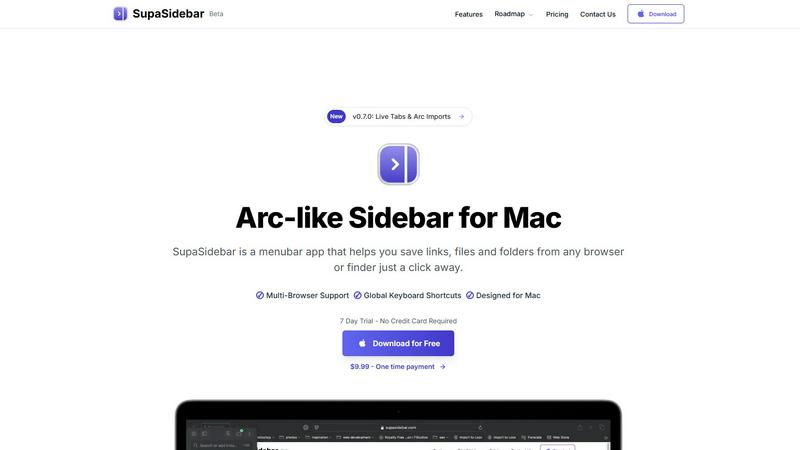
SupaSidebar transforms your Mac with an Arc-style sidebar for instant access to your favorite links, files, and folders.
Last updated: February 28, 2026
Visual Comparison
FilexHost

SupaSidebar
Feature Comparison
FilexHost
Universal File Support & Smart Rendering
FilexHost shatters the limitations of traditional file hosts by supporting an extensive range of file types including PDFs, images (JPG, PNG, WEBP, HEIC, TIFF), audio/video (MP4, MP3), archives (ZIP), data files (XLSX, CSV, JSON), and code. The transformative feature is its smart rendering engine, which automatically displays each file in its ideal format. HTML files become live, browsable websites, spreadsheets turn into interactive tables, and media files play directly in the browser with built-in lightweight players. This eliminates the need for recipients to have specific software, delivering the intended experience instantly and beautifully.
Instant, Zero-Config Hosting & Subdomains
Gone are the days of complex server setup. FilexHost delivers instant, configuration-free hosting the moment you upload a file. The platform automatically generates a clean, professional subdomain (e.g., your-file.filex.host) for every upload. This happens in seconds with zero technical setup required from the user. Every generated link is secured with free SSL encryption by default, ensuring safe and private access. This feature democratizes web hosting, making it accessible to anyone regardless of their technical expertise.
Advanced Sharing Controls & Security
FilexHost provides powerful, granular control over how your content is shared and accessed. You can set files to expire after a set duration, from 24 hours to forever, ensuring temporary shares don't linger. For sensitive materials, optional password protection adds a critical layer of privacy. Furthermore, you can choose the view mode for recipients, deciding if a file renders directly in the browser or presents a download page first. These game-changing controls allow professionals to share with confidence, knowing their work is distributed exactly as intended and secured appropriately.
Blazing Fast Global CDN & Built-in Tools
Every file hosted on FilexHost is served through a global Content Delivery Network (CDN), ensuring blazing fast load times and low latency for viewers anywhere in the world. The platform also includes a suite of built-in management tools, such as a live preview that lets you see your hosted page on both desktop and mobile views before sharing. For Pro users, built-in analytics track views and downloads, providing valuable insights into how your shared content is being engaged with, transforming simple sharing into a data-informed activity.
SupaSidebar
Arc-Inspired Sidebar
The unique, Arc-inspired sidebar design offers a visually appealing and intuitive interface, giving you instant access to your favorite links, files, and applications without the clutter of traditional tab management.
Global Keyboard Shortcuts
SupaSidebar enhances your productivity with customizable global keyboard shortcuts, allowing you to save links and files or switch between applications with simple key combinations, making your workflow faster and smoother.
Recents Tracking
Keep track of your recent activity effortlessly. SupaSidebar automatically logs every website accessed in the last 48 hours, allowing you to find and revisit your work instantly, eliminating the frustration of lost tabs.
Unlimited Spaces in Pro Version
With the Pro version, users can create unlimited spaces to organize links and files according to personal preferences. This feature allows for a tailored experience, ensuring that you can access information exactly how you want it.
Use Cases
FilexHost
Professional Client Reporting & Deliverables
Professionals such as consultants, designers, and marketers can transform their client delivery process. Instead of sending bulky email attachments or using confusing cloud storage links, they can upload final reports, presentations, or design mockups to FilexHost. They can then share a single, elegant link that renders the content perfectly in the client's browser, optionally protected with a password and set to expire. This eliminates "request access" hurdles and presents a polished, professional image.
Developer Prototyping & Static Site Hosting
Developers and engineers can use FilexHost as a transformative tool for rapid prototyping, hosting landing pages, demos, or mock API endpoints (using JSON files). By simply dragging and dropping HTML, CSS, and JavaScript files or a project ZIP, they get an instantly live URL to share with teammates, stakeholders, or for testing. This bypasses the need for complex deployment pipelines for early-stage projects, dramatically accelerating the feedback and iteration cycle.
Digital Product Distribution for Creators
Creators, educators, and solopreneurs distributing digital products like e-books, guides, video courses, or software assets can leverage FilexHost for seamless delivery. They can upload their product packages, set a password for customer-only access, and share the link directly with purchasers. The platform's smart rendering means e-books can be read online, videos can be previewed, and archives can be browsed, creating a superior delivery experience that enhances perceived value.
Friction-Free Media & Document Sharing
For everyday collaboration in teams, academic work, or personal projects, FilexHost removes the friction from sharing large or numerous files. Whether it's a collection of high-resolution images, a video compilation, a dataset, or a portfolio, users can drag, drop, and share a single link. Recipients can view the content immediately without downloading anything or creating an account, unlocking effortless and universal access to digital content.
SupaSidebar
Efficient Research Workflow
Researchers can utilize SupaSidebar to save and organize numerous links and references, making it easier to access critical information quickly without switching between multiple tabs or applications.
Streamlined Creative Process
Creators benefit from the quick access to tools and resources that SupaSidebar provides. Whether it's links to design inspirations or files for ongoing projects, everything is just a keyboard shortcut away.
Developer Resource Management
For developers, SupaSidebar serves as a command center for managing coding resources, documentation, and frequently used tools, fostering a more efficient coding environment that reduces time spent searching for assets.
Simplified Daily Task Management
Anyone with a busy schedule can leverage SupaSidebar to keep important files and links at their fingertips. By organizing daily tasks and reminders in the sidebar, users can maintain focus and productivity throughout their workday.
Overview
About FilexHost
FilexHost is a revolutionary, game-changing platform that transforms the complex world of file hosting and sharing into an effortless, instantaneous experience. It eliminates the traditional barriers of server management, DNS configuration, and cumbersome login requirements for recipients, unlocking a new era of digital collaboration. At its core, FilexHost provides universal, high-speed hosting for virtually any file type—from documents and spreadsheets to full media libraries and complete HTML websites. Its transformative "Drop & Share" workflow is designed for ultimate simplicity: users drag and drop a file and instantly receive a secure, shareable URL. The platform's intelligent rendering engine ensures every file is presented optimally, turning code into live websites, data into interactive tables, and media into seamless in-browser experiences. Built for professionals, developers, creators, and anyone needing to move digital assets without friction, FilexHost prioritizes the viewer's experience, delivering content beautifully and directly, free from attachment limits and "request access" emails. It’s more than a hosting service; it's a powerful tool for unlocking potential and accelerating workflows.
About SupaSidebar
SupaSidebar is a revolutionary productivity tool meticulously designed for Mac users, aiming to enhance your digital efficiency and streamline your workflow. This innovative menubar app introduces an Arc-inspired sidebar that offers instant access to your essential links, files, folders, and applications—all within a beautifully crafted interface. SupaSidebar empowers researchers, creators, developers, and anyone who juggles multiple browsers and apps by eliminating the chaos of tab overload and cumbersome bookmark managers. With its core philosophy centered around profound simplicity, it provides a unified space that houses your entire digital context, all accessible through lightning-fast global keyboard shortcuts. Committed to user privacy, SupaSidebar ensures that your data remains secure on your Mac, while its native macOS design integrates seamlessly with your existing environment. Experience a paradigm shift in productivity, as SupaSidebar transforms how you interact with your computer, allowing you to stay organized, focused, and in your creative flow.
Frequently Asked Questions
FilexHost FAQ
What is FilexHost?
FilexHost is a transformative, instant file hosting and sharing platform designed to eliminate complexity. It allows you to upload any file type—documents, media, code, websites—and instantly receive a secure, shareable URL. With no servers to manage or configuration needed, it renders files intelligently in the browser and provides powerful sharing controls like passwords and expiry dates, making digital collaboration seamless and professional.
Is it really free?
Yes, FilexHost offers a robust free plan perfect for quick sharing, testing, and casual use. The free plan includes hosting for up to 1,000 files, a 25MB maximum file size, 1GB of total storage, and links that can be set to expire for up to 7 days. This plan is supported by non-intrusive ads and a watermark. For permanent, high-traffic, and professional use, the Pro plan unlocks higher limits and advanced features.
What file types are supported?
FilexHost supports a universal range of file types. This includes documents (PDF, TXT), data files (XLSX, CSV, JSON), images (JPG, PNG, WEBP, HEIC, TIFF), media (MP4, MP3), archives (ZIP), and code (HTML, CSS, JS). Its smart rendering engine automatically displays each file in the optimal viewer, such as turning HTML into a live website or a spreadsheet into an interactive table, directly within the browser.
How do I update my hosted file or site?
To update a file or static site hosted on FilexHost, you simply need to upload the new version of the file. The platform will host it as a new item with a new unique URL. You would then share the new link with your audience. For iterative work like website prototypes, this workflow is incredibly efficient. The upcoming custom domains feature will provide even more flexibility for managing persistent project URLs.
SupaSidebar FAQ
Is SupaSidebar a browser extension?
No, SupaSidebar is a standalone menubar application designed specifically for macOS, providing seamless integration with all major browsers without needing a browser extension.
Which browsers does SupaSidebar work with?
SupaSidebar supports all major browsers including Safari, Chrome, Firefox, and Arc, ensuring that you can manage your links and files no matter your preferred browsing tool.
What macOS version do I need?
To use SupaSidebar, you need macOS version 13 or later, ensuring compatibility with the latest features and updates provided by the app.
Where is my data stored?
All user data is stored locally on your Mac, ensuring privacy and security. SupaSidebar does not transmit any data to external servers, maintaining a strong commitment to user confidentiality.
Alternatives
FilexHost Alternatives
FilexHost is a transformative file hosting and sharing platform in the productivity and management category. It redefines simplicity by allowing users to instantly generate live, shareable URLs for any file type through a simple drag-and-drop interface, eliminating traditional hosting complexities. Users often explore alternatives to find a solution that perfectly aligns with their specific needs. Common reasons include seeking different pricing structures, higher file size limits, longer storage durations, or specialized features like advanced analytics or custom branding. Platform reliability and the overall user experience for both the sender and recipient are also key decision factors. When evaluating alternatives, focus on your core requirements. Consider the maximum file size you need, how long you need links to remain active, and whether features like password protection or detailed viewer analytics are essential. The ideal platform should not only meet your technical specs but also deliver a seamless, professional experience that makes sharing feel effortless.
SupaSidebar Alternatives
SupaSidebar is a revolutionary productivity tool designed exclusively for Mac users, featuring an elegant, Arc-style sidebar that streamlines access to links, files, folders, and applications. This innovative utility falls under the category of productivity and management software, catering to individuals who thrive on organization and efficiency in their digital workflows. Users often seek alternatives to SupaSidebar for various reasons, including pricing considerations, specific feature requirements, or compatibility with different platforms. When selecting an alternative, it is essential to evaluate its core functionalities, user interface, and how well it integrates into your existing workflow, ensuring it enhances your productivity rather than disrupts it.