
BlitzCut vs conceptviz
Side-by-side comparison to help you choose the right AI tool.

BlitzCut
Blitzcut instantly transforms raw clips into viral videos by auto cutting silence and adding captions.
Last updated: February 28, 2026

conceptviz
ConceptViz transforms complex ideas into clear, science-ready diagrams for any educational level.
Last updated: February 28, 2026
Visual Comparison
BlitzCut

conceptviz
Feature Comparison
BlitzCut
Lightning-Fast Silence Removal
BlitzCut's advanced AI instantly detects and removes every pause, um, and ah from your videos automatically. This transformative feature eliminates the 15-20 minutes of manual cutting typically required, streamlining your footage to maintain perfect pacing and maximum viewer engagement. The AI works directly on your device, ensuring there is no frustrating upload wait, so you can cut silence and get to publishing faster than ever before.
AI-Powered Styled Captions
Generate captivating, accurate captions with over 95% precision in viral, attention-grabbing styles. This tool automates the entire captioning process—from transcription to stylish overlay—saving you another 15-20 minutes per video. The AI intelligently times text to match your speech, ensuring your content is accessible, engaging, and perfectly formatted for sound-off viewing on all major social media platforms.
Intuitive Text-Based Editing
Revolutionize your editing process by working with a transcript of your video. This feature allows you to edit your footage simply by deleting sentences from the text. The corresponding video and audio segments are removed instantly, making complex cuts and rearrangements as easy as editing a document. It's a game-changing approach that puts narrative control at your fingertips without ever needing to touch a timeline.
Mobile-First, One-Tap Export
Built from the ground up for iPhone, iPad, and Mac, BlitzCut delivers a seamless, powerful editing experience in your pocket. The workflow culminates in a one-tap export process that maintains full HDR quality and allows you to share your finished video directly to TikTok, Instagram, or YouTube. This end-to-end mobile optimization ensures you can create and publish professional content anywhere, anytime.
conceptviz
Subject & Grade Presets
ConceptViz is built with real classrooms in mind, offering quick-start presets for core STEM subjects including Physics, Biology, Chemistry, Earth & Space, and Math. These presets are intelligently tuned to align with U.S. grade bands, from elementary to high school, ensuring the generated diagrams are age-appropriate and conceptually accurate. This feature removes all guesswork, allowing educators to generate perfectly tailored visuals without any prior design or drawing expertise, making sophisticated diagram creation accessible to everyone.
Projector-Ready Clarity
Every diagram generated by ConceptViz is optimized for real-world teaching environments. The platform prioritizes practical details that matter most in a classroom: thick, legible lines and labels, simple backgrounds with minimal visual noise, and high-contrast color schemes. This intentional design guarantees that diagrams remain sharp and comprehensible from the front row to the back, even on lower-resolution classroom projectors, ensuring every student can follow along with ease.
Slide & Worksheet Friendly Output
ConceptViz diagrams are engineered for seamless integration into your existing workflow. They are automatically generated in a widescreen aspect ratio perfect for PowerPoint and Google Slides, and are available with clean white or light backgrounds ideal for printing on worksheets. Users can download high-resolution PNG files and instantly paste them directly into their teaching materials, saving countless hours normally spent on formatting and resizing found images.
Plain-English Description to Diagram
The core transformative feature of ConceptViz is its ability to turn a simple, plain-English description into a detailed scientific diagram. Users just need to type what they need, such as "labeled plant cell cross-section for 8th grade" or "convex lens ray diagram." The AI interprets the request and generates a clean, accurate visual. This allows educators to create diagrams that match their exact teaching narrative, fostering consistency and enabling the reuse of prompts across different classes and sections.
Use Cases
BlitzCut
Daily Social Media Content Creators
For influencers, coaches, and creators who post daily to TikTok, Reels, or Shorts, BlitzCut is a lifesaver. It transforms the unsustainable burden of hour-long edits into a sustainable two-minute routine. By automating silence removal and captioning, creators can consistently produce high-quality, engaging content that keeps their audience hooked and their growth on track, all from their mobile device.
Educators and Course Creators
Educators creating tutorial or explainer content can use BlitzCut to produce clear, concise, and professional videos without a steep learning curve. The automatic silence removal ensures lessons are paced perfectly, while accurate, styled captions improve comprehension and accessibility. This allows experts to focus on delivering value rather than wrestling with complicated editing software.
Entrepreneurs and Small Business Owners
Business owners marketing their products or services can leverage BlitzCut to create compelling testimonial videos, quick tutorials, or promotional clips with ease. The rapid turnaround from idea to published video enables agile marketing responses and consistent brand storytelling on social media, all without the need for a dedicated video editor or large production budget.
Podcasters and Interviewers Repurposing Content
Podcasters can effortlessly repurpose long-form interview audio and video into bite-sized, viral clips for social media. Using text-based editing, they can quickly find and isolate the most impactful quotes, then let BlitzCut automatically remove pauses and add dynamic captions to create standalone, shareable assets that drive traffic back to their full episodes.
conceptviz
Enhancing K-12 Lesson Plans
Elementary, middle, and high school STEM teachers can use ConceptViz to rapidly create custom diagrams for daily lesson plans, worksheets, and interactive whiteboard presentations. Instead of scouring the internet for "almost right" images, a teacher can generate a precise diagram on-demand, such as a "states of matter particle model" for elementary science or a "block on incline free body diagram" for high school physics, ensuring the visual perfectly aligns with the day's learning objective.
Accelerating Academic Research & Publishing
Graduate students, PhD candidates, and academic researchers can leverage ConceptViz to produce precise, publication-ready figures for theses, journal papers, and conference posters. The tool's ability to generate accurate schematics for complex concepts—like an acid-base titration setup or a mitosis stage sequence—streamlines the research communication process, allowing scholars to focus on their analysis rather than struggling with graphic design software.
Creating Differentiated Learning Materials
Educators can use ConceptViz to easily create multiple versions of a diagram to support differentiated instruction. For instance, a biology teacher could generate a simple animal cell diagram for some students and a more detailed, organelle-rich version for others, all from slightly adjusted text prompts. This enables personalized learning at scale, ensuring all students have access to visuals that match their comprehension level.
Supporting Student Projects and Study Aids
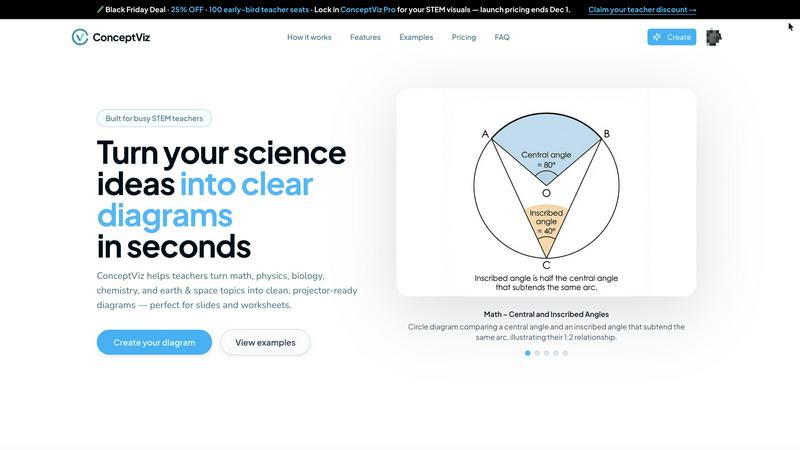
Students at all levels can use ConceptViz to create their own study guides, project visuals, and presentation materials. A student struggling to visualize central vs. inscribed angles in geometry can generate a clear diagram to study from. Similarly, a group working on a science fair project about potential and kinetic energy can quickly produce professional-looking visuals to enhance their display and explanation.
Overview
About BlitzCut
BlitzCut is a revolutionary AI-powered video editor designed to shatter the barriers of traditional content creation. It is the definitive solution for social media creators, influencers, educators, and entrepreneurs who need to produce high-engagement content daily without being bogged down by complex, time-consuming editing workflows. The core mission of BlitzCut is to unlock every creator's potential by automating the tedious, manual tasks that drain creativity and time. This mobile-first platform transforms raw talking-head clips into polished, professional videos for TikTok, Instagram Reels, and YouTube Shorts in a fraction of the usual time. Its game-changing value proposition lies in a powerful, two-minute workflow: simply import a video, let AI handle silence removal and caption styling with one tap, and export directly to social platforms. By prioritizing speed, on-device processing for instant results, and a philosophy that AI should augment—not replace—human creativity, BlitzCut empowers creators to focus on what truly matters: their message and their audience.
About conceptviz
ConceptViz is a revolutionary AI-powered diagramming tool that is fundamentally transforming the landscape of STEM education and research. It is engineered to unlock the potential of educators, students, and researchers by instantly converting intricate scientific and mathematical concepts into crystal-clear, visually engaging diagrams. This game-changing platform eliminates the traditional barriers of time, design skill, and resource availability, empowering users to generate classroom-ready, publication-quality visuals in mere seconds with a simple text description. From K-12 teachers crafting dynamic lesson plans and worksheets to university students and researchers needing precise figures for theses and presentations, ConceptViz caters to a wide spectrum of needs. Its core value proposition lies in delivering projector-ready clarity, curriculum-aligned accuracy, and unprecedented time savings, ensuring that the focus remains on explanation and discovery rather than on tedious graphic creation. By making complex ideas accessible and visually stimulating, ConceptViz is not just a tool; it's a transformative force in democratizing high-quality scientific visualization.
Frequently Asked Questions
BlitzCut FAQ
Is BlitzCut really free?
Yes, BlitzCut is free to download and use. You do not need to create an account to start editing. The app provides core AI features like silence removal and caption generation at no cost, making professional video editing truly accessible to every creator right from the start.
How does the on-device AI processing work?
On-device AI means the powerful algorithms for silence detection and speech recognition run directly on your iPhone, iPad, or Mac. Your video files never need to be uploaded to a remote server for processing. This ensures complete privacy, faster results with no internet dependency, and no compromise on your original video quality.
What video formats and lengths does BlitzCut support?
You can import any raw talking-head video from your camera roll. BlitzCut supports common formats and videos of any length. The AI is designed to efficiently process your footage, whether it's a 30-second quick tip or a longer interview, and prepare it for social media.
How does BlitzCut compare to other editors like CapCut or InShot?
BlitzCut is specifically engineered for unparalleled speed in automating the most tedious parts of social media editing: silence removal and caption styling. While other apps offer broad feature sets, BlitzCut's game-changing advantage is its dedicated AI workflow that completes in two minutes what can take 30+ minutes of manual work in other applications, all with a mobile-first, creator-centric design.
conceptviz FAQ
Do I need any design skills to use ConceptViz?
Absolutely not. ConceptViz is specifically designed for educators and researchers, not graphic designers. The entire process is driven by simple, plain-English text descriptions. You just describe the scientific diagram you need, and the AI handles all the complex drawing, labeling, and layout work, delivering a polished, classroom-ready visual in seconds without any design expertise required.
What subjects and grade levels does ConceptViz support?
ConceptViz supports a comprehensive range of STEM subjects, including Physics, Biology, Chemistry, Earth & Space, and Mathematics. It is built with grade-level appropriateness in mind, offering presets and tuning for U.S. grade bands from elementary school through to high school and even university-level research topics, making it a versatile tool for the entire educational journey.
Can I use the diagrams in printed worksheets and slides?
Yes, this is a core strength of ConceptViz. All diagrams are generated to be immediately useful in real teaching scenarios. They are provided in high-resolution PNG format with clean backgrounds, optimized for both digital use (in PowerPoint, Google Slides) and physical printing on worksheets and handouts. The widescreen aspect ratio and clear labeling ensure they look professional in any medium.
Is there a free trial available?
Yes, you can start using ConceptViz for free without a credit card. The free tier allows you to generate diagrams, including in 4K Ultra HD quality, so you can fully experience how the platform transforms your lesson preparation and research workflow before committing to a paid plan.
Alternatives
BlitzCut Alternatives
BlitzCut is a transformative AI-powered video editor designed for the modern content creator. It belongs to the rapidly evolving category of automated content creation tools, specifically engineered to turn raw footage into polished, shareable videos in minutes by handling tedious tasks like silence removal and captioning. Users often explore alternatives for various reasons, such as budget constraints, the need for different feature sets like advanced color grading or multi-track editing, or compatibility with specific operating systems like Windows or Android. The quest for the right tool is a personal one, driven by unique workflow demands and creative goals. When evaluating other options, focus on the core value that tools like BlitzCut provide: time savings. Look for solutions that genuinely automate the heavy lifting—accurate auto-transcription, intuitive editing interfaces, and efficient export processes. The goal is to find a platform that aligns with your posting frequency and quality standards, unlocking more time for the creative work that truly matters.
conceptviz Alternatives
ConceptViz is a transformative AI-powered design tool that specializes in creating clear, science-ready diagrams from complex concepts. It belongs to the dynamic categories of AI assistants, content creation, and data visualization, specifically engineered to empower STEM education and research. This platform is a game-changer for educators and students seeking to unlock visual understanding without design expertise. Users often explore alternatives for various reasons, such as budget constraints, specific feature requirements not covered, or the need for integration with other platforms like learning management systems. Some may seek tools with different output formats, more advanced customization, or a broader focus beyond STEM-specific diagramming. When evaluating an alternative, consider your core need: is it rapid, AI-driven generation, subject-specific accuracy, or classroom-ready simplicity? Assess the tool's ease of use, the quality and resolution of its outputs, and how well its presets or customization align with your educational level and subject matter. The right choice should seamlessly fit into your workflow, enhancing clarity without adding complexity.