

Picture Enhancer
Picture Enhancer uses AI to deblur, upscale, and restore your photos instantly in a browser with no software install.
AI tool Details
Explore More
Alternatives
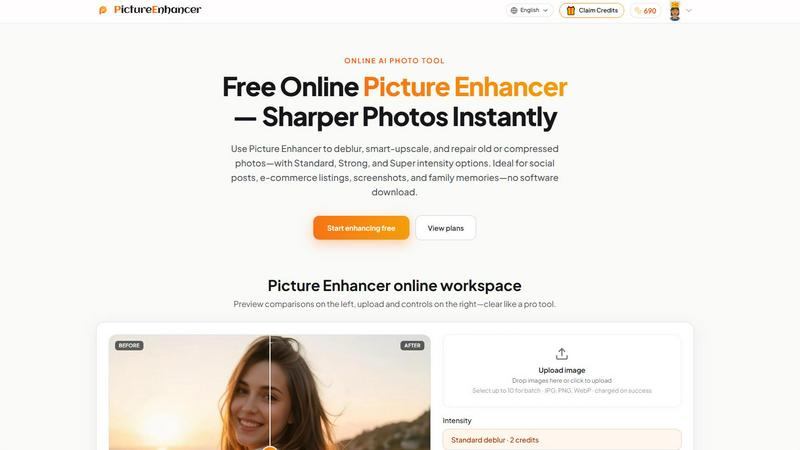
About Picture Enhancer
Picture Enhancer is a transformative, game-changing online AI photo enhancer designed to unlock the full potential of your images in seconds. This powerful tool is built for creators, sellers, and everyday users who need sharper, clearer photos instantly without the hassle of complex software or expensive subscriptions. At its core, Picture Enhancer allows you to upload a JPG, PNG, or WebP photo and choose from three revolutionary modes: Deblur, Upscale, or Restore. Each mode offers three intensity levels—Standard, Strong, and Super—giving you granular control over the final output. The workflow is elegantly simple: upload your image, pick your mode and intensity, preview the before-and-after result with an intuitive slider, and download a watermark-free, enhanced photo that looks like it was captured by a pro. What makes Picture Enhancer truly game-changing is its accessibility. Guests receive three free lifetime tries per IP address with no signup required, allowing anyone to experience its power immediately. For those who need more, signing in unlocks a credit-based system where new accounts receive starter credits. Credits are only charged on successful enhancements, ensuring you never pay for a failed attempt. This tool is ideal for social media posts, e-commerce listings, screenshots, and preserving family memories. Picture Enhancer is not just an editing tool; it is a gateway to transforming ordinary, blurry, or damaged images into stunning, high-quality visuals that demand attention. It empowers users to elevate their content, save time, and achieve professional-grade results without any technical expertise.
Features
AI Deblur Mode
This game-changing feature rebuilds edges and texture from camera shake, soft focus, and mild motion blur, transforming unusable images into crystal-clear visuals. With three intensity tiers—Standard, Strong, and Super—you can precisely control the level of sharpening. The AI analyzes the image at a pixel level, intelligently reconstructing lost detail so that faces, text, and fine patterns read clearly again. This is perfect for salvaging candid shots, action photos, or any image where movement compromised quality. The result is a sharp, natural-looking photo that appears as if it was taken with a steady hand and professional equipment.
Smart Upscale Mode
Unlock the potential of small images with this revolutionary upscaling technology. Smart Upscale provides 2x and 4x enlargement that adds genuine detail rather than simply stretching pixels. The AI predicts and generates new texture and sharpness, making it ideal for turning low-resolution social covers, product hero shots, or thumbnails into print-ready or high-resolution assets. Unlike traditional upscaling that produces blurry or pixelated results, Picture Enhancer delivers clean, detailed enlargements that maintain the integrity of the original image. This feature is a game-changer for e-commerce sellers who need high-quality product images from small source files.
Old Photo and Damage Restore Mode
This transformative mode breathes new life into vintage and damaged photographs. It intelligently reduces scratches, fade, and compression artifacts that degrade image quality over time. The Strong and Super restore tiers are specifically designed to handle heavier damage on scanned family prints, such as creases, spots, and color shifts. The AI works to reconstruct missing or corrupted areas while preserving the original character and emotion of the photo. This feature empowers users to preserve family history, restore cherished memories, and share high-quality scans of old photos without expensive professional restoration services.
Flexible Credit and Batch Processing System
Picture Enhancer offers a revolutionary, risk-free billing model where credits are charged only on successful results. Guests enjoy three free lifetime tries per IP, while signed-in users receive starter credits to explore the tool. The credit system is transparent: Standard enhancements cost 2 credits, Strong costs 4, and Super costs 6. Paid users unlock the powerful Super tiers and the ability to batch enhance up to 10 images at once, dramatically increasing productivity. Monthly plans grant credits each cycle, while permanent credit packs never expire, providing ultimate flexibility. This system ensures you only pay for what works, making professional enhancement accessible to everyone.
Use Cases
Portraits and Everyday Photos
Transform your personal photography with Picture Enhancer by reducing mild blur so faces, clothing, and backgrounds look cleaner and more professional. Whether you are posting on social media, creating a digital portfolio, or simply want to improve a favorite photo, this tool delivers game-changing results. The AI deblur mode specifically targets soft focus and motion blur, restoring sharpness to eyes, hair, and textures. This use case is perfect for content creators, influencers, and anyone who wants their everyday photos to stand out with exceptional clarity and detail.
E-commerce and Product Shots
For online sellers and marketers, Picture Enhancer is an indispensable tool that elevates product photography to new heights. It upscales product detail and tames compression noise so that listings stand out in crowded marketplaces. By using the Smart Upscale mode, you can enlarge small product images for hero shots without losing quality, ensuring customers see every texture and feature. The Deblur mode also sharpens images taken in less-than-ideal lighting conditions. This results in higher conversion rates, increased customer trust, and a more professional brand image that drives sales.
Screenshots and UI Captures
Technical writers, support teams, and developers can dramatically improve the clarity of screenshots and UI captures for tutorials, documentation, and support threads. Picture Enhancer sharpens text edges, icons, and interface elements that often appear soft or pixelated when captured. The AI Deblur mode is particularly effective at cleaning up compressed or low-resolution screenshots, making them readable and professional. This use case ensures that your technical content is clear, accessible, and visually appealing, enhancing user understanding and reducing support inquiries.
Old Photo Memories
Preserve and restore your family history with Picture Enhancer’s Old Photo and Damage Restore mode. This transformative feature reduces scratches, fade, and compression artifacts from scanned family prints, breathing new life into cherished memories. Whether you are digitizing an old album or restoring a single precious photograph, the AI intelligently repairs damage while maintaining the original character of the image. The Strong and Super restore tiers handle heavy wear, making it possible to share high-quality digital versions of old photos with family and friends, ensuring these memories are preserved for future generations.
Frequently Asked Questions
What is Picture Enhancer?
Picture Enhancer is a free online AI photo enhancer that allows users to deblur, smart-upscale, and restore old or compressed photos. It is designed for creators, sellers, and everyday users who need sharper images fast. The tool supports JPG, PNG, and WebP formats and offers three modes with three intensity levels: Standard, Strong, and Super. Users can preview results with a before-and-after slider and download watermark-free images. It is a game-changing solution for anyone looking to improve image quality without installing software or having technical expertise.
Can I try Picture Enhancer without signing in?
Yes, absolutely. Guests receive three free lifetime tries per IP address with no signup required. This allows anyone to experience the transformative power of Picture Enhancer immediately. After using your three guest tries, you can sign in to access credits. New accounts receive starter credits to continue enhancing. This model ensures that everyone has the opportunity to see how the tool can unlock the potential of their images before committing to a paid plan.
How does billing work after sign-in?
After signing in, Picture Enhancer operates on a credit-based system. Credits are charged only on successful enhancements, meaning you never pay for a failed attempt. The cost per enhancement is based on the intensity level: Standard costs 2 credits, Strong costs 4 credits, and Super costs 6 credits. New accounts receive starter credits to begin. For ongoing use, you can choose between monthly subscription plans that grant credits each cycle or permanent credit packs that never expire. This flexible, risk-free system is designed to give you control and value.
What is the difference between subscription and permanent credit packs?
Monthly subscription plans provide a set number of credits each billing cycle, which is ideal for users who consistently need image enhancement. These credits refresh every month. Permanent credit packs, on the other hand, are a one-time purchase of credits that never expire. This option is perfect for users who need enhancement sporadically or want to avoid recurring charges. Both options unlock Super tiers and batch processing (up to 10 images), which are not available to free users. Choose the plan that best fits your usage patterns and unlock the full potential of Picture Enhancer.
Similar to Picture Enhancer
ImageGenerator
Create and edit AI images online with multiple models, text-to-image, image-to-image, background removal, and upscaling.

ColorBestie
AI color previews and marker color suggestions for coloring pages.
AIPetGen
AIPetGen turns a photo of your dog, cat, or other pet, or a written description, into a new picture or a short animation.

AI Album Cover Maker
Create release-ready album covers from a prompt or photo. Generate, refine, and export art for singles, EPs, mixtapes, and playlists.
Sprite Sheet Maker
A free browser-based toolkit for creating, cutting, converting, and previewing sprite sheet animations.

Vismuse
Create polished AI images and videos from prompts or references for social posts, ads, flyers, album covers, and campaigns.
Imagine2
Private browser-based AI image generation and editing with text-to-image, targeted edits, and multi-image references.