

GifSpeed
Transform your GIFs instantly by speeding them up, slowing them down, or compressing them—all for free and in your.
AI tool Details
Explore More
Alternatives
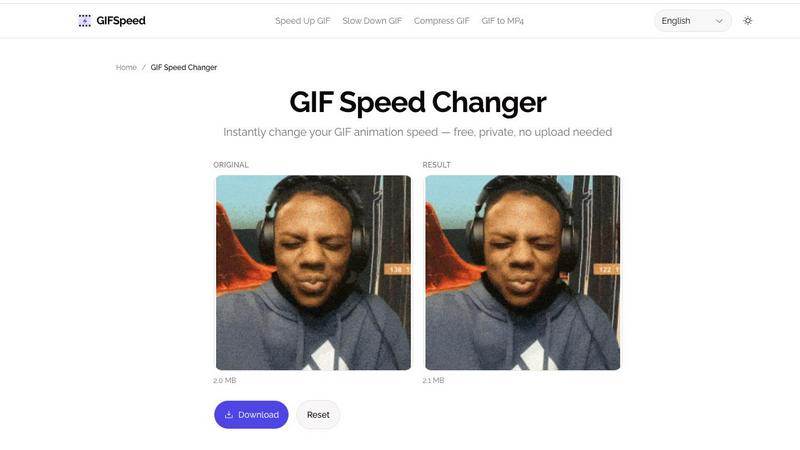
About GifSpeed
GIFSpeed is an innovative online tool designed to transform the way users interact with GIF animations. It addresses common frustrations associated with traditional GIF editing tools, such as watermarks, file uploads, and lengthy processing queues. By leveraging advanced WebAssembly technology, GIFSpeed processes GIF files entirely within the browser, ensuring fast, private, and seamless editing experiences. Whether you are a marketer looking to enhance social media posts, a developer needing to optimize animations, or a creator who desires precise control over playback speed, GIFSpeed offers a powerful solution. With capabilities to speed up, slow down, compress, and convert GIFs to MP4, it empowers users to maintain high-quality visuals while streamlining their workflows. Best of all, users can enjoy these features without any cost or compromise, making GIFSpeed a game-changer for anyone who works with GIFs.
Features
Instant Browser Processing
GIFSpeed utilizes cutting-edge WebAssembly technology to process GIFs directly within your browser, eliminating the need for uploads and waiting times. This means you can edit GIFs instantly and efficiently, making it an ideal choice for time-sensitive projects or quick edits.
100% Private
Privacy is a top priority at GIFSpeed. All processing is done client-side, ensuring that your GIF files never leave your device. This commitment to user confidentiality means you can edit with confidence, knowing your content is kept secure and private.
No Watermark
Unlike many other online GIF tools, GIFSpeed allows users to download their edited GIFs without any watermarks or branding. This feature is particularly appealing for creators and marketers who want to maintain a professional appearance in their content.
Free Forever
GIFSpeed is committed to providing a user-friendly experience without any monetary barriers. There is no sign-up required, and users can change GIF speed as many times as they like at no cost. This makes it accessible to everyone, from casual users to professionals.
Use Cases
Speed Up Slow Tutorials
GIFSpeed is perfect for educators and trainers who want to create engaging tutorials. By speeding up GIFs, they can eliminate unnecessary fluff and deliver content at 2x or 3x speed, allowing viewers to grasp essential information quickly.
Slow Down Fast Animations
For animators and motion designers, the ability to slow down GIFs is invaluable. GIFSpeed allows users to analyze rapid animations frame by frame, enhancing their understanding of motion and enabling them to study techniques in detail.
Shrink GIF File Size
Content creators often face challenges with large GIF files that are cumbersome to upload or share. GIFSpeed solves this by allowing users to easily compress GIFs without sacrificing quality, making them ideal for social media, email attachments, and website optimization.
Fix Browser Playback
If GIFs are playing too slowly in web browsers due to throttling, GIFSpeed enables users to adjust frame delays to achieve smooth playback. This feature is particularly useful for developers and content creators looking to enhance user experience on their websites.
Frequently Asked Questions
How do I change GIF speed online?
To change GIF speed using GIFSpeed, simply upload your GIF file, adjust the speed using the slider from 0.25x to 4x, and then click "Change Speed" to process it. You can download the edited GIF instantly without any hassle.
Is GIF speed changer free?
Yes, GIFSpeed is completely free to use. There are no hidden fees or subscriptions required. Users can change GIF speeds as many times as they wish without any cost.
Does changing GIF speed affect quality?
No, changing the speed of a GIF in GIFSpeed does not compromise its quality. The tool maintains visual fidelity while allowing for adjustments in playback speed, ensuring a high-quality viewing experience.
What is the maximum GIF file size?
GIFSpeed supports GIF files up to 80MB in size. This allows users to work with a wide range of GIFs, from smaller animations to larger, more complex files without any issues.
Similar to GifSpeed

Cursive Text Generator
Cursive Text Generator is a free browser-based tool that converts regular text into beautiful cursive and stylish Unicode fonts. Users can instantly p

Presentation Intelligence
AI-native presentation and visual content platform that turns prompts, documents, images, videos, and data into polished, shareable decks.

PNG to SVG
Free, private image conversion tools that run entirely in your browser.


IsThisAIImage
Free AI image checker: upload a photo for AI-generated and deepfake scores, a clear verdict, and optional generator hints.
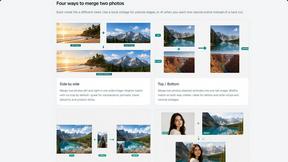
Merge Two Photos
Merge two photos free in your browser: side by side, stacked, overlay, or AI. Download a clean PNG, no watermark.
Kirkify
Kirkify AI instantly transforms any photo into viral, Kirkified memes using advanced face-swap and AI video tools for creators and marketers.