

FlashSlides
Create stunning presentations in minutes with FlashSlides, your AI-powered tool for effortless content transformation.
AI tool Details

About FlashSlides
FlashSlides is a revolutionary AI-powered presentation generator designed to transform the way individuals create presentations, reports, and educational content. This innovative tool allows users to prepare professional-quality meeting decks, compelling investor presentations, and engaging lesson plans in a fraction of the time it would typically take. By simply entering a topic, users can generate a complete set of slides that include relevant text and stunning AI-generated images, all ready for download in under a minute. FlashSlides caters to a diverse audience—students, business professionals, teachers, and startup founders alike—ensuring that everyone can deliver impactful presentations without the usual hassle. The value proposition is clear: with FlashSlides, you can unlock your potential and streamline your workflow, enabling you to impress stakeholders, captivate classrooms, and present ideas effectively. Experience the transformative capabilities of FlashSlides and elevate your presentation game to new heights.
Features
Instant Presentation Generation
With just a few clicks, users can describe a topic, paste a YouTube URL, drop a website link, or upload a PDF or Word document. FlashSlides will instantly generate a complete presentation, saving users countless hours in preparation time.
Customizable Slide Count
Users have the flexibility to choose the number of slides they want—ranging from 1 to 50. This ensures that whether you need a brief overview or an in-depth exploration, FlashSlides can accommodate your specific requirements.
AI-Generated Images
Each slide is not only filled with relevant text but also features unique, AI-generated images tailored to the content. These visuals enhance the overall aesthetic and engagement level of the presentations, helping to capture the audience's attention.
Easy Download and Sharing Options
Once the presentation is generated, users can easily download it as a PowerPoint file or share it via a unique URL. This makes it convenient to present in meetings, classrooms, or any setting where impactful communication is key.
Use Cases
Student Presentations
Students can utilize FlashSlides to create impressive class presentations and project reports in mere minutes. This tool takes the stress out of preparation, allowing them to focus on content mastery and delivery.
Business Meetings
Business professionals can quickly prepare polished meeting decks, proposals, and quarterly reports. FlashSlides enables them to create visually appealing presentations that resonate with stakeholders and convey professionalism.
Educational Content Creation
Teachers and educators can generate engaging lesson plans and educational materials effortlessly. With FlashSlides, they can create presentations that capture students' attention, making learning more interactive and enjoyable.
Startup Pitch Decks
Startup founders can build compelling pitch decks and investor presentations that make an impact. FlashSlides helps them convey their ideas clearly and attractively, increasing their chances of securing funding and support.
Frequently Asked Questions
How does FlashSlides work?
Simply enter your topic, and our AI will generate a complete presentation with slides, each containing relevant content and a custom AI-generated image. The whole process takes less than a minute, making it incredibly efficient.
Is it really free?
Yes! Every user receives 1 free presentation per day with no credit card required. For additional generations, users can purchase credits, allowing for greater flexibility and usage.
What formats can I download?
Users can download their presentations as PowerPoint (.pptx) files. Additionally, they have the option to share their presentations via a unique URL, making collaboration easy.
Are my presentations private?
By default, presentations are public and may appear in our archive. However, users have the option to make any presentation private directly from their dashboard, ensuring control over their content.
Similar to FlashSlides


PerPageFax
PerPageFax lets you send a fax online from any browser for a flat $0.50 per page — no account, no subscription, no fax machine.

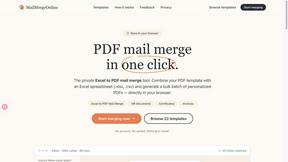
PDF Mail Merge
在线批量PDF Excel 合并工具,将PDF模板与Excel/CSV数据结合,在浏览器内批量生成个性化PDF文件,安全高效。
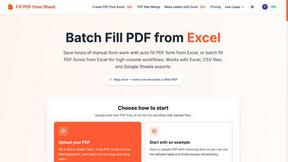
Fill PDF from Sheet
Fill PDF from Sheet automates the process of populating PDF forms from data in Excel, CSV, or Google Sheets.


Glanced
Follow news, blogs, newsletters, and podcasts in a free RSS reader, with AI summaries, top stories, full-text search, saved searches, and a catalog.
