

AskFormulas
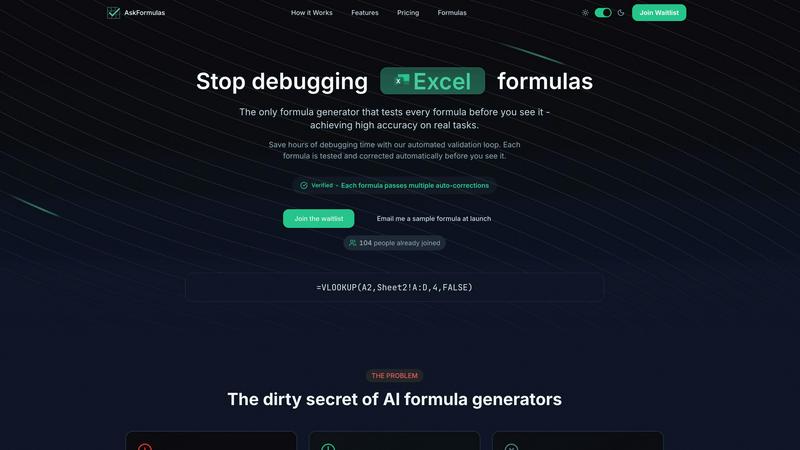
AskFormulas instantly generates and validates Excel and Sheets formulas, saving you time and ensuring accuracy with.
About AskFormulas
AskFormulas is a groundbreaking AI-powered tool that revolutionizes the way users create and validate Excel formulas. Designed specifically for individuals and professionals who require precision in their spreadsheet tasks, AskFormulas eliminates the frustration associated with traditional formula generators, which often yield accuracy rates between 40-60%. With AskFormulas, you can describe your needs in plain English, and the tool will generate complex formulas without requiring any prior knowledge of syntax. This is particularly beneficial for financial analysts, revenue managers, and small to medium business owners who often find themselves overwhelmed by the tedious process of debugging formulas. The tool's automated validation and smart error correction ensure that users receive formulas with a remarkable accuracy rate exceeding 95%. By streamlining the formula generation process, AskFormulas saves users valuable time and effort, allowing them to focus on what truly matters—analyzing data and making informed decisions. Say goodbye to endless debugging and embrace a new era of seamless and efficient spreadsheet management with AskFormulas.
Features
Natural Language Input
AskFormulas allows users to input their requirements in plain English, removing the steep learning curve associated with complex syntax. Simply describe your need, and the tool will convert it into an accurate formula.
Automated Validation Loop
Every formula generated goes through a rigorous three-step validation process. This ensures that formulas not only work but are also optimized for the user's specific context, providing a level of reliability unmatched by traditional tools.
Verified Formula Output
Upon generation, each formula is accompanied by a green "Verified" badge, indicating that it has successfully passed the validation tests. This feature provides users with confidence that their formulas are accurate and ready to use.
Smart Error Detection
AskFormulas incorporates intelligent error detection that identifies and corrects issues within generated formulas automatically. This feature significantly reduces the occurrence of common errors, such as #REF! or #VALUE!, streamlining the user experience.
Use Cases
Financial Analysis
Financial analysts can utilize AskFormulas to quickly generate complex financial calculations, such as cash flow projections and revenue forecasts, without the risk of syntax errors, enabling them to focus on interpreting results rather than debugging.
Small Business Management
Small business owners can leverage AskFormulas to create essential financial reports and performance metrics, ensuring that their data analysis is accurate and efficient, ultimately aiding in better decision-making.
Academic Research
Researchers and students can use AskFormulas to simplify the process of data analysis in their spreadsheets. By generating validated formulas swiftly, they can concentrate on the research itself rather than the technicalities of formula creation.
Team Collaboration
Teams can enhance productivity by using AskFormulas to share validated formulas effortlessly. This ensures that all team members are utilizing accurate formulas in their collaborative efforts, reducing discrepancies and improving overall output quality.
Frequently Asked Questions
How accurate are the generated formulas?
AskFormulas guarantees a high accuracy rate of over 95% for all generated formulas, thanks to its rigorous three-step validation process that tests and corrects each formula before delivery.
Does it work with both Excel and Google Sheets?
Yes, AskFormulas seamlessly works with both Excel and Google Sheets. Users can toggle between the two platforms with ease, and the tool automatically adjusts formula syntax accordingly.
How many formulas can I generate per month?
Depending on the chosen plan, users can generate anywhere from 500 to 6,000 formulas per month. This flexibility allows individuals and teams to select a plan that best suits their needs.
What support options are available?
AskFormulas offers various support options, including email support for all users and priority support for Pro and Team plans. This ensures that users receive assistance promptly whenever they encounter issues.
Similar to AskFormulas
Kody Tools
Free collection of online developer utilities, code formatters, and digital converters designed to streamline your daily workflow.

Forms Plugin
The #1 Native Form Builder Plugin for Framer - No Code, No Embeds, No External Platforms.




PerPageFax
PerPageFax lets you send a fax online from any browser for a flat $0.50 per page — no account, no subscription, no fax machine.

PDF Mail Merge
在线批量PDF Excel 合并工具,将PDF模板与Excel/CSV数据结合,在浏览器内批量生成个性化PDF文件,安全高效。